Response Headers
💡 The collection of HTTP response security headers mentioned in this section is applicable when the user agent processing the HTTP response is a browser. The support for these headers by non-browser API clients (user agent), like for example an HTTP client in a programming language, is not standardized. So, it requires specific testing to identify if an HTTP response security header is supported or not by such HTTP client.
🚦 Header lifecycle flow:

📐 Working draft
✅ Active
- Strict-Transport-Security
- X-Frame-Options
- X-Content-Type-Options
- Content-Security-Policy
- X-Permitted-Cross-Domain-Policies
- Referrer-Policy
- Clear-Site-Data
- Cross-Origin-Embedder-Policy
- Cross-Origin-Opener-Policy
- Cross-Origin-Resource-Policy
- Cache-Control
- X-DNS-Prefetch-Control
- Integrity-Policy
⏰ Almost deprecated
None
❌ Deprecated
Strict-Transport-Security
HTTP Strict Transport Security (also named HSTS) is a browser security policy mechanism which helps to protect websites against protocol downgrade attacks and cookie hijacking. It allows web servers to declare that web browsers (or other complying user agents) should only interact with it using secure HTTPS connections, and within a defined timespan (max-age) not via the clear text HTTP protocol. HSTS is an IETF standard track protocol and is specified in RFC 6797. A server implements an HSTS policy by supplying a header (Strict-Transport-Security) over an HTTPS connection (HSTS headers over HTTP are ignored).
📍 Important note about the behavior of the header over a HTTP connection (source Mozilla MDN):
- The
Strict-Transport-Securityheader is ignored by the browser when your site has only been accessed using HTTP. - Once your site is accessed over HTTPS with no certificate errors, the browser knows your site is HTTPS capable and will honor the
Strict-Transport-Securityheader.
💡 More information about Preloading Strict Transport Security can be found here.
💡 The preload directive is not part of the RFC and its support/evolution is managed at browsers level. We explicitly decided to keep this directive out of the configuration proposed to be aligned with the advice specified by the hstspreload.org team (source):
If you maintain a project that provides HTTPS configuration advice or provides an option to enable HSTS, do not include the preload directive by default.

We get regular emails from site operators who tried out HSTS this way, only to find themselves on the preload list without realizing that some subdomains cannot support HTTPS.

Removal tends to be slow and painful for those sites.
Values
| Value | Description |
|---|---|
max-age=SECONDS | The time, in seconds, that the browser should remember that this site is only to be accessed using HTTPS. |
includeSubDomains | If this optional parameter is specified, this rule applies to all of the site’s subdomains as well. |
preload | If this optional parameter is specified, it instructs the browser to always access the site using HTTPS because the site is included into Strict-Transport-Security preload list. |
Example
Strict-Transport-Security: max-age=63072000
Strict-Transport-Security: max-age=63072000 ; includeSubDomains
Strict-Transport-Security: max-age=63072000 ; includeSubDomains ; preload
References
- https://tools.ietf.org/html/rfc6797
- https://cheatsheetseries.owasp.org/cheatsheets/HTTP_Strict_Transport_Security_Cheat_Sheet.html
- https://wstg.owasp.org/latest/4-Web_Application_Security_Testing/02-Configuration_and_Deployment_Management/07-HTTP_Strict_Transport_Security/
- https://en.wikipedia.org/wiki/HTTP_Strict_Transport_Security
- https://www.chromium.org/hsts
- https://hstspreload.org/
- https://developer.mozilla.org/en-US/docs/Web/Security/HTTP_strict_transport_security
- https://raymii.org/s/tutorials/HTTP_Strict_Transport_Security_for_Apache_NGINX_and_Lighttpd.html
- https://blogs.windows.com/msedgedev/2015/06/09/http-strict-transport-security-comes-to-internet-explorer-11-on-windows-8-1-and-windows-7/
X-Frame-Options
The X-Frame-Options response header (also named XFO) improves the protection of web applications against clickjacking. It instructs the browser whether the content can be displayed within frames.
The Content-Security-Policy (CSP) frame-ancestors directive obsoletes the X-Frame-Options header. If a resource has both policies, the CSP frame-ancestors policy will be enforced and the X-Frame-Options policy will be ignored.
Values
| Value | Description |
|---|---|
deny | No rendering within a frame. |
sameorigin | No rendering if origin mismatch. |
allow-from: DOMAIN | Allows rendering if framed by frame loaded from DOMAIN (not supported by modern browsers). |
Example
X-Frame-Options: deny
References
- https://tools.ietf.org/html/rfc7034
- https://tools.ietf.org/html/draft-ietf-websec-x-frame-options-01
- https://tools.ietf.org/html/draft-ietf-websec-frame-options-00
- https://developer.mozilla.org/en-US/docs/Web/HTTP/X-Frame-Options
- https://portswigger.net/web-security/clickjacking
- https://blogs.msdn.microsoft.com/ieinternals/2010/03/30/combating-clickjacking-with-x-frame-options/
- https://developer.mozilla.org/en-US/docs/Web/HTTP/Headers/Content-Security-Policy/frame-ancestors
X-Content-Type-Options
Setting this header will prevent the browser from interpreting files as a different MIME type to what is specified in the Content-Type HTTP header (e.g. treating text/plain as text/css).
Values
| Value | Description |
|---|---|
nosniff | Will prevent the browser from MIME-sniffing a response away from the declared content-type. |
Example
X-Content-Type-Options: nosniff
References
- https://msdn.microsoft.com/en-us/library/gg622941%28v=vs.85%29.aspx
- https://blogs.msdn.microsoft.com/ie/2008/09/02/ie8-security-part-vi-beta-2-update/
- https://developer.mozilla.org/en-US/docs/Web/HTTP/Headers/X-Content-Type-Options
Content-Security-Policy
A Content Security Policy (also named CSP) requires careful tuning and testing after definition of the policy. A content security policy can have a significant impact on the way browsers render pages (e.g., inline JavaScript or CSS can be disabled). A proper CSP can prevent a wide range of attacks, including cross-site scripting, other cross-site injections and clickjacking.
Values
💡 Source used was Mozilla MDN.
The values below are an overview of available directives, for an exhaustive list please consult the dedicated Mozilla MDN section.
| Directive | Description |
|---|---|
base-uri | Define the base URI for relative URIs. |
default-src | Define loading policy for all resources type in case a resource type’s dedicated directive is not defined (fallback). |
script-src | Define which scripts the protected resource can execute. |
object-src | Define from where the protected resource can load plugins. |
style-src | Define which styles (CSS) can be applied to the protected resource. |
img-src | Define from where the protected resource can load images. |
media-src | Define from where the protected resource can load video and audio. |
frame-src | (Deprecated and replaced by child-src) Define from where the protected resource can embed frames. |
child-src | Define from where the protected resource can embed frames. |
frame-ancestors | Define from where the protected resource can be embedded in frames. Useful against clickjacking |
font-src | Define from where the protected resource can load fonts. |
connect-src | Define which URIs the protected resource can load using script interfaces. |
manifest-src | Define from where the protected resource can load manifests. |
form-action | Define which URIs can be used as the action of HTML form elements. |
sandbox | Specifies an HTML sandbox policy that the user agent applies to the protected resource. |
block-all-mixed-content | (Deprecated) Prevent the user agent from loading mixed content. |
upgrade-insecure-requests | Instruct the user agent to use HTTPS when trying to download insecure HTTP resources. |
referrer | (Deprecated) Define information the user agent can send in the Referer header. |
report-uri | (Deprecated and replaced by report-to) Specifies a URI to which the user agent sends reports about policy violation. |
report-to | Specifies a group (defined in the Report-To header) to which the user agent sends reports about policy violation. |
require-trusted-types-for | Instructs user agents to control the data passed to DOM XSS sink functions. |
trusted-types | Specify an allowlist of Trusted Type policy names that a website can create using trustedTypes.createPolicy(). |
Example
Content-Security-Policy: script-src 'self'
Trusted Types feature
Trusted Types is a security feature in the Content-Security-Policy header that stops the browser from accepting plain strings in dangerous functions (called sinks) like .innerHTML or eval(). Instead, it forces usage of Trusted Type objects that have been vetted by a defined policy.
Browsers support level (source):
- Supported by default in Chromium based browsers.
- Supported by default in Safari.
- Supported by Firefox in its Nightly version.
Below is an example of definition of a default Trusted Types policy leveraging DOMPurify for the sanitization processing:
📋 Content-Security-Policy policy specifying Trusted Types via require-trusted-types-for and trusted-types directives.
default-src 'self'; form-action 'self'; base-uri 'self'; object-src 'none'; frame-ancestors 'none'; require-trusted-types-for 'script'; trusted-types default dompurify;
🔒 Script defining the Trusted Types policy (file named defineDefaultTrustedTypesPolicy.js):
if (window.trustedTypes && window.trustedTypes.createPolicy) {
    // Create the default policy and leverage DOMPurify to sanitize any HTML content created
    trustedTypes.createPolicy("default", {
        createHTML: (unsafeValue) => {
            console.info("Default trusted types policy used.");
            return DOMPurify.sanitize(unsafeValue);
        }
        // Functions createScript() and createScriptURL() implementation are missing here as it is a simple example
        // See https://developer.mozilla.org/en-US/docs/Web/API/TrustedTypePolicyFactory/createPolicy
    });
} else {
    console.warn("Trusted types not supported!");
}
🐞 Script defining the dangerous behavior (file named dangerousCode.js):
const input = document.getElementById("userInput");
const display = document.getElementById("display");
const button = document.getElementById("renderBtn");
button.addEventListener("click", () => {
    const rawValue = input.value;
    try {
        display.innerHTML = rawValue;
    } catch (e) {
        display.innerText = "Blocked by Trusted Types! Check the console.";
        console.error(e);
    }
});
📜 Test HTML page using elements above:
<!DOCTYPE html>
<html>
    <head>
        <title>Sample</title>
        <!-- Step 1: Load the DOMPurify library -->
        <!-- Allow it to create its own Trusted Types policy named "dompurify" -->
        <!-- See https://github.com/cure53/DOMPurify?tab=readme-ov-file#what-about-dompurify-and-trusted-types -->
        <script src="purify.js"></script>
        <!-- Step 2: Setup the Trusted Types policy named "default" referenced into the CSP header -->
        <!-- Use the "default policy" to catch as much as possible dangerous sinks without the need to modify the existing code -->
        <script src="defineDefaultTrustedTypesPolicy.js"></script>
    </head>
    <body>
        <input type="text" id="userInput" value="Hello<script>alert(1)</script> Dominique!" size="40">
        <button id="renderBtn">Render to DOM</button>
        <div id="display"></div>
        <script src="dangerousCode.js"></script>
    </body>
</html>
🔬 Execution into Chromium:
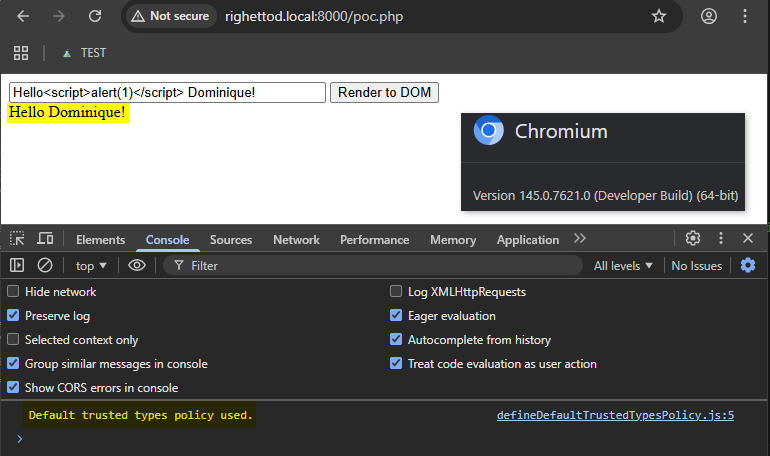
Below is an example of definition of a custom Trusted Types policy leveraging DOMPurify for the sanitization processing, both used in a function intended to centralize the loading of unsafe content from a remote location:
📋 Content-Security-Policy policy specifying Trusted Types via require-trusted-types-for and trusted-types directives.
default-src 'self'; form-action 'self'; base-uri 'self'; object-src 'none'; frame-ancestors 'none'; require-trusted-types-for 'script'; trusted-types content_loader dompurify;
🔒 Script defining the Trusted Types policy as well as the content loading function (file named defineContentLoader.js):
// Made the function globally available
let loadContent = null;
if (window.trustedTypes && window.trustedTypes.createPolicy) {
    // Create the policy and leverage DOMPurify to sanitize any HTML content created
    const contentLoaderTrustedPolicy = trustedTypes.createPolicy("content_loader", {
        createHTML: (unsafeValue) => {
            console.info("'content_loader' trusted types policy used.");
            return DOMPurify.sanitize(unsafeValue);
        }
        // createScript() and createScriptURL() functions implementation are missing here as it is a simple example
        // See https://developer.mozilla.org/en-US/docs/Web/API/TrustedTypePolicyFactory/createPolicy
    });
    // Create the content loading function using the Trusted Types policy created
    loadContent = function (apiPath, uiComponent) {
        fetch(apiPath).then(response => response.text()).then(response => {
            uiComponent.innerHTML = contentLoaderTrustedPolicy.createHTML(response);
        });
    };
} else {
    console.warn("Trusted types not supported!");
}
🐞 Script defining the dangerous behavior (file named dangerousCode.js):
/*
The content of the file "unsafe.txt" is:
Hello<script>alert(1)</script> Dominique!
*/
loadContent("/unsafe.txt", document.getElementById("display"));
📜 Test HTML page using elements above:
<!DOCTYPE html>
<html>
    <head>
        <title>TEST</title>
        <!-- Step 1: Load the DOMPurify library -->
        <!-- Allow it to create its own Trusted Types policy named "dompurify" -->
        <!-- See https://github.com/cure53/DOMPurify?tab=readme-ov-file#what-about-dompurify-and-trusted-types -->
        <script src="purify.js"></script>
        <!-- Step 2: Setup the content loading function creating the Trusted Types policy named "content_loader" referenced into the CSP header -->
        <!-- Such content loader is used to retrieve unsafe content from an API -->
        <script src="defineContentLoader.js"></script>
    </head>
    <body>
        <div id="display"></div>
        <script src="dangerousCode.js"></script>
    </body>
</html>
🔬 Execution into Chromium:
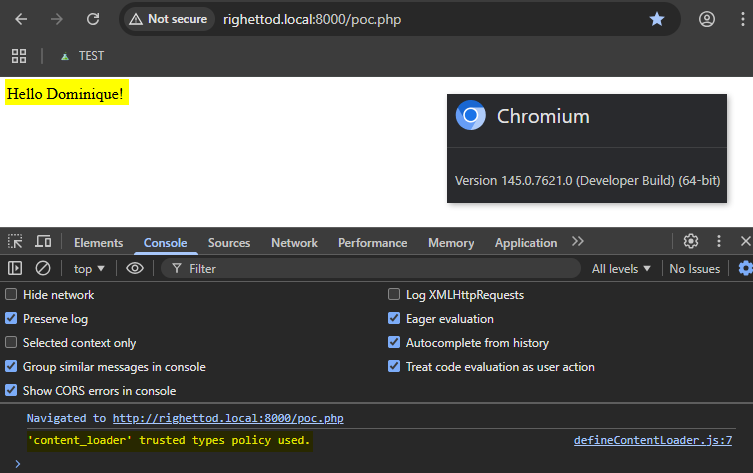
References
- https://www.w3.org/TR/CSP/
- https://developer.mozilla.org/en-US/docs/Web/Security/CSP
- https://cheatsheetseries.owasp.org/cheatsheets/Content_Security_Policy_Cheat_Sheet.html
- https://scotthelme.co.uk/content-security-policy-an-introduction/
- https://report-uri.io
- https://content-security-policy.com
- https://report-uri.com/home/generate
- https://csp-evaluator.withgoogle.com/
- https://developer.mozilla.org/en-US/docs/Web/API/Trusted_Types_API
- https://www.w3.org/TR/trusted-types/
- https://developer.mozilla.org/en-US/docs/Web/HTTP/Reference/Headers/Content-Security-Policy/require-trusted-types-for
- https://developer.mozilla.org/en-US/docs/Web/HTTP/Reference/Headers/Content-Security-Policy/trusted-types
- https://developer.mozilla.org/en-US/docs/Web/API/Trusted_Types_API#the_default_policy
- https://eiv.dev/trusted-types/
- https://caniuse.com/trusted-types
- https://developer.mozilla.org/en-US/docs/Web/API/Trusted_Types_API#injection_sink_interfaces
X-Permitted-Cross-Domain-Policies
A cross-domain policy file is an XML document that grants a web client, such as Adobe Flash Player or Adobe Acrobat (though not necessarily limited to these), permission to handle data across domains. When clients request content hosted on a particular source domain and that content makes requests directed towards a domain other than its own, the remote domain needs to host a cross-domain policy file that grants access to the source domain, allowing the client to continue the transaction. Normally a meta-policy is declared in the master policy file, but for those who can’t write to the root directory, they can also declare a meta-policy using the X-Permitted-Cross-Domain-Policies HTTP response header.
Values
| Value | Description |
|---|---|
none | No policy files are allowed anywhere on the target server, including this master policy file. |
master-only | Only this master policy file is allowed. |
by-content-type | [HTTP/HTTPS only] Only policy files served with Content-Type: text/x-cross-domain-policy are allowed. |
by-ftp-filename | [FTP only] Only policy files whose file names are crossdomain.xml (i.e. URLs ending in /crossdomain.xml) are allowed. |
all | All policy files on this target domain are allowed. |
Example
X-Permitted-Cross-Domain-Policies: none
References
Referrer-Policy
The Referrer-Policy HTTP header governs which referrer information, sent in the Referer header, should be included with requests made.
Values
| Value | Description |
|---|---|
no-referrer | The Referer header will be omitted entirely. No referrer information is sent along with requests. |
no-referrer-when-downgrade | This is the user agent’s default behavior if no policy is specified. The origin is sent as referrer to an a-priori as-secure destination (HTTPS → HTTPS), but isn’t sent to a less secure destination (HTTPS → HTTP). |
origin | Only send the origin of the document as the referrer in all cases. (e.g. the document https://example.com/page.html will send the referrer https://example.com/.) |
origin-when-cross-origin | Send a full URL when performing a same-origin request, but only send the origin of the document for other cases. |
same-origin | A referrer will be sent for same-site origins, but cross-origin requests will contain no referrer information. |
strict-origin | Only send the origin of the document as the referrer to an a-priori as-secure destination (HTTPS → HTTPS), but don’t send it to a less secure destination (HTTPS → HTTP). |
strict-origin-when-cross-origin | Send a full URL when performing a same-origin request, only send the origin of the document to an a-priori as-secure destination (HTTPS → HTTPS), and send no header to a less secure destination (HTTPS → HTTP). |
unsafe-url | Send a full URL (stripped from parameters) when performing a same-origin or cross-origin request. |
Example
Referrer-Policy: no-referrer
References
- https://www.w3.org/TR/referrer-policy/
- https://developer.mozilla.org/en-US/docs/Web/HTTP/Headers/Referrer-Policy
Clear-Site-Data
The Clear-Site-Data header clears browsing data associated with the requesting website. It allows web developers to have more control over the data stored locally by a browser for their origins (source Mozilla MDN). This header is useful, for example, during a logout process, in order to ensure that all stored content on the client side like cookies, storage and cache are removed.
Values
| Value | Experimental? | Description |
|---|---|---|
"cache" | No | Indicates that the server wishes to remove locally cached data for the origin of the response URL. |
"cookies" | No | Indicates that the server wishes to remove all cookies for the origin of the response URL. HTTP authentication credentials are also cleared out. This affects the entire registered domain, including subdomains. |
"storage" | No | Indicates that the server wishes to remove all DOM storage for the origin of the response URL. |
"executionContexts" | Yes | Indicates that the server wishes to reload all browsing contexts for the origin of the response. |
"prefetchCache" | Yes | Indicates that the server wishes to remove all speculation rules prefetches that are scoped to the referrer origin. |
"prerenderCache" | Yes | Indicates that the server wishes to remove all speculation rules prerenders that are scoped to the referrer origin. |
"clientHints" | Yes | Indicates that the server wishes to remove all client hints (requested via Accept-CH) stored for the origin of the response URL. |
"*" | No | Indicates that the server wishes to clear all types of data for the origin of the response. |
Example
Clear-Site-Data: "cache","cookies","storage"
References
- https://w3c.github.io/webappsec-clear-site-data/
- https://developer.mozilla.org/en-US/docs/Web/HTTP/Headers/Clear-Site-Data
- https://www.chromestatus.com/feature/4713262029471744
- https://github.com/w3c/webappsec-clear-site-data
- https://github.com/w3c/webappsec-clear-site-data/tree/master/demo
Cross-Origin-Resource-Policy
This response header (also named CORP) allows one to define a policy that lets web sites and applications opt in to protection against certain requests from other origins (such as those issued with elements like <script> and <img>), to mitigate speculative side-channel attacks, like Spectre, as well as Cross-Site Script Inclusion (XSSI) attacks (source Mozilla MDN).
💡 To fully understand where CORP and COEP work:
- CORP applies on the loaded resource side (resource owner).
- COEP applies on the “loader” of the resource side (consumer of the resource).
Values
| Value | Description |
|---|---|
same-site | Only requests from the same Site can read the resource. |
same-origin | Only requests from the same Origin (i.e. scheme + host + port) can read the resource. |
cross-origin | Requests from any Origin (both same-site and cross-site) can read the resource. Browsers are using this policy when a CORP header is not specified. |
Example
Cross-Origin-Resource-Policy: same-origin
References
- https://fetch.spec.whatwg.org/#cross-origin-resource-policy-header
- https://developer.mozilla.org/en-US/docs/Web/HTTP/Headers/Cross-Origin-Resource-Policy
- https://caniuse.com/mdn-http_headers_cross-origin-resource-policy
- https://web.dev/articles/why-coop-coep#corp
- https://web.dev/articles/cross-origin-isolation-guide
- https://resourcepolicy.fyi/
- https://andrewlock.net/understanding-security-headers-part-2-cross-origin-resource-policy-preventing-hotlinking/
Cross-Origin-Embedder-Policy
This response header (also named COEP) prevents a document from loading any cross-origin resources that don’t explicitly grant the document permission (source Mozilla MDN).
💡 To fully understand where CORP and COEP work:
- CORP applies on the loaded resource side (resource owner).
- COEP applies on the “loader” of the resource side (consumer of the resource).
Values
| Value | Description |
|---|---|
unsafe-none | Allows the document to fetch cross-origin resources without giving explicit permission through the CORS protocol or the Cross-Origin-Resource-Policy header (it is the default value). |
require-corp | A document can only load resources from the same origin, or resources explicitly marked as loadable from another origin. |
Example
Cross-Origin-Embedder-Policy: require-corp
References
- https://html.spec.whatwg.org/multipage/origin.html#coep
- https://developer.mozilla.org/en-US/docs/Web/HTTP/Headers/Cross-Origin-Embedder-Policy
- https://caniuse.com/mdn-http_headers_cross-origin-embedder-policy
- https://web.dev/articles/why-coop-coep#coep
- https://web.dev/articles/cross-origin-isolation-guide
- https://andrewlock.net/understanding-security-headers-part-3-cross-origin-embedder-policy/
Cross-Origin-Opener-Policy
This response header (also named COOP) allows you to ensure a top-level document does not share a browsing context group with cross-origin documents. COOP will process-isolate your document and potential attackers can’t access your global object if they were to open it in a popup, preventing a set of cross-origin attacks dubbed XS-Leaks (source Mozilla MDN).
Values
| Value | Description |
|---|---|
unsafe-none | Allows the document to be added to its opener’s browsing context group unless the opener itself has a COOP of same-origin or same-origin-allow-popups (it is the default value). |
same-origin-allow-popups | Retains references to newly opened windows or tabs which either don’t set COOP or which opt out of isolation by setting a COOP of unsafe-none. |
same-origin | Isolates the browsing context exclusively to same-origin documents. Cross-origin documents are not loaded in the same browsing context. |
Example
Cross-Origin-Opener-Policy: same-origin
References
- https://html.spec.whatwg.org/multipage/origin.html#cross-origin-opener-policies
- https://developer.mozilla.org/en-US/docs/Web/HTTP/Headers/Cross-Origin-Opener-Policy
- https://caniuse.com/mdn-http_headers_cross-origin-opener-policy
- https://web.dev/articles/why-coop-coep#coop
- https://web.dev/articles/cross-origin-isolation-guide
- https://xsleaks.dev/
- https://github.com/xsleaks/xsleaks
- https://portswigger.net/daily-swig/xs-leak
- https://portswigger.net/research/xs-leak-detecting-ids-using-portal
- https://andrewlock.net/understanding-security-headers-part-1-cross-origin-opener-policy-preventing-attacks-from-popups/
Cache-Control
This header holds directives (instructions) for caching in both requests and responses. If a given directive is in a request, it does not mean this directive is in the response (source Mozilla MDN). Specifying the capability of a resource to be cached is important to prevent exposure of information via the cache.
The headers named Expires and Pragma can be used in addition to the Cache-Control header. Pragma header can be used for backwards compatibility with the HTTP/1.0 caches. However, Cache-Control is the recommended way to define the caching policy.
Values applicable for HTTP responses
| Value | Description |
|---|---|
must-revalidate | Indicates that once a resource becomes stale, caches do not use their stale copy without successful validation on the origin server. |
no-cache | The response may be stored by any cache, even if the response is normally non-cacheable. However, the stored response MUST always go through validation with the origin server first before using it. |
no-store | The response may not be stored in any cache. |
no-transform | An intermediate cache or proxy cannot edit the response body, Content-Encoding, Content-Range, or Content-Type. |
public | The response may be stored by any cache, even if the response is normally non-cacheable. |
private | The response may be stored only by a browser’s cache, even if the response is normally non-cacheable. |
proxy-revalidate | Like must-revalidate, but only for shared caches (e.g., proxies). Ignored by private caches. |
max-age=<seconds> | The maximum amount of time a resource is considered fresh. Unlike Expires, this directive is relative to the time of the request. |
s-maxage=<seconds> | Overrides max-age or the Expires header, but only for shared caches (e.g., proxies). Ignored by private caches. |
Extended values
The following directives are not part of the core HTTP caching standards document. Therefore, check this table for their support.
| Value | Description |
|---|---|
immutable | Indicates that the response body will not change over time. |
stale-while-revalidate=<seconds> | Indicates the client can accept a stale response, while asynchronously checking in the background for a fresh one. The seconds value indicates how long the client can accept a stale response. |
stale-if-error=<seconds> | Indicates the client can accept a stale response if the check for a fresh one fails. The seconds value indicates how long the client can accept the stale response after the initial expiration. |
Example
No caching allowed, clear any previously cached resources and include support for HTTP/1.0 caches:
Cache-Control: no-store, max-age=0
Pragma: no-cache
Caching allowed with a cache duration of one week:
Cache-Control: public, max-age=604800
References
- https://redbot.org
- https://developer.mozilla.org/en-US/docs/Web/HTTP/Headers/Cache-Control
- https://developer.mozilla.org/en-US/docs/Web/HTTP/Headers/Pragma
- https://developer.mozilla.org/en-US/docs/Web/HTTP/Headers/Expires
- https://developer.mozilla.org/en-US/docs/Web/HTTP/Caching
- https://datatracker.ietf.org/doc/html/rfc7234
- https://cwe.mitre.org/data/definitions/524.html
- https://cwe.mitre.org/data/definitions/525.html
- https://portswigger.net/web-security/web-cache-poisoning
- https://portswigger.net/research/practical-web-cache-poisoning
- https://portswigger.net/research/web-cache-entanglement
- https://portswigger.net/web-security/web-cache-deception
- https://portswigger.net/research/gotta-cache-em-all
X-DNS-Prefetch-Control
⚠️ This header does not belong to any specification and is not standardized.
The X-DNS-Prefetch-Control header controls DNS prefetching, a feature by which browsers proactively perform domain name resolution on links that the user may choose to follow as well as URLs for items referenced by the document, including images, CSS, JavaScript, and so forth. The intention is that prefetching is performed in the background so that the DNS resolution is complete by the time the referenced items are needed by the browser. This reduces latency when the user clicks a link, for example (source Mozilla MDN).
📍 Important note about the behavior of different browsers for this header based on technical tests performed:
- DNS prefetch seems only active on Chromium based browsers.
- Setting X-DNS-Prefetch-Control to off is only honored by the Chrome browser.
Values
| Value | Description |
|---|---|
on | Enables DNS prefetching. This is what browsers do if they support the feature when this header is not present. |
off | Disables DNS prefetching. This is useful if you don’t control the link on the pages or know that you don’t want to leak information to these domains. |
Example
X-DNS-Prefetch-Control: off
References
- https://developer.mozilla.org/en-US/docs/Web/HTTP/Reference/Headers/X-DNS-Prefetch-Control
- https://bitsup.blogspot.com/2008/11/dns-prefetching-for-firefox.html
- https://www.chromium.org/developers/design-documents/dns-prefetching/
- https://http.dev/x-dns-prefetch-control
- https://caniuse.com/mdn-http_headers_x-dns-prefetch-control
- https://developer.mozilla.org/en-US/docs/Web/Performance/Guides/dns-prefetch
- https://www.keycdn.com/support/prefetching
Integrity-Policy
The Integrity-Policy header allows servers to enforce Subresource Integrity (called SRI) checking by the browser on resources loaded for a page.
Normally SRI is applied only when the integrity attribute is present on a <script> or <link rel="stylesheet"> tag. Therefore, if it is not present then the integrity constraints are not enforced. The Integrity-Policy header is a way to indicate to the browser that any <script> or <link rel="stylesheet"> tag, without the integrity attribute, must be blocked and the related resource must not be loaded.
Values
The following directives are supported (source Mozilla MDN):
blocked-destinations(required): A list of request destinations that must include valid integrity metadata.sources(optional): A list of integrity sources that must include integrity metadata.endpoints(optional): A list of reporting endpoint names that indicate where reports will be sent.
📍 The reporting endpoints must be defined in a Reporting-Endpoints HTTP response header.
The values allowed for blocked-destinations and sources directives are the following:
| Directive | Value | Description |
|---|---|---|
blocked-destinations | script | Force the integrity attribute to be present on all <script> tags. |
blocked-destinations | style | Force the integrity attribute to be present on all <link rel="stylesheet"> tags. |
sources | inline | The integrity metadata source is inline to the content, such as the integrity attribute (this is the default). |
💡 Omitting the sources directive is equivalent to specifying sources=(inline).
📍 Important note about the value style for the directive blocked-destinations based on technical tests performed:
- Chrome
150.0.7871.115/ Edge150.0.4078.65/ Chromium152.0.7956.0: Is not supported. - Firefox
152.0.6: Is supported but not enabled by default (settingsecurity.integrity_policy.stylesheet.enabled).
Example
The following policy instructs the browser to block the loading of any script resource, for which, the <script> tag does not specify the integrity attribute. Any violation report will be sent to the endpoint https://example.com/report via an HTTP POST request:
Reporting-Endpoints: integrity-endpoint="https://example.com/report"
Integrity-Policy: blocked-destinations=(script), endpoints=(integrity-endpoint)
Example of violation report sent based on technical tests performed:
[
 {
  "age": 0,
  "body": {
   "blockedURL": "https://code.jquery.com/jquery-2.2.4.min.js",
   "destination": "script",
   "documentURL": "https://domain.com/?x=45",
   "reportOnly": false
  },
  "type": "integrity-violation",
  "url": "https://domain.com/?x=45",
  "user_agent": "Mozilla/5.0 (Windows NT 10.0; Win64; x64) AppleWebKit/537.36 (KHTML, like Gecko) Chrome/152.0.0.0 Safari/537.36"
 }
]
References
- https://developer.mozilla.org/en-US/docs/Web/HTTP/Reference/Headers/Integrity-Policy
- https://w3c.github.io/webappsec-subresource-integrity/#integrity-policy-section
- https://caniuse.com/mdn-http_headers_integrity-policy
- https://caniuse.com/mdn-http_headers_integrity-policy_blocked-destinations_style
- https://caniuse.com/mdn-http_headers_integrity-policy_blocked-destinations_script
- https://developer.mozilla.org/en-US/docs/Web/API/HTMLScriptElement/integrity
Permissions-Policy
💻 Working draft.
The Permissions-Policy header replaces the existing Feature-Policy header for controlling delegation of permissions and powerful features. The header uses a structured syntax, and allows sites to more tightly restrict which origins can be granted access to features (source Chrome platform status).
Values
🧭 As the specification is still under development, it is better to consult this page to obtain the current list of supported directives.
Example
Permissions-Policy: accelerometer=(), autoplay=(), camera=(), cross-origin-isolated=(), display-capture=(), encrypted-media=(), fullscreen=(), geolocation=(), gyroscope=(), keyboard-map=(), magnetometer=(), microphone=(), midi=(), payment=(), picture-in-picture=(), publickey-credentials-get=(), screen-wake-lock=(), sync-xhr=(self), usb=(), web-share=(), xr-spatial-tracking=(), clipboard-read=(), clipboard-write=(), gamepad=(), hid=(), idle-detection=(), interest-cohort=(), serial=(), unload=()
References
- https://github.com/w3c/webappsec-permissions-policy/blob/main/permissions-policy-explainer.md
- https://caniuse.com/permissions-policy
- https://developer.mozilla.org/en-US/docs/Web/HTTP/Headers/Feature-Policy
- https://developer.mozilla.org/en-US/docs/Web/HTTP/Headers/Feature-Policy#directives
- https://developer.mozilla.org/en-US/docs/Web/HTTP/Reference/Headers/Permissions-Policy
- https://developer.mozilla.org/en-US/docs/Web/HTTP/Reference/Headers/Permissions-Policy#directives
- https://www.w3.org/TR/permissions-policy-1/
- https://www.chromestatus.com/feature/5745992911552512
- https://www.permissionspolicy.com/
Feature-Policy
Deprecated: Replaced by the header Permissions-Policy.
Feature Policy allows web developers to selectively enable, disable, and modify the behavior of certain features and APIs in the browser. It is similar to Content Security Policy but controls features instead of security behavior (Source Mozilla MDN).
Values
Refer to this page to obtain the list of supported directives.
Example
Feature-Policy: vibrate 'none'; geolocation 'none'
References
- https://w3c.github.io/webappsec-feature-policy/
- https://scotthelme.co.uk/a-new-security-header-feature-policy/
- https://github.com/w3c/webappsec-feature-policy/blob/master/features.md
- https://developer.mozilla.org/en-US/docs/Web/HTTP/Headers/Feature-Policy
- https://caniuse.com/feature-policy
Expect-CT
Deprecated.
⚠️ Warning: This header will likely become obsolete in June 2021. Since May 2018, new certificates are expected to support SCTs by default. Certificates before March 2018 were allowed to have a lifetime of 39 months, those will all be expired in June 2021.
The Expect-CT header is used by a server to indicate that browsers should evaluate connections to the host for Certificate Transparency compliance. In Chrome 61 (Aug 2017) Chrome enabled its enforcement via SCT by default (source). You can still use this header to specify a report-uri.
This header comes from RFC 9163 (Expect-CT Extension for HTTP).
Values
| Value | Description |
|---|---|
report-uri | (Optional) Indicates the URL to which the browser should report Expect-CT failures. |
enforce | (Optional) A valueless directive that, if present, signals to the browser that compliance to the CT Policy should be enforced (rather than report-only) and that the browser should refuse future connections that violate its CT Policy. When both the enforce and report-uri directives are present, the configuration is referred to as an “enforce-and-report” configuration, signalling to the browser both that compliance to the CT Policy should be enforced and that violations should be reported. |
max-age | Specifies the number of seconds after the response is received the browser should remember and enforce certificate transparency compliance. |
Example
Expect-CT: max-age=86400, enforce, report-uri="https://foo.example/report"
References
- https://datatracker.ietf.org/doc/html/rfc9163
- https://scotthelme.co.uk/a-new-security-header-expect-ct/
- https://www.chromestatus.com/feature/5677171733430272
Public-Key-Pins
Deprecated.
⚠️ Warning: This header has been deprecated by all major browsers and is no longer recommended. Avoid using it, and update existing code if possible;
HTTP Public Key Pinning (HPKP) is a security mechanism which allows HTTPS websites to resist impersonation by attackers using mis-issued or otherwise fraudulent certificates. (For example, sometimes attackers can compromise certificate authorities, and then can mis-issue certificates for a web origin.).
The HTTPS web server serves a list of public key hashes, and on subsequent connections clients expect that server to use one or more of those public keys in its certificate chain. Deploying HPKP safely will require operational and organizational maturity due to the risk that hosts may make themselves unavailable by pinning to a set of public key hashes that becomes invalid. With care, host operators can greatly reduce the risk of man-in-the-middle (MITM) attacks and other false authentication problems for their users without incurring undue risk.
Deprecation Reason
Criticism and concern revolved around malicious or human error scenarios known as HPKP Suicide and Ransom PKP. In such scenarios, a website owner would have their ability to publish new contents to their domain severely hampered by either losing access to their own keys or having new keys announced by a malicious attacker.
Values
| Value | Description |
|---|---|
pin-sha256="<sha256>" | The quoted string is the Base64 encoded Subject Public Key Information (SPKI) fingerprint. It is possible to specify multiple pins for different public keys. Some browsers might allow other hashing algorithms than SHA-256 in the future. |
max-age=SECONDS | The time, in seconds, that the browser should remember that this site is only to be accessed using one of the pinned keys. |
includeSubDomains | If this optional parameter is specified, this rule applies to all of the site’s subdomains as well. |
report-uri="<URL>" | If this optional parameter is specified, pin validation failures are reported to the given URL. |
Example
Public-Key-Pins: pin-sha256="d6qzRu9zOECb90Uez27xWltNsj0e1Md7GkYYkVoZWmM="; pin-sha256="E9CZ9INDbd+2eRQozYqqbQ2yXLVKB9+xcprMF+44U1g="; report-uri="http://example.com/pkp-report"; max-age=10000; includeSubDomains
References
- https://tools.ietf.org/html/rfc7469
- https://en.wikipedia.org/wiki/HTTP_Public_Key_Pinning
- https://developer.mozilla.org/en-US/docs/Web/Security/Public_Key_Pinning
- https://raymii.org/s/articles/HTTP_Public_Key_Pinning_Extension_HPKP.html
- https://labs.detectify.com/2016/07/05/what-hpkp-is-but-isnt/
- https://blog.qualys.com/ssllabs/2016/09/06/is-http-public-key-pinning-dead
- https://scotthelme.co.uk/im-giving-up-on-hpkp/
- https://groups.google.com/a/chromium.org/forum/m/#!msg/blink-dev/he9tr7p3rZ8/eNMwKPmUBAAJ
X-XSS-Protection
Deprecated.
⚠️ Warning: The X-XSS-Protection header has been deprecated by modern browsers and its use can introduce additional security issues on the client side. As such, it is recommended to set the header as
X-XSS-Protection: 0in order to disable the XSS Auditor, and not allow it to take the default behavior of the browser handling the response. Please useContent-Security-Policyinstead.
This header enables the cross-site scripting (XSS) filter in your browser.
Values
| Value | Description |
|---|---|
0 | Filter disabled. |
1 | Filter enabled. If a cross-site scripting attack is detected, in order to stop the attack, the browser will sanitize the page. |
1; mode=block | Filter enabled. Rather than sanitize the page, when an XSS attack is detected, the browser will prevent rendering of the page. |
1; report=http://[YOURDOMAIN]/your_report_URI | Filter enabled. The browser will sanitize the page and report the violation. This is a Chromium function utilizing CSP violation reports to send details to a URI of your choice. |
Example
X-XSS-Protection: 0
References
- https://cheatsheetseries.owasp.org/cheatsheets/Cross_Site_Scripting_Prevention_Cheat_Sheet.html
- https://www.chromestatus.com/feature/5021976655560704
- https://bugzilla.mozilla.org/show_bug.cgi?id=528661
- https://blogs.windows.com/windowsexperience/2018/07/25/announcing-windows-10-insider-preview-build-17723-and-build-18204/
- https://github.com/zaproxy/zaproxy/issues/5849
- https://scotthelme.co.uk/security-headers-updates/#removing-the-x-xss-protection-header
- https://portswigger.net/daily-swig/google-chromes-xss-auditor-goes-back-to-filter-mode
- https://portswigger.net/web-security/cross-site-scripting
- https://www.virtuesecurity.com/blog/understanding-xss-auditor/
- https://www.veracode.com/blog/2014/03/guidelines-for-setting-security-headers
Pragma
Deprecated.
The Pragma HTTP/1.0 general header is an implementation-specific header that may have various effects along the request-response chain.
This header serves for backwards compatibility with the HTTP/1.0 caches that do not have a Cache-Control HTTP/1.1 header (source Mozilla MDN).
Values
| Value | Description |
|---|---|
no-cache | Same as Cache-Control: no-cache. Forces caches to submit the request to the origin server for validation before a cached copy is released. |
Example
Pragma: no-cache
References
- https://developer.mozilla.org/en-US/docs/Web/HTTP/Headers/Pragma
- https://http.dev/pragma
- https://caniuse.com/mdn-http_headers_pragma
Response Headers With Report-Only Support
ℹ️ The following HTTP response headers offer a variant in which the processing is not blocked in case of detection of a violation but a violation notification is sent to a defined endpoint.
📖 Headers:
- Content-Security-Policy-Report-Only: Send the violation report to the endpoint defined in the directive named
report-to. - Cross-Origin-Embedder-Policy-Report-Only: Send the violation report to the endpoint defined in the parameter named
report-to. - Integrity-Policy-Report-Only: Send the violation report to the endpoint defined in the parameter named
endpoints. - Permissions-Policy-Report-Only: Send the violation report to the endpoint defined in the directive named
report-to. - Cross-Origin-Opener-Policy-Report-Only: Send the violation report to the endpoint defined in the parameter named
report-to.
📄 Mapping of the violation report to the related header:
| Header | Violation report structure |
|---|---|
Content-Security-Policy-Report-Only | CSPViolationReport |
Cross-Origin-Embedder-Policy-Report-Only | COEPViolationReport |
Integrity-Policy-Report-Only | IntegrityViolationReport |
Permissions-Policy-Report-Only | PermissionsPolicyViolationReport |
Cross-Origin-Opener-Policy-Report-Only | Not clearly documented but information can be found in this section of the specification. |
⚠️ The name of the endpoint specified in report-to / endpoints must reference an endpoint defined in an HTTP response header named Reporting-Endpoints returned in the same HTTP response.
💡 Example of HTTP response:
HTTP/2 200
Date: Thu, 30 Aug 2026 09:45:51 GMT
Content-Type: text/html;charset=UTF-8
Integrity-Policy-Report-Only: blocked-destinations=(script), endpoints=(integrity-endpoint)
Reporting-Endpoints: integrity-endpoint="https://example.com/report"
...
📍 The endpoint defined to receive the violation report will have the following properties:
- Exposed publicly.
- Exposed without authentication.
- Can contain malicious content due to these two situations:
- Direct attacks against the endpoint.
- Presence of a malicious payload contained in the violation report due to the initial violation detected and then the sample provided in the report.
⚠️ It is why it is important to process the violation report considering that data provided are not safe. The following approach can be used:
- For a field for which the type is known, like for example number, then validate the value received against the type and a range of minimum and maximum allowed values.
- For a field for which the type is a string and for which the expected values are known, then validate the value against a whitelist of allowed values.
- For the other cases, encode the value in HEX prior to storing it. This way, the information is kept for analysis but it is stored in a way that the malicious payload is not directly executed/triggered when it is read back from the system consuming the violation report.
🤔 For what purposes could these variants be used?
- Test a policy against a real production context prior to enforcing it: load, types of browsers used by users, etc.
- Debug an existing policy causing issues after the update of a specific browser to its latest release.
- Define a new attack detection use case using a violation report as a source of data like a “sensor”.
- and so on.