Miscellaneous
💡 This section provides extra useful information about HTTP Security headers.
Fetch metadata request headers
A fetch metadata request header is an HTTP request header that provides additional information about the context from which the request originated. This allows the server to make decisions about whether a request should be allowed based on where the request came from and how the resource will be used .
🔒 These headers are prefixed with Sec-, and hence have forbidden header names. As such, they cannot be modified from JavaScript.
📑 Source Mozilla MDN.
🎯 These headers can be leveraged to add protection measures against XS-Leaks attacks.
Sec-Fetch-Dest
The Sec-Fetch-Dest fetch metadata request header indicates the request’s destination. That is the initiator of the original fetch request, which is where (and how) the fetched data will be used.
📋 Possible values are detailed here.
📑 Source Mozilla MDN.
Sec-Fetch-Mode
The Sec-Fetch-Mode fetch metadata request header indicates the mode of the request: cors, no-cors, same-origin, navigate or websocket.
Broadly speaking, this allows a server to distinguish between: requests originating from a user navigating between HTML pages, and requests to load images and other resources.
📋 Possible values are detailed here.
📑 Source Mozilla MDN.
Sec-Fetch-User
The Sec-Fetch-User fetch metadata request header is only sent for requests initiated by user activation, and its value will always be ?1.
📑 Source Mozilla MDN.
Sec-Fetch-Site
The Sec-Fetch-Site fetch metadata request header indicates the relationship between a request initiator’s origin and the origin of the requested resource.
In other words, this header tells a server whether a request for a resource is coming from the same origin, the same site, a different site, or is a “user-initiated” request. The server can then use this information to decide if the request should be allowed.
📋 Possible values are detailed here.
📑 Source Mozilla MDN.
💡 Explanation about Site vs Origin can be found here.
Example
GET /www-project-secure-headers/
Host: owasp.org
User-Agent: Chrome/91.0.4472.124
Sec-Fetch-Dest: document
Sec-Fetch-Mode: navigate
Sec-Fetch-Site: cross-site
Sec-Fetch-User: ?1
References
- https://developer.mozilla.org/en-US/docs/Glossary/Fetch_metadata_request_header
- https://caniuse.com/mdn-http_headers_sec-fetch-dest
- https://developer.mozilla.org/en-US/docs/Web/HTTP/Headers/Sec-Fetch-Dest
- https://caniuse.com/mdn-http_headers_sec-fetch-mode
- https://developer.mozilla.org/en-US/docs/Web/HTTP/Headers/Sec-Fetch-Mode
- https://caniuse.com/mdn-http_headers_sec-fetch-user
- https://developer.mozilla.org/en-US/docs/Web/HTTP/Headers/Sec-Fetch-User
- https://caniuse.com/mdn-http_headers_sec-fetch-site
- https://developer.mozilla.org/en-US/docs/Web/HTTP/Headers/Sec-Fetch-Site
- https://web.dev/same-site-same-origin/
- https://jub0bs.com/posts/2021-01-29-great-samesite-confusion/#are-site-and-origin-interchangeable
- https://portswigger.net/daily-swig/firefox-becomes-latest-browser-to-support-fetch-metadata-request-headers
- https://xsleaks.dev/docs/defenses/opt-in/fetch-metadata/
Local Network Access
🤖 Gemini was used to obtain further details on this specification, in addition to the manual analysis that had been performed. Tests were performed on
Chromium 148.0.7735.0.
🎯 The purpose of Local Network Access (called LNA) is to prevent public websites from silently accessing devices on a user’s local network: The browser must ask the user for permission before allowing such requests.
🖥️ The specification defines 3 spaces of IP addresses. Their description is taken from the specification itself (source):
- loopback: Includes loopback addresses, which are only accessible on the local host.
- local: Contains addresses that have meaning only within the current network.
- public: Contains all other addresses.
🔓 A LNA permission popup is triggered when the request targets a more private network that the one of the current site:
| Origin | Target | Result |
|---|---|---|
| public | local | Permission required |
| public | loopback | Permission required |
| local | loopback | Allowed |
| loopback | local | Allowed |
🧑💻 The following test was performed with a page hosted on GitHub trying to access to a resource (image here) hosted on a local domain bound to 127.0.0.1:
📄 File index.html hosted on github.io:
<!DOCTYPE html>
<html>
<header><title>Sandbox</title></header>
<body>
    It works.
    <br>
    <img src="https://righettod.local:8443/test.png"/>
</body>
</html>
🔓 2 permissions popups were raised by Chromium in the following sequence:
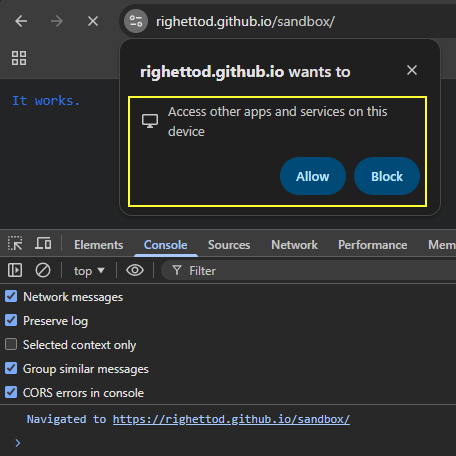
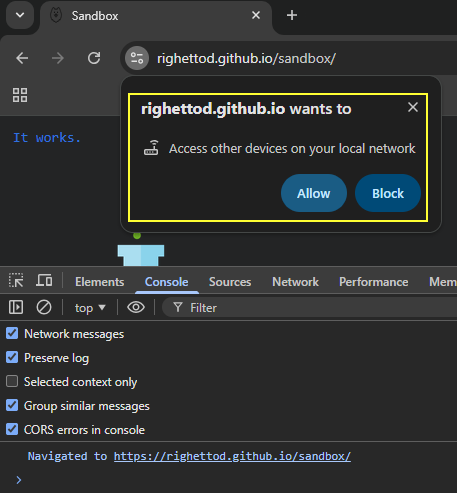
💡 Explanation of the 2 permissions popup:
- The first popup
Access other apps and services on this deviceis intended to ask permission to access the resource hosted on a loopback network as the domain was bound to127.0.0.1.- Flow: From a public network (
github.io) to a loopback network (righettod.localbound to127.0.0.1).
- Flow: From a public network (
- The second popup
Access other devices on your local networkis intended to ask permission to access a resource on a local network.- Flow: From a public network (
github.io) to a local network (righettod.local). As the domain targeted was ending with.local, then Chromium identified that the local network was targeted.
- Flow: From a public network (
🔬 The only information, that the target site will have about the sender of the request, is the content of the request headers Referer for the base URL and Sec-Fetch-Site to indicate that the request is a cross site one:
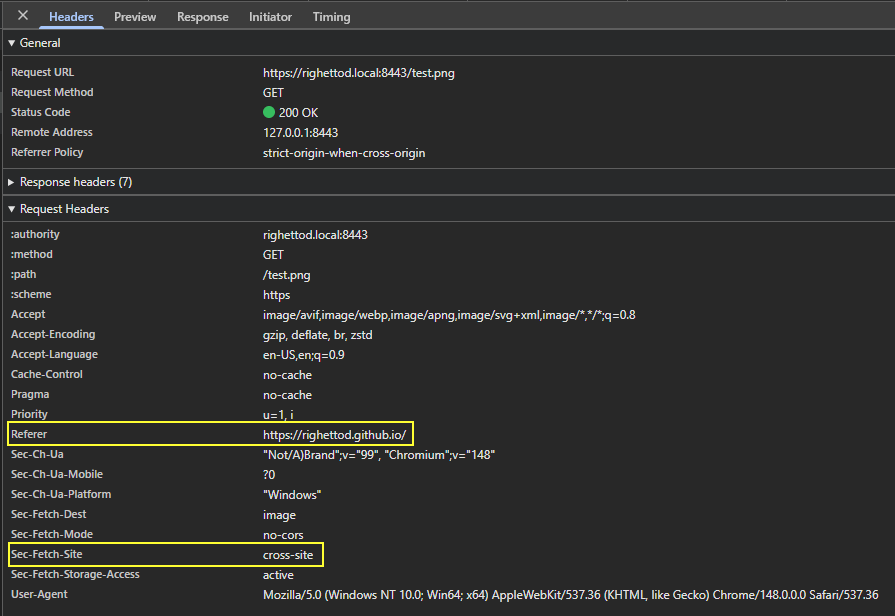
📍 Therefore, it is the browser that control itself if the request is sent or not based on:
- The triggering of permission popups if the network of the target resource is more private than the network of the site initiating the request.
- The reply of the user to the permission popups if triggered.
📍 The target site will only have the value of the request header Referer to check the corresponding IP address to see if it is part of the loopback, local or public IP addresses space.