Operations
Running the event once it is up: what organizers do during and after, the admin panel, how teams work, how to verify the kit before an event, the local dev-stack for clicking through the real experience, and the current status of live-GitHub scoring. For standing the kit up in the first place, see docs/hosting.md.
On this page: Running an event · Teams · Admin panel · Archiving and replaying an event · Quiz · Jeopardy · Verifying it works · Local dev-stack · Before launch · Status
Running an event
During:
- The leaderboard and app live at the
EVENT_URLyou configured in.env. - How fresh the board is. The folded standings — every module’s points,
team totals, the chart, hint penalties — are computed once and shared by
every viewer for 10 seconds, then recomputed on the next request
(
apps/web/src/lib/leaderboard/folded.ts). So a quiz answer, a flag or an AI solve shows on/leaderboardand the landing strip within 10 s rather than on the contestant’s very next page load. Secure Development points take longer: the app’s read of the scorer is itself cached for 30 s (next: { revalidate: 30 }inlambda.ts), and the 10 s memo sits on top of it, so a score the poller has already ingested can take up to about 40 s to reach the board — and the poller’s own cadence comes before either. The projector board refreshes every 30 s regardless. A contestant’s own/profile,/quiz,/flagsand/challengesread live and show their solve at once. A read that fails is never cached — the next request retries. - Poller logs:
docker compose logs -f sync. - All state lives in named Docker volumes, so a box reboot loses nothing.
- On AWS (ECS), the logs, a shell, the failure drills, rollback and tear-down are in the AWS event-day runbook. Everything else on this page applies unchanged.
After — preview the teardown, then run it:
./setup/ctf-setup.sh teardown --dry-run
./setup/ctf-setup.sh teardown
This archives each target repo in the event org. It does not revoke
credentials or delete secrets — do that yourself: uninstall the GitHub App,
and delete any Actions secrets the org still carries. LEADERBOARD_URL /
LEADERBOARD_TOKEN are the ones to look for on an org that has hosted an
event before: push ingest was removed in v0.6
(#377), so nothing reads
them and they are just credentials every contestant-triggered run can read.
Check the org’s Settings → Secrets and variables → Actions page — ctf-setup.sh doctor no longer does (#503).
Teams
Scoring is per team, and a team is required — nothing a contestant solves counts until they are on one. Contestants self-register in the app: create a team to become its captain and get a join code, join an existing team by code, or hit Play solo for a one-click team of one named after their GitHub login. Everyone ends up on a team — a solo player is simply a team of one.
The requirement is enforced in three places, earliest first. At sign-in:
every GitHub sign-in lands on a post-signin step that sends a contestant with
no team straight to the team card — team setup is the first thing a new
contestant completes, not something discovered later (a /join/<code> invite
passes through untouched, since the invite is the team step). At the
module pages: a signed-in contestant with no team who opens /quiz,
/flags or /ai is sent to the team card too, so nobody who slipped past the first
step discovers the rule by answering a question and watching it not count.
At the routes: the quiz and flag submission routes refuse a teamless
login outright — the boundary that actually holds. Organizers are exempt
from both redirects — they sign in to check that their content renders,
which is not playing — but not from the submission check, since an
organizer’s points would fold into no team either. So a teamless
organizer gets a notice above the form instead, naming the same fix and
the one-click Play solo: the exemption is from the redirect, not from
being told. Without it the rule reached them the expensive way — the form
rendered, the route refused the submission, and they learned the
requirement from a solve that did not count, which made the people most
likely to be testing a board the ones guaranteed to discover it by losing
something to it. If registration is closed when a teamless contestant
reaches the team card, it explains that instead of offering forms the
routes would refuse.
Secure Development still has no route to refuse. Its points arrive from GitHub through the sync poller rather than through an app route, so a contestant who patches a fork while on no team has their score ingested against a login that belongs to no team, and it contributes to no team total until they join one — team totals fold from current membership at read time, so already-banked solves count from the moment the login is on a team. That deferred-credit behavior is deliberate: refusing the score at ingestion would lose it permanently (the poller marks the comment seen), whereas banking the score against the login only delays credit. The sign-in steering above is what closes the gap in practice — it is the only enforcement point this module’s scoring path passes through — so it matters most for events running Secure Development.
Captains
manage the roster from the app: rename the team, remove a member, transfer the
captaincy, regenerate the join code, or disband. A team name is up to 32
characters, counted after Unicode normalization (NFC). Any script and emoji
may appear in it, but a new team’s name needs at least one letter a–z or
digit 0–9, because the team’s id (its key and invite URL) is built from
those; a rename keeps the id, so it has no such need. A name with nothing
visible (zero-width or control characters, or the blank Braille cell U+2800,
alone) or
with a text-direction control character (U+202E and the rest of the bidi
controls) is refused on create and on rename, and every page shows a team
name direction-isolated, so a name stored before that check cannot reorder
the row around it (#603). The join code doubles as a
shareable link — Copy invite link on the team card yields
https://<your-event>/join/<code>, which a teammate opens and joins in one
click. Signing in mid-way keeps the invite: the code lives in the URL, so the
GitHub round-trip returns to the same page. Regenerating the code invalidates
any link that carried the old one. Team size is capped at four members by
default; an organizer changes that from the admin panel’s Event tab
(“Players per team”) without a rebuild.
The leaderboard ranks teams, and each row expands to show its members with each member’s individual points. A flag solved by several teammates counts once for the team, so a team’s total can be lower than its members’ scores added together — the leaderboard dedupes shared solves rather than double-counting them. Organizers open or close the registration window from the admin panel below — by hand with the Team registration switch, or on a timer with the Registration opens / Registration closes schedule fields. While it is closed nobody can create or join a team, and a captain cannot rename it or regenerate its code; transfer captaincy, disband, leave and remove member still work, because those are exits and gating them would trap a player or a captain behind a closed window. Leave and remove member ask for confirmation first, though: a player who leaves (or is removed) after close cannot join any team again on their own, and their points leave the team’s total. The warning says so, the request is refused until it is confirmed, and an organizer can put the player back from Support → Add to team (see below).
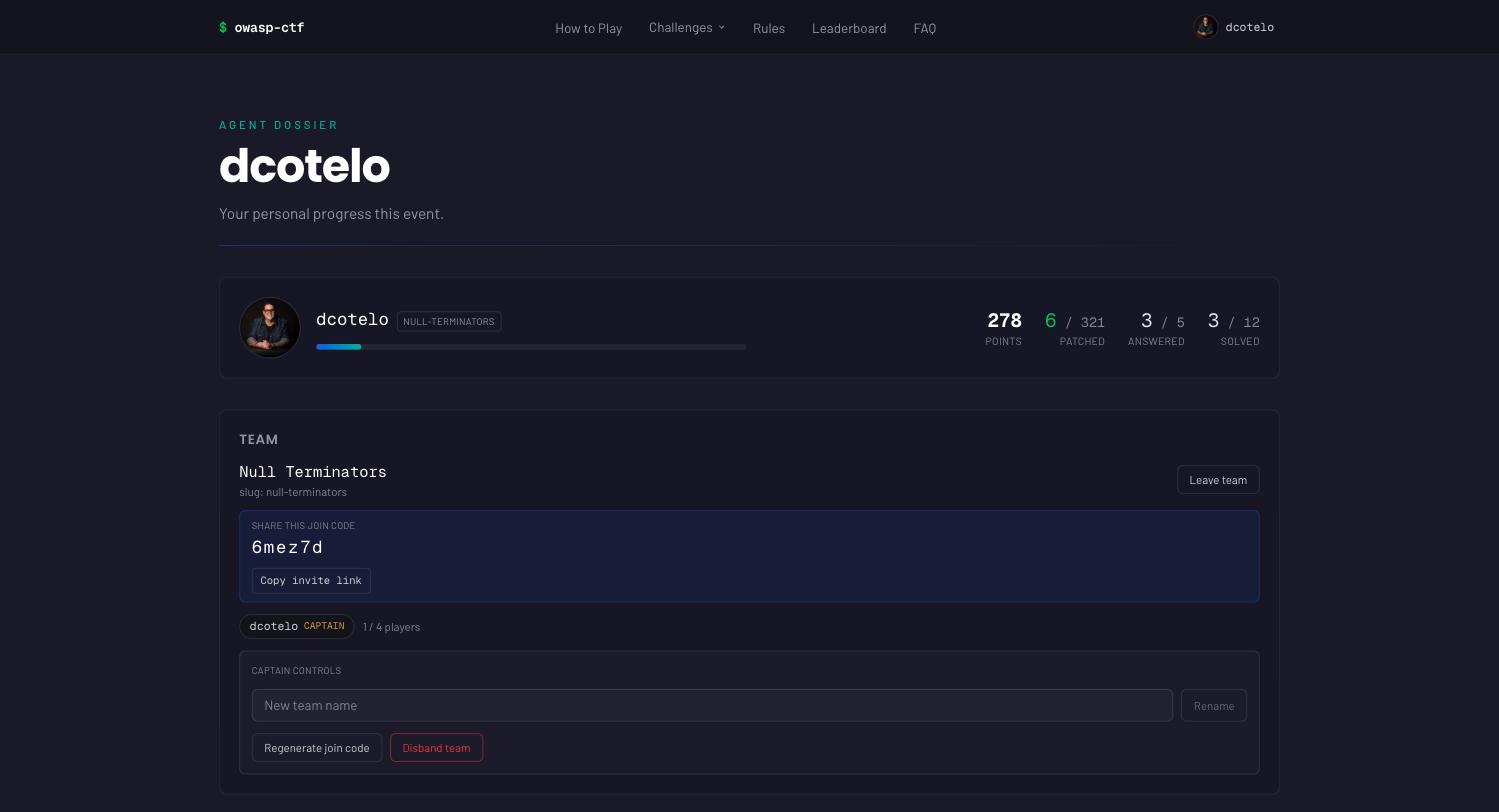
The profile is where teams live day to day: the join code and invite link to share, the captain’s controls, and a header stat per enabled module.
Organizer admin panel
Anyone listed in .env’s ADMIN_LOGINS (checked case-insensitively against
their GitHub login) can sign in and reach /admin — everyone else gets a
403, on both the page and its API routes.
Those are the bootstrap admins: read from the environment at runtime, so
changing them needs a restart, not a rebuild. An empty or unset
ADMIN_LOGINS locks everyone out of /admin. Everyone else is granted from
the panel itself, on the Admins tab, and takes effect immediately (see
below).
The header is one row — Admin · <event name> · <phase badge> · until <date>
— with the same phase vocabulary and colours as the public phase strip. The
controls sit behind a left sidebar in three groups (it collapses to a
“Sections” drawer on narrow screens):
- Run — Overview, Activity, Insights, Support.
- Content — one destination per enabled module, in event-config order, labelled with that module’s name as the organizer has set it. A module’s own knobs live in its own destination, so an event that doesn’t run a module never sees its settings at all.
- Setup — Event (identity, modules, freeze, team registration, team size, the schedule, then demo seed and the master reset at the bottom), Hints, Admins, Sponsors.
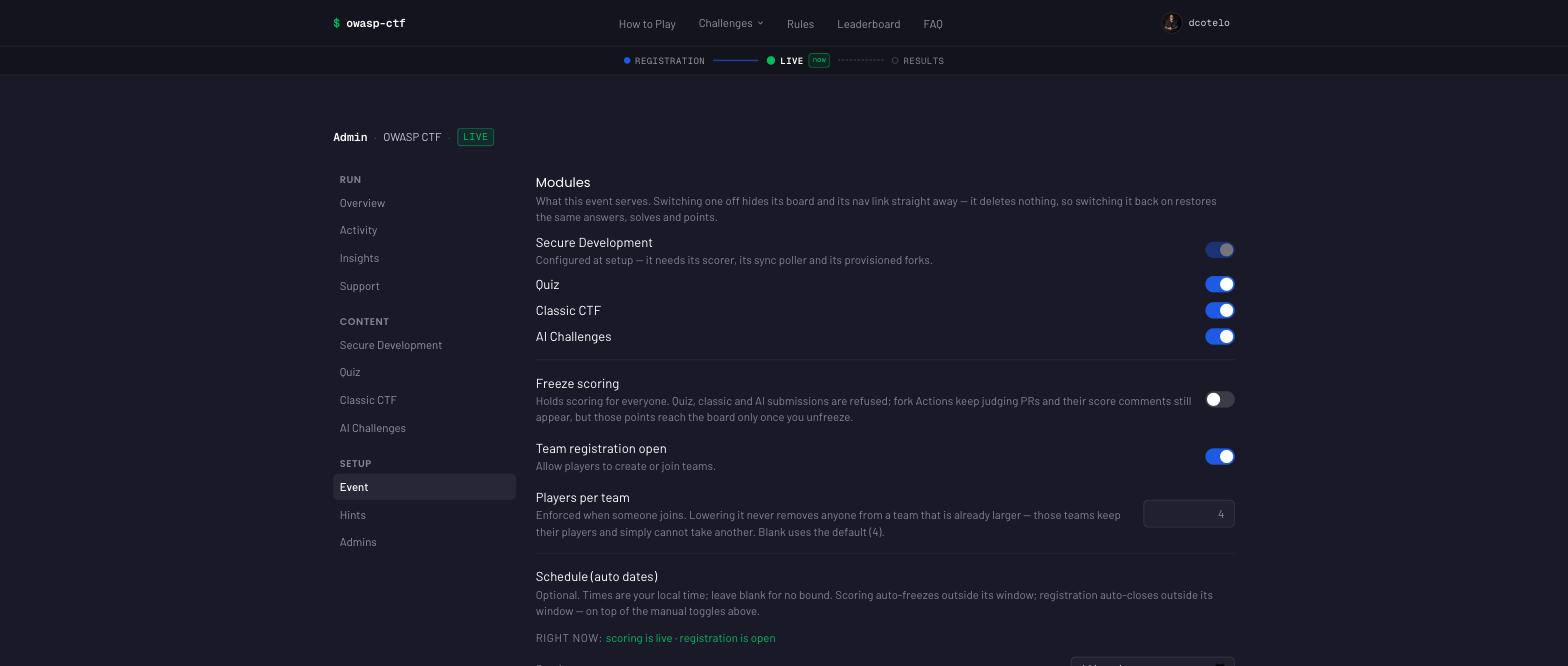
Overview is the default on load, regardless of how many modules are enabled — unless the URL names another destination (see the deep links below). It answers “is scoring on, how many teams, is anything stuck” in one screen: the phase and time remaining, Scoring and Registration as switches you can flip from there, the team / player / submitted / stuck figures (stuck leads when it is non-zero), the poller’s sync health line (one line — last poll, ingested, dropped, running/paused — that opens into the full breakdown, repos polled, last drop and last error, the old Status card), the five most recent activity rows, and a setup-status line per module (“checking…” until that module’s own panel has reported its counts; “enabled” for a module with nothing countable). The figures and the activity rows load when you open Overview and, while the event phase is live, refresh every 15 seconds; the stamp on the phase row (“updated 12s ago · refreshes every 15 s”) says how old the read is, and reads “auto-refresh paused while the event is not live” before scoring opens or once it is frozen or over — the panel still loads once when you open it, but the numbers do not move in those phases, so nothing is re-polled. While live, a hidden browser tab never polls, and switching back to it refreshes at once. A read that fails says so in place rather than sitting on “Loading…”, keeps the previous figures and the stamp’s age (so retained data is never called “updated”), and clears itself when a later refresh succeeds.
Every on/off control in the panel — the module switches, Freeze scoring and Team registration on Event, Scoring and Registration on Overview, Hints enabled — is a switch that reports its own save beside the row: “Saving…”, then “Saved” for a moment, or the reason the server refused it (with the switch snapped back to the stored state). Overview’s Scoring switch and Event’s Freeze scoring row write the same setting, so a flip on either screen shows “Saved” on both. The numeric fields do the same and no longer show a browser spinner: type the value, tab out, read the line under it.
The hint policy has its own Hints destination because it is event-wide:
Secure Development, Jeopardy and AI all sell their hints through the same
four settings. (It sat on the Secure Development tab for a while, which left
a classic-only or ai-only event with no hint switch at all, then in a section
of Event.) Every move has been a UI relocation only — the underlying
storage keys (hintsEnabled, hintCost, hintsMinSolves,
hintsUnlockAfterMin) and their validation are completely unchanged, so no
deployed event’s settings, or their meaning, changed by upgrading.
Every module screen opens with a sticky header and a setup status line.
The header is the module’s name and its Enabled switch — the same control
as the module’s row on Event, with the same lock (the last live module cannot
be switched off) and the same confirmation, so a flip on either screen shows
“Saved” on both. Under it, one line — “Setup complete · 4 categories · 12
challenges” — opens into the setup checklist: what contestants experience in
that module, the steps you do in this panel in dependency order, and a
link to that module’s section of this page. The checklist is expanded only
while a step the panel can verify is still to do; once questions or
challenges or categories exist it collapses to the line, and stays collapsed
while the counts are still loading (“checking…”) rather than accuse a set-up
module on first paint. Steps done outside the panel (ctf-setup.sh, the
GitHub org, .env) are not repeated — the screen exists only while the
module is enabled, so they are behind you; the linked guide has them. A
second line, What is safe to change mid-event, opens the safe / not-safe
lists. All of it is registry content (the module contract’s §5.9), not copy
typed into each tab.
Settings card. Below the status line, one card holds the module’s title and blurb side by side, its own knobs (the quiz’s retry gate, the cooldowns), and — on every module that sells hints — a link to the Hints screen where their price lives. The title is capped at 60 characters, the blurb at 200; both are plain text only — control characters and Unicode bidi-override characters are rejected, since there is no markup to sanitise, only rendered text to keep intact. Leaving a field blank clears the override and restores the module’s registry default — the field’s placeholder shows what that default is, so clearing it is discoverable rather than a guess. Changes are live on the next request; there is no rebuild and no cache to wait out.
Where a rename actually shows up. Set a title and it replaces the module’s
name in three places on every event: the tab’s own label, the nav link
(header and footer alike), and the module’s own page header and browser tab
title (/challenges for Secure Development, /quiz for Quiz, /flags for
Jeopardy, /ai for AI). It also reaches two more surfaces on every event:
- the landing page’s module card — each card under “The game” (or “The games”, with more than one module) is headed by the module’s title, override included. The page’s uppercase kicker above it comes from the modules’ registry taglines, which are not overridable at all;
- the team leaderboard’s per-module rows — an expanded team row labels each module’s progress with its title, even when only one module runs.
One surface is suppressed on a single-module event, which is what most events are: the individual leaderboard row’s per-module block heading, hidden while only one module is enabled because a row’s points are that module’s and the heading would only restate the column above it. Nothing is broken if a contestant’s own row does not show your new name on a one-module event — that heading only appears once there are two modules to tell apart.
The blurb is contestant-facing copy — write it as such. It reaches three places:
- the meta description of the module’s own page (what a search result or a chat link preview shows);
/quiz’s,/flags’s and/ai’s page header, as the lede under the title. This is the module describing itself; a contestant’s own progress lives on the board itself (Quiz’s progress strip, Jeopardy’s “Your run” rail), and a signed-out visitor sees a “Sign in with GitHub to …” line above the questions/challenges;- the landing page section lede, but only for a module that ships no
registry
homeblock. All four modules that exist today have one, so today this is a fallback for a future module rather than something you can see — Secure Development’s, Quiz’s, Jeopardy’s, and AI’s landing copy all come from the registry and are not organizer-editable.
Leaving it blank restores the module’s registry default, which is a complete sentence, so a blank blurb is a perfectly good answer — it is never an empty line on a page.
The panel offers:
-
Identity (Event tab, top of the page) — how the event names itself, a runtime
/adminsetting (issue #386). It is the only place these fields exist: there is no config file to set them in and nothing is baked into the image. Each restores its default when left blank: Event name (≤80 characters; blank restores “OWASP CTF in a Box”; shown in page titles, the header, the leaderboard, and this panel’s own master-reset confirmation), Location (≤160; shown beside the dates on the landing page and in the page description; blank hides it), Timezone (≤64; an IANA zone such asAmerica/Argentina/Buenos_Aires, suggested as you type; the landing page’s dates, the phase line, the score chart’s axis and the schedule inputs below and the admin activity times (Overview and the Activity tab, to the second; a “Show UTC” switch beside each flips them to UTC and is remembered per browser) read on this clock (Insights’ “as of” time and Support’s joined and first-on-a-team times stay UTC, to the second, to match against logs; the Insights timeline counts ten-minute buckets, so its labels stay at the minute); the phase line and the launch status name its offset, e.g. “9:00 AM GMT-3”; blank means UTC, the output before this setting existed), Contact e-mail (≤254; the organizers’ own inbox, rendered as amailto:link on the privacy and terms pages; blank hides it), and Discord invite (≤200; must be anhttps://URL; the header, hero, rules, how-to-play, FAQ and 404 pages link to it; blank hides every Discord mention), and Logo link (≤2048; anhttps://URL with nouser:pass@; the landing page’s event logo opens it in a new tab; blank leaves the logo unlinked, and it does nothing until a logo is uploaded). Changes are live on the next page load — no rebuild, no cache to wait out.Below the fields, two images (issue #529) — each picked from a file, saved at once, and undone with Restore default:
- Logo — PNG, JPEG or WebP, up to 128 KB and 4096 px a side. It leads the landing page’s hero (shown up to 224 px tall and 32 rem wide on a desktop, 144 px tall on a phone, whatever its shape; clickable when a Logo link is set), and a smaller project logo, which carries the OWASP mark, stays beside it, captioned “Built with OWASP CTF in a Box”: the OWASP Project Policy wants OWASP branding prominent on any domain the kit runs on, so an event adds its logo and never removes OWASP’s (ADR 65). It is shown as uploaded on the dark navy hero — upload a version made for a dark background. With no logo set, the hero shows the project logo alone.
- Favicon — the browser tab icon: a square PNG, 32–512 px, up to 32 KB. With none set, the project’s built-in icon is used.
The server checks each file’s real bytes, not its name or claimed type, and refuses SVG outright (an SVG served from the box can run script). Both are served from the box’s own origin at
/api/event/logoand/api/event/icon; pages link them with?v=<etag>, so a replacement shows on the next page load even where a browser holds on to favicons. A master reset keeps them — like the name, they are the event’s identity, not progress. An event archive carries the logo and its Logo link together; contact and Discord never travel in one. -
Sync (Overview tab, shown only while Secure Development is present) — the sync poller’s heartbeat as one line (last poll time, comments ingested, comments dropped, running or paused) that expands to the full breakdown: repos polled, whether sync is paused, the last drop and the last error.
Read Ingested and Dropped together. Ingested is points that reached the leaderboard; Dropped is points that reached a contestant’s PR and stopped there — the scorer rejected the submission, or the comment carried a
ctf-score:marker the poller could not read. Dropped should be 0 on a healthy event; it turns amber and a Last drop line names the repo, the PR, and the reason when it isn’t. Neither figure resets on its own: a dropped score is still missing after the poller recovers, so the pointer to the PR that needs looking at stays up (unlike Last error, which describes only the most recent tick). A nonzero Dropped means a contestant is looking at a correct score on their PR that the leaderboard does not show — go read the poller’s logs for the matching line, fix the cause, and re-run that PR’s scoring workflow.Routine things are deliberately not counted here: a comment re-read at the cursor boundary, and the workflow’s own “⏳ Scoring in progress…” placeholder, are both expected and leave Dropped at 0. Neither is a score the scorer refused because of when it was posted — before the launch, while scoring was frozen, after the end, or before a master reset (see Freeze below): that is the rule working, not a loss, so it is logged as
submit <repo>#<pr>: refused (<reason>), not scoredand left out of Dropped. The poller’s logs carry a per-repo breakdown of all of these on any tick where something non-routine happened. -
Freeze — a pause switch. Pausing freezes scoring, not fork Actions: contestants’ PRs keep getting judged and commented on exactly as before. Quiz, Jeopardy and AI answers are refused while it is on. A Secure Development score is judged by when its score comment was posted on the PR, not when the box reads it (ADR 67): a PR scored before you froze still counts, even if the poller reads it during the freeze, and a PR scored while frozen never counts, not even after you un-freeze. The same rule applies to the scoring window: a PR scored before Scoring closes counts even if it is read later, and one scored before the launch or after the end does not. The poller keeps reading during a freeze and the scorer decides each score; the refusals are final and show in the poller’s log as
refused (paused),refused (outside-window)orrefused (pre-reset), not in Dropped.To make that possible the box records when each freeze ran, not only whether one is on: freezing stores the start (
pausedSincein the settings hash) and un-freezing moves the interval ontoctf:admin:pauses(the last 200 are kept). Both are written by the same save as the switch. A freeze set straight on the hash with no recorded start (by hand, or left over from a version without the log) has an unknown start, so the scorer holds Secure Development scores read during it (503, retried) rather than refusing them, and judges them once it lifts — that one freeze then lets in a PR scored during it.One edge, by design. A PR’s score comment is edited on every run, so its time is the time of the last run. A solve the box already recorded keeps its first time. But if the poller was down across a re-run, a solve first read from the re-run gets the re-run’s time, and a re-run after the event ends refuses a solve that was never read, even if its first passing run was in time. Normally the poller reads each comment within a minute, so this needs the poller to have been down across the re-run.
- Projector board (Event tab) — QR code on the projector board, on
by default: display mode (
/leaderboard?display=1) shows a QR code of the event’s address, with the address printed under it, in the bottom-right corner below the standings, so anyone in the room can join from a phone (#592). The code is the box’s own origin fromEVENT_URL(compose passes it asBETTER_AUTH_URL); with none set, no code is shown rather than one guessed from the request. It is encoded on the server into an inline SVG, with no third-party service and no request from the viewer’s browser. The regular/leaderboardnever shows it. -
Modules (Event tab) — which modules this event serves, switchable during the event without a rebuild. Switching one off removes its nav link and stops its board resolving on everyone’s next page load; switching it on brings both back.
It deletes nothing. A disabled module’s answers, solves, attempts and points stay exactly where they are, so re-enabling restores the same board — the toggle is a switch, not a delete. Use it to pull a broken board out of an event without losing what contestants have already done.
Switching Quiz, Jeopardy or AI off also stops their grading on the next request, and nothing is recorded while the board is off (#495):
- Quiz and Jeopardy: an answer or flag submitted from a tab that was already open (or straight to the API) is refused, and the board shows “Couldn’t verify that right now”.
- AI, in the box: the flag form on an already-open challenge page gets the same refusal from its server action.
- AI, from the external challenge site:
POST /api/ai/submitandPOST /api/ai/eventanswer403 {"error": "unavailable"}before the token or signature is even checked (see the AI module contract).
For Secure Development specifically: switching it off does not stop the poller or the scorer — ingestion keeps running underneath, and any points it records while the board is off show up on the board again the moment you switch it back on.
One thing it refuses, on purpose: Secure Development on a deployment with no scorer image. The scorer and sync containers are chosen when the stack comes up (
SCORE_IMAGEin.env), and the app cannot start one, so the switch is greyed out with that reason and the server refuses the write. Everything else — including switching the last board off — is yours. An event with nothing on shows “No boards are open yet” and points at this panel.A Secure Development left on from before the scorer image was removed is not force-disabled outright — it is hidden from contestants (the module contract’s usual “switched off” behaviour) and drops out of the stored enabled set automatically the next time you change any module here, so it never comes back on its own once the deployment has a scorer image again.
What is on before you touch anything: Secure Development, and only when the deployment has a scorer image (
SCORE_IMAGEin.env); otherwise nothing. Quiz, Jeopardy and AI always start off. Nothing else influences enablement — there is no config file and no baked default (#386) — and which Secure Development targets run is a separate setting on that module’s own tab; if the settings read fails the app falls back to that same “all six” default rather than to a surprise.What a contestant sees. The module’s nav link disappears from the header and the footer, and its route stops resolving — with a page that says the module is switched off, that their link is fine, and that nothing they have already solved is affected. It is deliberately not the generic “that page doesn’t exist, your link is wrong or out of date”: their link was right, the page was there a minute ago, and sending them to hunt for a better URL wastes their time mid-event.
/challengesbehaves like the other boards’ switched-off pages.A newly enabled module’s own admin tab appears on the next page load, since the tab strip is rendered server-side.
- Team registration — an open/close switch for the team-forming window.
While closed, players cannot create or join teams (Play solo included),
and a captain cannot rename the team or regenerate the join code.
Transfer captaincy, disband, leave and remove member are deliberately not
gated (
team-store.tssays so at each one): they are exits, and gating them would trap a player the moment registration closes. Leave and remove member require a confirmation that says the player cannot rejoin and their points leave the team; Support → Add to team puts them back. Existing teams keep their scores. The switch is one of two things that close registration — the scheduled window below is the other. - Schedule (auto dates) — four optional date-time fields, on the Event
tab beneath the players-per-team cap: Scoring opens / Scoring
closes (
scoringStartsAt/scoringEndsAt) and Registration opens / Registration closes (registrationStartsAt/registrationEndsAt). You enter times on the event’s clock (the Timezone above, UTC when blank), whatever your own laptop is set to; the launch status line shows the event-local time with UTC beside it. Each is stored as an ISO instant — the scorer and the poller only compare instants, so the zone never changes what scores — and a blank field means no bound on that side — except Scoring opens: an event with no scoring start is not launched, and nothing scores (flags, quiz, AI, and Secure Development PRs in the scorer and the poller) until one is set. Every event needs that official launch (#464) — until then module pages redirect to/(see Before launch). They stack on top of the manual toggles rather than replacing them: scoring is live only when it is not frozen and inside its window, registration is open only when the switch is open and inside its window — either condition on its own closes it. Because four fields plus two switches is a boolean nobody should do in their head mid-event, the section shows the effective state in a live Right now: readout — “scoring is live” / “is frozen (manual)” / “is frozen (outside its window)” / “is closed (not launched — set a scoring start)”, and the matching states for registration — computed from the very fields it edits. The scoring window is honoured by every reader of scoring state (the app, the scorer, the sync poller — see architecture). Flags, quiz answers and AI solves are judged when they arrive; a Secure Development PR is judged at the time its score comment was posted, so a PR scored before Scoring closes counts even if the poller reads it after (see Freeze above). A refusal is final: a PR refused as outside the window stays refused if you move the bounds later, until it is re-run. The registration window is enforced byteam-store.tson exactly the mutations the manual switch gates. - Hint controls (the Hints destination, under Setup) — whether hints are enabled and
what they cost. Hints are on by default and cost 10 points each; the
cost (
hintCost) is a whole number from 0 to 100000. This is the only hint switch: there is no environment variable, and the toggle takes effect immediately across every surface — whether a hint can be bought, whether the challenges page offers the button and its notice banner, and whether the leaderboard shows the hint-penalty column. Turning hints off does not forgive points already spent: the spend stays recorded, so switching back on restores the penalties rather than wiping them. The one thing the toggle cannot do is turn hints on withoutUPSTASH_REDIS_REST_*credentials — the hint text lives only there. - Hint gating — two knobs that decide who may buy a hint and when,
enforced server-side in
revealHint(the API is the boundary; the UI only hides things):- Solves required (
hintsMinSolves, default 1, at most 1000) — a login must already have solved that many challenges on that target before it can buy any of that target’s hints. This is the anti-farming gate: a hint’s price lands on the account that reveals it, but the hint text is trivially relayed, so a throwaway account could otherwise buy hints, eat a penalty nobody cares about, and pass the text to a real team. Requiring earned progress makes that cost the same real work the event scores. Set to0to disable. - Unlock after (
hintsUnlockAfterMin, default 0, at most 100000 minutes) — minutes after the scheduled scoring start before any hint can be bought, so the early game is decided on unaided work. Needs a scoring start (the Scoring opens field under Schedule above) to have any effect;0means hints are available immediately. -
Affordability (no knob — it follows Hint cost) — a contestant can only buy a hint they can pay for: their score on the leaderboard (every module, net of hints already bought) must cover the price, or the reveal is refused with “Not enough points: this hint costs N and you have M” (#553). Before this, the board floored a net score at 0 and the difference was quietly forgiven. Re-viewing a hint already bought is always free, whatever the balance. After a purchase the reveal also tells the contestant what is left (“N pts left” — the balance at the moment of the charge; a solve landing in the same instant shows on the refresh that follows). A free hint (cost
0) skips the check. -
Price changes (no knob — it follows Hint cost) — a contestant is charged the price their confirm button showed, or nothing. The purchase carries that price, and the charging script reads the current Hint cost itself and compares the two in the same atomic step as the charge (the affordability check and the charge use that same live price): if an organizer changed the cost after the page rendered, nothing is charged, the request answers 409 with the new price, and the button asks again at it (“This hint now costs N pts. Confirm again to buy it at the new price.”). Re-viewing a hint already bought is free and never refused this way.
- Scoring window (no knob — it follows Freeze scoring and the Scoring closes schedule) — a hint purchase lowers the buyer’s net, so it is a scoring action and closes with scoring (#566): while scoring is frozen the reveal is refused with “Scoring is paused right now — hints can’t be bought until it resumes”, and once the scheduled end has passed with “Scoring has closed — the event has ended, so hints can no longer be bought”. Final standings cannot move after the end. Re-viewing a hint already bought stays free and allowed (nothing to charge), and an admin preview is exempt. Checked right after “hints on”, before the time, progress and affordability gates — and re-checked inside the atomic charge script against Redis’s own clock and the live freeze flag, so a reveal that passed the gate a moment before the end still cannot charge after it.
All of them fail closed: if the solve or balance lookup errors, the hint is refused rather than handed out unverified. A refused purchase never reads the hint text either: the charge script checks that the hint exists by field, runs every check that can refuse, and only then reads the text it is about to hand over — a refusal carries nothing of it, not even server-side. A denial on the gate’s own terms returns
403with a message naming what’s missing; a lookup the server could not complete answers “Couldn’t check your score right now. Try again” instead of inventing a balance. The module check is per target: a hint on a secure-development target requires that module enabled, a classic hint requiresclassic, an ai hint requiresai, and each refuses outright when its module is off (hint-store.ts’shintGate). In practice only classic and ai ever reach it: Secure Development has no hints, because nothing in the kit authors hint text for a target, so no challenge on/challengesoffers one and that page shows no hint banner (issue #334). Jeopardy and AI count “solves required” across the whole board rather than per app, the same way secure-development counts per target — see the AI section for its own hint text/knobs. The quiz has no hints by design — a question’s hint is its choices. - Solves required (
-
Hint penalties apply to teams too. A team’s displayed points are its scorer total minus the sum of its members’ hint spend, floored at 0, and the team board re-ranks on the penalised figure (a
−N hintschip shows the deduction). Note the deliberate asymmetry with flag scoring: a flag solved by two teammates counts once, but a hint bought by two teammates is charged twice — hints are individually purchased, so redundant buying is the team’s own coordination cost. -
Activity (its own tab) — the live event log: sign-ins, quiz, classic and ai solves (an ai solve’s entry also notes whether it came in via flag or via event), and team create/join/leave/rename, newest first. Type chips (each with its count) and one search box narrow it: every word must match somewhere in a row — login, event, detail (challenge, question or team id) or the time as shown — and
login:,type:,detail:andteam:restrict a word to one field; a time range (last 15 min to 24 h, or from/to on the panel’s clock) narrows it further. While any of these is on, the tab reads the rest of the log so the search covers all of it, and says how much it searched; the search rides in the URL (/admin/activity?q=…), so a filtered view survives a reload and can be shared. Backed by one capped Redis list (ctf:activity:log, newest ~5,000 entries — older ones drop automatically), written fail-open so a Redis blip can lose a log line but never fail the sign-in or solve it describes. Entries carry the challenge/question id or team slug — never a flag, an answer, or hint text — and no IP or device data, which is what keeps the tab safe to screen-share mid-event. It loads when you open the tab and, while the event phase is live, refreshes every 15 seconds — re-reading as many rows as you have paged in, so the log never jumps back to its first page under you — with an “updated Ns ago” stamp beside the count; Refresh is the same read for when you won’t wait. The master reset wipes it with the rest of the event’s progress. -
Insights (its own tab) — engagement metrics for the event, computed entirely from data the box already stores. Nothing is collected from contestants’ forks, and no new tracking was added: quiz answers and classic solves already carry a timestamp per item per login, Secure Development solves are timestamped as they are ingested, attempts are counted per login, and
firstTeamAtsupplies the funnel’s conversion moment. Every per-login record is read under the login as GitHub spells it, so a contestant whose login has a capital letter counts like any other.It computes when you open the tab, not when the admin page loads — the fold is O(contestants) — and, while the event phase is live, recomputes every 30 seconds (half Overview’s cadence, for the same reason) with an “updated Ns ago” stamp beside the “as of” time; Refresh is the same read for when you won’t wait. You get:
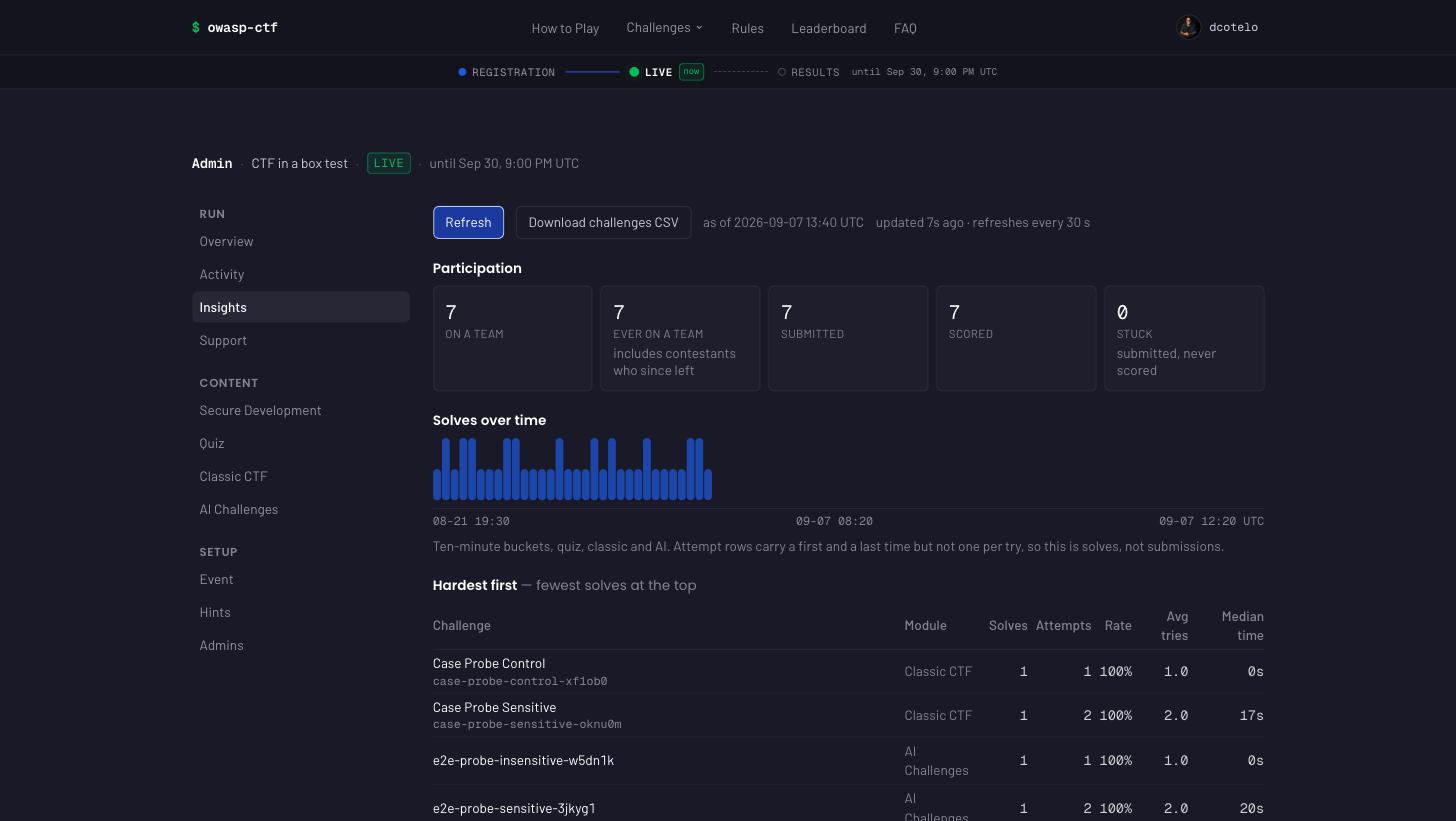
- Participation — on a team / ever on a team / submitted / scored / stuck (submitted and never scored). The gap between the last two is the number worth watching during an event.
- Solves over time: every bucket from the first solve to the last, empty ones included, across the full width, with a time axis (first, middle and last bucket, UTC; dated once the buckets cross midnight), so a room going quiet is a visible, datable gap. Buckets are ten minutes, widened (30 min, 1 h, 2 h, … up to a day, then whole days) to keep any span within 120 bars; the caption names the width and the busiest bucket, and each bar’s tooltip its date, range and count. The same figures for every bucket with solves sit in a “Buckets with solves” list under the chart, for keyboard and screen-reader use.
- Hardest first — every challenge by solves, attempts, solve rate,
average tries taken by the people who did solve it, and the median time
to solve: from a player first opening a Jeopardy or AI challenge’s page
to their solve (the box records the first open, once per player and
challenge). Where no open was recorded (quiz, and solves from before the
record existed) it falls back to their first submission and the cell is
starred and taken over the solvers who missed first; where every solver
was right on their first submission it shows —, because that fallback is
0 by construction, not fast. Those last two are the difficulty
signal solve rate alone hides: a challenge everyone eventually solved on
their fourth attempt, forty minutes in, is harder than its 100% rate
suggests. Each row is named by its title — the quiz question’s prompt,
the challenge’s title — with its generated id underneath, so the table can
be read out without decoding slugs; a challenge deleted since it was solved
keeps its metrics and shows its id alone. Download challenges CSV
exports the full table,
titlebesideidrather than instead of it. The file is UTF-8 with a byte-order mark, so Excel opens accented and non-Latin titles intact, and a title beginning with=,+,-or@is written with a leading'so a spreadsheet shows it as text instead of running it as a formula. - Where attention went — scorers per module, hint buyers and spend, and how many hints were bought before the buyer solved the thing. A hint bought afterwards bought nothing, so that split is the difference between “hints are used” and “hints help”.
What each figure counts. Several of these mean something narrower than their label, and the narrow reading is the one that matters when you quote a number at a closing ceremony:
Figure Counts Does not count On a team Distinct logins on a team right now Anyone who has since left Ever on a team Distinct logins that have ever joined one — survives leaving and switching, including a player who left without scoring (found through their user record) Signing in; that leaves no record at all Submitted Made at least one submission in any module — Scored Earned at least one point-bearing item in any module, Secure Development included Submissions that never landed a point Stuck Submitted and never scored Anyone who has not submitted yet Solves (per challenge) Distinct contestants who earned it Repeat submissions by the same person Attempts (per challenge) Every submission against it, right or wrong Secure Development items, which do not appear in this table at all Solve rate solves ÷ the people who tried it The rest of the event; this is not an event-wide difficulty figure Avg tries Mean attempts taken by the contestants who did solve it Everyone still stuck on it — which is why a low rate and a low average can coexist Median time Median seconds from a contestant first opening the challenge to their solve; starred (*) when it falls back to their first submission because no open was recorded Time spent before opening it (reading the board, working offline from a shared link); a row where everyone solved on their first submission and no open was recorded shows — Team points The leaderboard’s own figure for the team: the union of its members’ solves, hint spend netted — the two screens agree. Only if the board can’t be read does the tab fall back to the sum of members’ totals, and it says so Hints before solving Hints bought before the buyer earned that item Hints bought afterwards, and hints for items never solved Solve rate can never exceed 100%: its denominator is the larger of “people with an attempt row” and “people who solved it”, because an earned row can exist without an attempt row (the demo seed writes answers directly, and so does any data predating the attempts hash). Dividing by attempt rows alone once produced solve rates of 200% and 300% on a seeded event.
The tab ends with what these numbers do not measure, and that list ships in the API payload too rather than living only here — a metric whose limits travel separately from it gets quoted without them. In short: attempt rows carry a first and a last time but not one per try, so the timeline is solves rather than submissions; signing in leaves no record, so the funnel starts at “ever on a team”; Secure Development has no per-challenge attempt data, since its scores arrive already judged; and anything earned before these timestamps existed carries no start time, so early-event figures cover fewer contestants than late-event ones.
Admin-only, and it stays that way. A solve rate is harmless to publish, but this payload is computed from per-contestant rows, so every field added to it later is one edit away from carrying a login. A public post-event summary, if you want one, should be an explicit export of chosen aggregates rather than this endpoint with its guard removed.
-
Support (its own tab) — act on one contestant or one team, mid-event, without touching anybody else. Before this tab existed the only destructive control was the master reset below, so an organizer facing a single stuck contestant chose between doing nothing and wiping the event.
Look a contestant up by GitHub login and the tab shows their team, their points and solves per module, their attempt count and their hint spend. Every action stays disabled until a lookup returns — seeing the score you are about to delete is the guard against resetting the wrong person from a half-remembered username while a room waits.
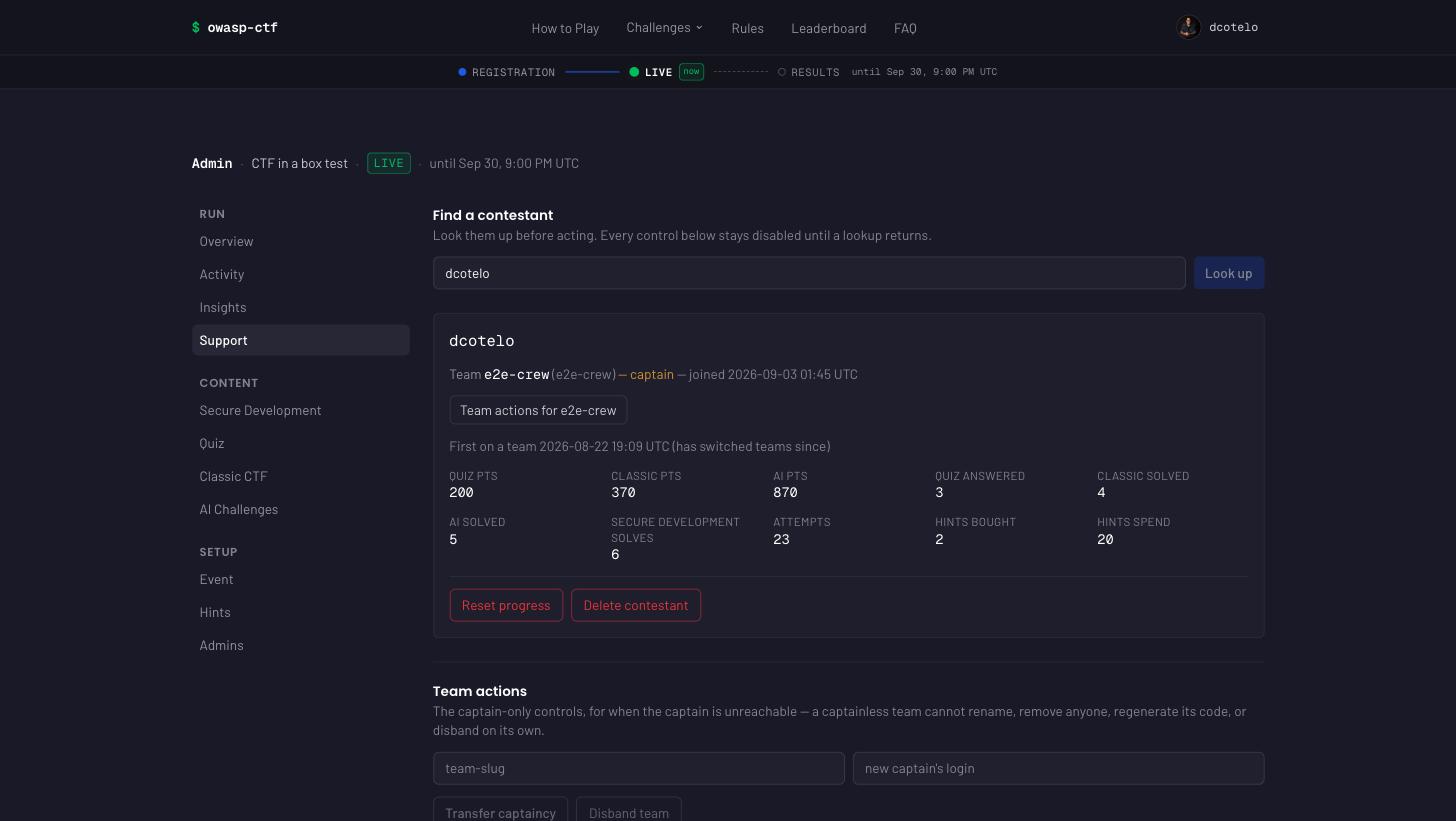
From there: reset progress (clears their Secure Development solves on every target, their quiz answers, classic and AI solves, attempts and hints; keeps the account and the team), delete contestant (all of that plus the team membership and the account record), remove from team, or add to team / move to team: type a team slug and the player goes onto it, leaving their current team if they have one, whatever the registration state. This is how a player who left after registration closed gets back. The team-size cap applies unless you tick over the team-size cap; a captain of a team with other members must hand it over first, as with leaving; a team their move empties is deleted with its join code, as when its last member leaves. The player is found by the spelling they signed in with, so a login that has never signed in is refused. Their points count for the new team on the next board read, and their
joinedAtis the move, so earlier solves do not open the new team’s story steps. The move is in the admin audit log (ops:team-add-member) and the activity log (as a team join). Team-side, there is transfer captaincy and disband — the captain-only controls, available to an organizer for when the captain is unreachable. That is the common live ticket: a captainless team cannot rename, remove a member, regenerate its code, or disband on its own, and nothing else can rescue it.Two deliberate refusals. A captain cannot be deleted or removed while they hold the team — transfer or disband first, or you would leave a team nobody can administer. And disbanding deletes nobody’s points: solves are per contestant, so the players keep what they earned and can regroup.
Score adjustments (the last block on the tab) — a bonus or penalty for a team, with a required reason: type the team slug, a whole number of points (negative for a penalty, up to ±100000, never 0) and the reason, and Add adjustment. The list below shows every adjustment with its team, amount, reason and who added it, each with Remove. An adjustment:
- is applied to the team’s total last, after hint spend, on every surface that shows it (the board, display mode, the profile’s team panel), marked “±N adjustment” beside the total; the total floors at 0, like the hint fold;
- never touches anyone’s hint balance, survives hints being switched off, and adjusts teams only (individual rows are unchanged);
- moves points, not time: two teams level after an adjustment are still ordered by who earned their last points first;
- is written to the admin audit log on add and on remove (
adjustment:add,adjustment:remove, with who and why), and lives in its own ledger,ctf:adjustments; - is this event’s scoring data: the master reset clears it, and the event archive does not carry it (an archive carries content and policy, never solves). The score chart stays gross, as it does for hints. It replaces writing hint spend by hand in Redis, which the board labelled as hints, took from one member’s hint balance, and vanished with hints off.
Secure Development solves come back. The scorer writes them with
HSETNXso replays are no-ops, and the poller re-submits from the PR comments it reads — so a per-contestant reset clears them, and the next time that contestant’s PR is scored they are written again. The tab warns when this applies. To make it stick, close the contestant’s PR or freeze scoring first. Quiz, classic and ai have no such problem: those writes originate in the app, so a delete is final.Every action is admin-gated and writes an audit line naming both the actor and the target — “who deleted that team, and when” is a question asked after an event, not during it. The destructive ones require type-to-confirm against the specific login or slug, not a generic word.
-
Master reset (danger zone) — wipes all contestant progress so a test run or a botched setup can be cleared before the real event. It deletes every solve, attempt, team, per-player record, join code and hint purchase, the organizer’s score adjustments, the activity log, and every sponsor (see Sponsors); it keeps everything you authored — quiz questions and their answer key, classic and AI challenges with their flags, hints and categories — along with your admin settings, and appends the reset to the audit log. It does rotate the AI module’s launch keypair (see below), so an external challenge site re-fetches the public key on its next verification. It is server-side and admin-gated, and requires typing the event name — the current runtime name from the Identity section above, not a fixed default — to proceed (a single click can’t fire it).
The reset also returns the event to not launched (it clears Scoring opens, #464 — launch again when ready), freezes scoring and bumps a reset epoch that the sync poller honours as a watermark: it drops its cursor and re-reads the PR comments, but skips every score comment last edited before the reset (#551), so the points from a rehearsal PR do not come back on the first poll after the wipe. This is what makes a reset stick in poll mode. So the intended flow is reset → box is frozen → unfreeze when ready. A PR that is re-scored after the reset (its score comment is edited forward past the epoch) is ingested as normal — that is a fresh result, not a resurrected one. The poller’s log reports the skip once, as
poll <repo>: N preReset. The scorer applies the same watermark to each score’s comment time, and the reset clears the freeze log (see Freeze above) and starts its own freeze at the reset instant, so a PR scored between the reset and your un-freeze never counts either.While the reset (or any other score-lowering control — a per-player reset or delete, the demo clear, a settings save) is running, a hint purchase is refused with “Scores are being updated. Try again in a moment” (#553): the price is checked against a score that is being rewritten. It is a matter of seconds.
- Quiz controls (Quiz tab, present only when the
quizmodule is enabled) — the two retry-gate knobs (max attempts, accepted from 0 to 100; retry cooldown, from 0 to 100000 minutes) plus full question authoring: add, edit, reorder (drag, or Move up / Move down from the row’s ⋯ menu), and delete (also in that menu). See Quiz below for what these do and their defaults. - Jeopardy controls (Jeopardy tab, present only when the
classicmodule is enabled) — the submission-cooldown knob (in seconds, not minutes) plus category management and full challenge authoring: add, edit, reorder (drag, or Move up / Move down from the row’s ⋯ menu), and delete (also in that menu), with the list grouped by category the way contestants see the board. See Jeopardy below for what these do and their defaults. - Seed demo data (danger zone) — populates the leaderboard with fake
contestants, teams, and real-challenge-id solves so you can preview the app
without running real PRs. When the
quizmodule is enabled, this also seeds a small demo question bank with some already answered, so the board shows a genuinely combined score (patch points plus quiz points) rather than just one module. When theclassicmodule is enabled, it seeds a demo flag board the same way — categories, challenges (flags included), and a spread of solves — so a multi-module event previews as one combined board. See Jeopardy below. When theaimodule is enabled, it seeds two demo challenges and a spread of solves for them, plus theAIcategory to hold them. Their launch URL templates deliberately point at a placeholder host that does not resolve, because a demo dataset cannot ship an externally hosted challenge site — so Open challenge dead-ends on both, and both are gradable by flag in the box instead, which keeps the demo board clearable end to end. Neither is seeded asevent-mode on purpose: that mode can only be solved by an external arena reporting the solve, so seeding one put a challenge on the board that nobody could clear (#355). See AI below for what the modes mean. Sponsors are seeded too, always — three placeholder ones, one per tier, so the landing-page strip, the footer, and/sponsorsall preview populated instead of empty. Each carries a plain solid-color placeholder logo (nothing resembling a real brand mark) and uses the.exampleTLD, which cannot resolve to anything real. The seed also writes attempt rows, including some for items that were tried and never earned, so the Insights tab previews a plausible event rather than one where every challenge was solved first try by everyone who looked at it. Seed and its inverse, Clear demo data, are ordinary admin actions — noDEMO_MODEenv var gates them any more (issue #419); admin auth plus a type-to-confirm click, same as every other destructive control on this screen, is the whole safety net. Both buttons live inside the Event tab’s danger zone, above the master reset: Seed writes fake rows into the live event and Clear deletes rows again, which is the same class of action as a wipe, not ordinary setup. Clear removes exactly the run-state rows Seed added — the fake contestants, teams, solves, and sponsors — but deliberately leaves the demo quiz/classic/ai questions, challenges, flags, and categories in place: once written they’re authored content, the same way a master reset already treats real challenges, so remove those by hand from their own admin tab if you don’t want them.
Every destination has its own URL. /admin/overview, /admin/activity,
/admin/insights, /admin/support, /admin/event, /admin/hints,
/admin/admins, /admin/sponsors, and one per enabled module — /admin/quiz,
/admin/classic, /admin/ai, /admin/secure-development. That is what the
sidebar links to, so a link is safe to bookmark, paste into a runbook, or
read out over a call. Switching tabs updates the address bar without a page
load, and Back walks the destinations you visited, so the URL always names
the screen in front of you.
The older /admin?tab=<id> form still works and still means the same thing —
docs, bookmarks and cross-links written before this keep resolving. This is
what /quiz, /flags and /ai link an organizer to when the module has no
content yet — an empty board shows them Author questions / Author
challenges instead of the contestant’s “check back soon”. An unknown or
not-enabled tab name, in either form, falls back to Overview rather than
404ing.
Every setting says whether it saved. The number knobs (hint cost and gating, players per team, the retry gate, the cooldowns) and the four schedule fields commit when you leave the field, and report beside it: Saving… while the write is in flight, Saved for a moment after, or the reason it was refused. Emptying a number field resets it to its default: the stored override is removed and the field shows the default as its greyed placeholder again, so an overridden knob (a value in the box) reads differently from one following the default (an empty box). Junk, a fraction or a negative snaps back to the stored value with that reason (“Whole numbers only — kept 10.”); a value the server refuses is rewritten through the field’s own label (“Hint cost must be a whole number between 0 and 100,000.”) and the field snaps back too, so what you see is always what is stored. The switches — module on/off, Freeze scoring, Team registration, Hints enabled, and Overview’s Scoring and Registration — report the same three states beside their own row, so nothing in the panel writes into the error line under it any more except the demo seed and the master reset.
Every settings change is recorded in an audit log (who, when, what changed)
alongside the setting itself; the log (ctf:admin:audit) keeps the newest
500 entries and drops older ones automatically. The six Identity fields
are the exception to “what changed”: the audit line names the field and
whether it was set or cleared, never the value — eventDiscord can carry an
invite/join token and eventContact is personal data, so neither is fit for
an admin-visible log. Disruptive controls
prompt for confirmation: the freeze and team-registration toggles, each
module’s Enable/Disable switch, and removing an admin on the Admins tab
ask a one-click “are you sure?”; every control in the Event tab’s danger zone
— Seed demo data, Clear demo data and the master reset — requires
type-to-confirm. Opening a different question or
challenge while an unsaved draft is open also asks before discarding it —
the module forms sit below the list, so every list control stays clickable
while you write.
The panel accepts only the event’s name as that phrase — exactly the
Event name currently set on the Event tab’s Identity section (or its
default, OWASP CTF in a Box, if you have not changed it). The route behind
the button, POST /api/admin/reset, additionally accepts the literal RESET as its
confirm value; that is a raw-API fallback for a scripted reset, and the
panel never offers it.
When the quiz module is enabled, the master reset also clears every
contestant’s quiz answers and attempts (and the point/answered counters and
the award times the leaderboard reads) — but it deliberately keeps your authored
questions and their answer keys, the same way it keeps the event’s
identity and policy settings. A reset event doesn’t mean re-building the quiz
from scratch.
See Quiz below.
A reset that cannot finish now fails instead of reporting a count. The
wipe walks the keyspace in pages, and a page it cannot read used to be treated
as “that was the last one” — so a sweep that stopped halfway still returned
cleared: 412 and an organizer opened a “fresh” event holding the previous
one’s solves, with nothing having reported a problem. The reset now surfaces
the error. Deletions already made stand, and re-running it is safe:
deleting a key that is already gone does nothing, so the fix for a failed
reset is to run it again.
classic is scoped exactly the same way: the master reset clears every
contestant’s flag solves and attempts (and the points/solved/solve-count
hashes and the award times the leaderboard reads) but deliberately
keeps your authored challenges, their flags, and your categories — the
same organizer content/contestant progress line the quiz reset draws. A
rehearsal on the classic module wipes back to the challenge set you wrote,
ready to run for real. See Jeopardy below.
Targets
Also on the Secure Development tab: which of the six targets (Juice Shop,
DVWA, WebGoat, Security Shepherd, VulnerableApp, VAmPI) this event actually
runs, as a checkbox list. ctf-setup.sh org forks and provisions all six for
every event that provisions Secure Development at all — six forks, six
scoring workflows, six package Read grants — regardless of this setting; an
event with an empty SCORE_IMAGE forks and grants nothing (see
modules.md). The checkboxes decide which of those six
contestants see and which the sync poller reads, not which get provisioned.
At least one target must stay checked — the last box is disabled, the same
lock as the last live module’s Enabled switch, because unchecking every
target is what disabling the whole module is for.
A change here reaches contestants on their next page load (the challenge
browser, the leaderboard’s per-app breakdown, and the module’s setup-status
counts all read the stored list at request time) and reaches the sync poller
on its next tick (it re-reads the list from Redis every poll rather than
once at startup). Absent — a fresh event, or one that has never touched this
control — defaults to all six on both sides; a Redis read that fails during a
page render also falls back to all six (fail open), but a poll tick that
cannot read the list polls nothing that tick and records the failure as
the poller’s lastError, rather than guessing (a wrong guess here would mean
scoring the wrong repos or none at all).
Unchecking a target closes it; it does not take points back. From the next tick nothing new on that target scores, and contestants stop seeing it, but solves it already scored stay on the board: they still count in each contestant’s and each team’s total and in the Secure Development figure, because the scorer builds the board from every target in its rubric, not from this list. The one visible trace is on an expanded leaderboard row, whose per-target breakdown lists only the targets that are checked now, so a contestant who scored on a target you then unchecked shows Secure Development points with no target listed for them. That is deliberate: switching a broken target off mid-event should not re-rank anyone. There is no per-target way to take those points back: reset progress on the Support tab (see Organizer admin panel) clears everything a contestant has scored, on every target and in every module.
This panel is the only place the running set is chosen; there is no file and
no environment variable that also names targets, so nothing can disagree with
it. The event archive
carries the setting: an export’s snapshot includes secureDevTargets, and
importing one restores exactly the target list it was exported with.
Re-run cooldown
On the Secure Development tab. It is the minimum minutes between scored
runs on the same PR — every run hands back a per-challenge pass/fail, so a
short cooldown lets a contestant iterate a check-gaming patch against the
rubric. The default is 5 minutes (a blank field means the default; it is
the same 5 the fork workflow carries as COOLDOWN_MINUTES), the field
accepts 0 to 1440 — a day, long enough for any “one scored run per
session” policy and short enough that a typo cannot freeze scoring for a
week — and 0 disables it.
It takes effect on the next push, with no re-rendering of any fork’s workflow: each fork’s Action reads the current value from the event when it runs. If the box is unreachable the Action uses the value baked into its workflow instead, so scoring continues either way.
Players per team
The cap defaults to four and is changed from the Event tab. It is enforced when someone joins, inside the same atomic Redis script that adds them to the roster — so the number the panel shows and the number the join path enforces are always the same value, read through one resolver.
Lowering it never evicts anyone. A team already at five keeps its five players when the cap drops to four; it simply cannot take another. Raising it takes effect on the next join.
A cap of 0 is rejected: it would refuse every join, including into a captain’s own team, while the UI advertised “0 players max”. The accepted range is 1 to 100.
If Redis is briefly unreachable the cap falls back to the default rather than refusing joins — the opposite of the admin access check, and for the same reason in reverse: a registration outage is a worse failure than being briefly wrong about a team size.
Adding and removing admins
The Admins tab grants organizer access at runtime. Type a GitHub login,
press Add admin, and they can reach /admin immediately — no rebuild, no
redeploy, no .env edit.
Two kinds of admin appear in the list:
| Source | Where it lives | Removable from the panel? |
|---|---|---|
.env’s ADMIN_LOGINS |
read from the environment at startup | no — restart to change; marked .env |
| Added on this tab | ctf:admin:admins in Redis |
yes |
A bootstrap admin cannot be revoked here, and that is the point. It is
the recovery path: no sequence of clicks, and no compromised admin session,
can lock every organizer out of the panel. If you genuinely need to remove
one, edit ADMIN_LOGINS in .env and restart — the same cost as adding one
used to be.
You can remove yourself, and the panel asks first. It is safe because, if
ADMIN_LOGINS contains at least one login, a bootstrap admin remains.
Only an admin can create an admin; there is no self-service path in. Every grant and revocation is written to the same audit log as the rest of the panel’s changes, recording who did it and when.
If Redis is unavailable, runtime grants stop resolving and those admins get a 403 — the access check fails closed, deliberately, and deliberately unlike the freeze read, which fails open so a Redis blip cannot drop live submissions. A bootstrap admin still gets in, because that check never touches Redis at all — which is exactly when you most need the panel.
Sponsors
The Sponsors tab (issue #405) is recognition-only: name, logo, link, a
short blurb. Sponsors get no sponsored challenges, no prizes wired into
scoring, no contestant data, and no lead capture — anything past that is out
of scope for this tab entirely. It is a platform feature, not a module: there
is no toggle to turn it off, and it renders on the landing page, the footer,
/sponsors, the leaderboard (a strip under its header, ADR 66), and the
leaderboard’s projector display (?display=1) if and only if at least one
sponsor is configured. The footer’s credit is left out on the landing page,
where the strip above the fold already names them. An event with no sponsors
ships zero sponsor pixels anywhere. The leaderboard also shows the event logo
beside its title when one is uploaded in /admin → Event, and the project
logo otherwise, as the landing page does.
The tab is the list. Each sponsor is a card showing its logo as it will actually appear — on the site’s own dark background, untreated — next to its name, tier and link. That is the fastest answer to “did that upload work, and does this logo read against a dark theme?”, which previously meant opening the public pages to check.
Add a sponsor. + Add sponsor opens a dialog: name, an https:// link,
an optional one-line blurb, a tier (Gold/Silver/Community — display grouping
and a label only; every sponsor appears on every surface regardless of tier),
and the logo. A logo is optional — without one, the sponsor’s name renders as
plain text everywhere a logo would have gone. Edit on a row opens the same
dialog on that record, with the logo currently on file shown next to
Replace logo…, so you can see what you are replacing before you replace
it. Choosing a file previews it immediately; nothing is written until you
save. A file that is not a PNG, JPEG or WebP is refused in the dialog with
the reason, rather than after a round trip — though the box still decides for
itself from the uploaded bytes, and ignores whatever type your browser
claimed.
Order is the arrows, not a number. Each row has ↑ and ↓ buttons that move the sponsor one place and save the new order straight away (the endpoint renumbers the whole list); the arrow at either end of the list is disabled. The row moves as soon as you click, while the write is still in flight, and the saved order replaces it when the box answers. If the write is refused, the list snaps back to the order the box actually holds and says why — so a move that looks like it stuck, stuck.
Sponsor logo size. One control at the top of the tab — Small, Medium
(the default) or Large — sizes sponsor logos on the three surfaces where they
are a credit row rather than the content: the landing page’s strip below the
hero, the same strip under the leaderboard’s header, and the leaderboard’s
projector display (?display=1). Each surface
scales it for its own viewing distance, so Large on a projector is much
bigger than Large on the landing page. The /sponsors page is deliberately
not affected: it is the page that exists to show sponsors, and it keeps its
own layout.
The 64KB PNG/JPEG/WebP-only rule, and why. A logo must be a PNG, JPEG or
WebP under 64KB, decoded. SVG is rejected outright, with its own error
message explaining why: an SVG served from this box’s own origin executes any
script it carries the moment someone opens the logo’s URL directly in a
browser — being referenced only from an <img> tag elsewhere on the site does
not stop that. Export the logo as PNG, JPEG or WebP first; most design tools
do this in one step. The declared file type and filename are ignored — only
the file’s own bytes decide, so renaming a .svg to .png does not get it
past this check.
Prefer PNG or WebP with a transparent background. JPEG has no alpha
channel, so its own background — usually white — renders as a solid rectangle
against the site’s dark theme everywhere the logo appears, and on the
leaderboard’s projector display (?display=1) it erases the logo entirely:
that surface renders every PNG/WebP logo as a white silhouette
(brightness-0 invert, meant for a transparent image), and an opaque JPEG’s
whole rectangle turns uniformly white under the same filter, so the display
board skips it for JPEG and shows the logo in its real colors instead.
Replace or remove a logo. Saving the edit dialog with a new file replaces
the old logo immediately — the URL contestants already loaded stays the same
(/api/sponsors/logo/<id>), but its ETag changes, so a cached copy refreshes
within about five minutes. Remove logo on save clears it back to the
plain-text name; it is offered only on a sponsor that actually has a logo.
A master reset clears sponsors too — unlike a challenge’s flag or description, a sponsor list is scoped to one event run, and there is no “disabled” state to fall back to; deleting a sponsor (or resetting the event) is the only off switch. Re-add sponsors after a reset if the next run needs them.
In the event archive. A sponsor-carrying export embeds each logo’s bytes
as base64 inside the JSON bundle — a sponsor-heavy archive is noticeably
larger than one with none. Every import runs the master reset, which deletes
the box’s sponsors, so after an import the sponsor list is exactly the
bundle’s sponsors section — and empty when the bundle carries none.
Archiving and replaying an event
The Event tab carries an Event archive section — its own collapsed
block, above the danger zone rather than inside it, because Export changes
nothing and is the thing to run before anything risky (an Export button
and an Import a bundle (replaces everything) box, backed by GET/POST
/api/admin/event) for exporting
the whole event as one JSON file, or replacing it wholesale from a
previously exported one — publishing a finished event’s content, or
stamping out a repeat run of the same CTF, without re-authoring anything by
hand.
What a bundle carries. Jeopardy, Quiz and AI content — challenges,
flags, hints and categories, quiz questions with their answer keys, and each
AI challenge’s mode, launch URL template and per-challenge signing key
(so an external site configured against it keeps working after a restore) —
plus policy settings: the hint controls (enabled, cost, and its two
gating knobs), the quiz retry-gate knobs, Jeopardy’s and AI’s submission
cooldowns, the re-run cooldown, the team-size cap and registration switch,
module title/blurb overrides, which modules are enabled, and which Secure
Development targets the event runs (secureDevTargets). The content of
all three modules is in every bundle, switched on or off, so a module that is
off comes back from an import with its content intact and still off. It carries no
scoring data: no solves, attempts, team rosters or score adjustments. It also carries an informational event
identity block — name, dates, location and ctfStartsAt, plus
logoUrl and timeZone when they are set — read from the running box at
export time.
How a bundle is recognised. The file’s top level is stamped
"kind": "archive" next to a numeric version, and import checks both
before it looks at anything else: a file whose kind is not exactly
archive, or whose version this box does not know, is refused with the
field named. A per-module export — the Jeopardy board’s or the Quiz bank’s
own Export — carries no kind at all (it is a bare version plus
content) and is refused here for that reason; feed those to their own
module’s import box, not this one.
What it does not carry: contestant run state. No teams, no users, no solves, no attempts, no hint purchases, no admin audit log. That is the whole security property that makes a bundle safe to hand out at all — it is authored content and policy, never who played or how they did. It also never carries the AI module’s launch keypair: that is module identity, not content, and an import leaves the box’s own keypair in place so every deployed external verifier and every token already in a contestant’s browser keeps working (ADR 53).
Export warns you of two things on the panel itself, before you do anything with the downloaded file:
- if Secure Development is enabled, that its content — target repos, forks, rubrics, the GitHub App installation — lives outside the box and is not included in the bundle;
- if scoring is currently effectively live — not manually paused, and inside its scheduled scoring window (either one on its own makes scoring not-live) — that you should not publish this bundle while contestants can still play.
The exported file contains every flag and every quiz answer key, in
plaintext. Publishing a running event’s bundle hands every contestant the
whole answer sheet. Only publish an archive once the event is over, or
before it starts as a fresh, unsolved seed — never while it is live, and
treat the file with the same care as /admin access itself.
Import is replace-all, and it is destructive. Confirming an import first
validates and applies the file’s policy settings, then runs the same reset
the master reset button does — wiping every team, solve, attempt and hint
purchase, the score adjustments, the activity log and every sponsor, and
leaving scoring frozen with a fresh pause log, a new reset epoch and the
event not launched — and replaces the entire Jeopardy board, Quiz bank and
AI catalogue with exactly what the file contains (a section absent from the
file leaves that module empty, not as it was — replace-all, not merge).
Settings go first and fail-fast: a bad or cross-box-incompatible settings block is rejected before anything is wiped,
never after. It is refused outright (409) while scoring is
effectively live — not manually paused, and inside its scheduled scoring
window; manually pausing scoring is one way to make the event eligible for
import, but so is simply being outside that window even with paused
false. The panel gates the button behind two
confirmations in sequence — a plain warning naming exactly what gets wiped,
then a type-to-confirm phrase — so there is no single click that can fire
it.
How big an archive can be. An import body can be at most about 75 MB:
the full 50 MiB of event attachments as base64, plus 8 MiB for everything
else. The limit is the same on every deployment: Caddy on compose, Fly’s
proxy and the AWS ALB set no body limit of their own. An archive over it is refused with
413 and the panel says An archive import can be at most 75 MB, before
anything is reset. That holds even if the upload declares no length, because
the route counts the bytes it actually reads. The route sits outside the Next
proxy on purpose: the proxy cuts every body it sees at 10 MB, which
used to break any archive with more than about 7 MB of attachments with a bare
“invalid request payload” (ADR 40 has the detail).
Import is not atomic — re-run it if it fails partway. Once the settings have validated, the reset and the three content replacements run in sequence against Redis, and there is no cross-step transaction rolling them back: a storage error partway through can leave the event reset and only partially replaced. This is the same non-atomic property the master reset already has, and it is deliberately bounded — import only runs while scoring is not live, against an event you have chosen to overwrite. If an import errors, fix the storage problem and simply run it again: it is a full replace-all, so a second successful run overwrites whatever the failed one left behind.
The event’s logo and favicon travel with the bundle too (as
eventImages, issue #529), and only when one is set. Their bytes are checked
again before the import runs anything destructive; an archive without them
leaves the box’s own images as they are.
Name, location, time zone and logo link travel with the bundle; contact
and Discord never do. The event’s identity is a runtime /admin setting
(issue #386), so on import only the supported identity fields are applied —
name, plus location, timeZone and logoUrl when the bundle carries
them; an older archive’s theme (the retired tagline) is ignored. They go
through the same validated settings patch as every other policy field,
before anything destructive runs — a restore or a repeat run of the same
CTF renames itself without a rebuild. The bundle’s
dates and ctfStartsAt are informational only (they travel with the
export for the record — see above) and are not reapplied on import: both
are derived from the Scoring opens / Scoring closes schedule, which an
organizer sets for the new run on the Event tab, so importing a bundle never
writes this event’s dates from the file. The import’s reset does clear
Scoring opens, though, exactly like a master reset (#464): an imported
event is not launched until an organizer launches it again, so set or
press Launch once the new run is ready. Contact e-mail and Discord
invite are deliberately left
out of the bundle, even though both are runtime settings too: they are
organizer PII (a private inbox, an invite link), not needed to replay the
event, and not something an organizer should be handing out inside a file
they might publish or share — re-enter them by hand on the new box’s
Identity section after import.
Quiz
Switch Quiz on from /admin → Event → Modules and contestants get a second,
self-paced way to earn points: single- and multiple-choice questions,
answered directly in the app alongside Secure Development’s patch
challenges. It doesn’t touch GitHub,
the scorer, or sync at all — see
docs/architecture.md for how it scores
entirely inside the app.
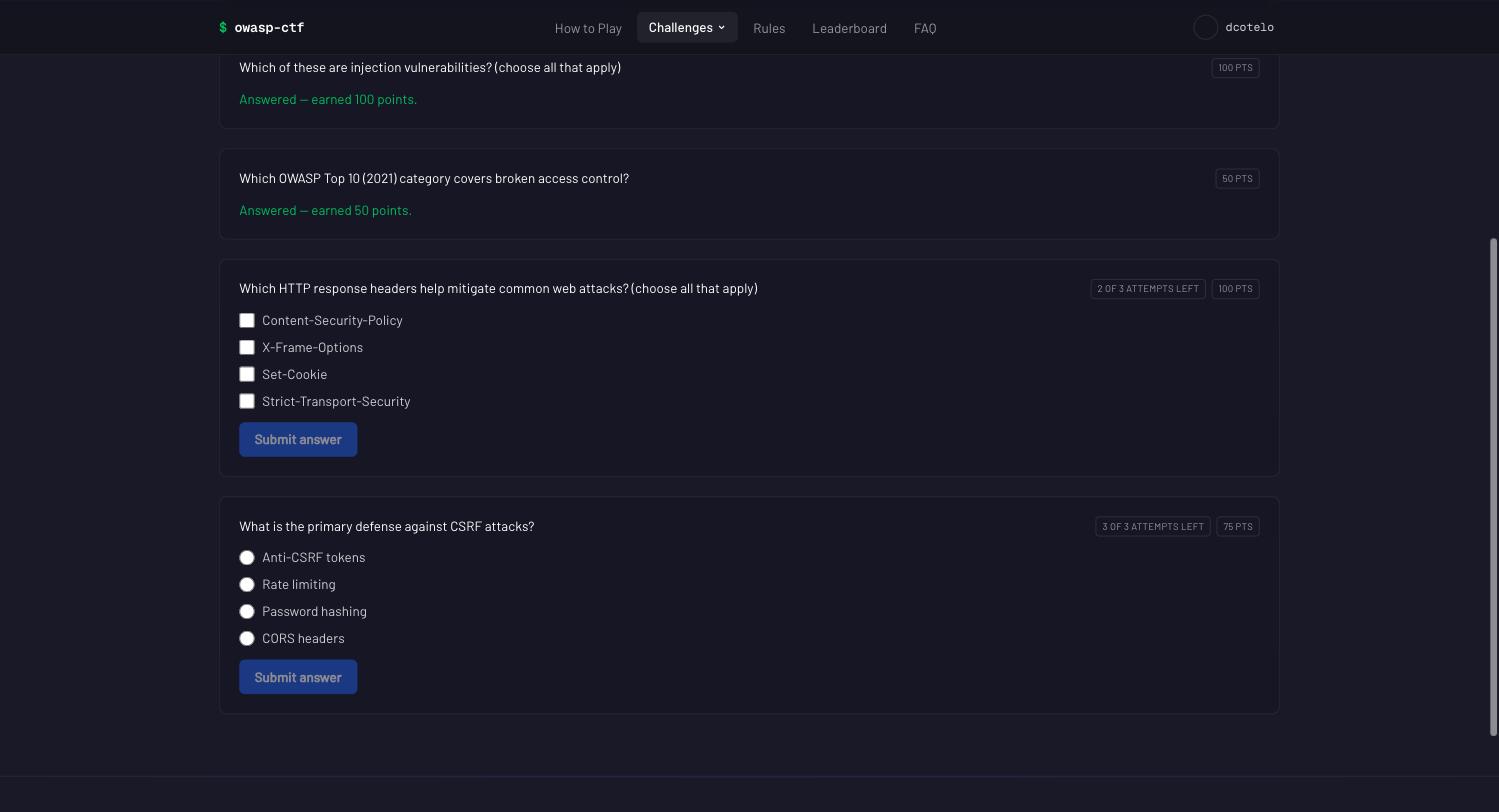
What a contestant sees: answered questions collapse to what they earned; open ones show their choices, the attempts they have left, and what a correct answer is worth.
Authoring happens in /admin, under the Quiz module’s section (see
“Quiz controls” above): add a question with a prompt, pick single choice
or multiple choice, give it two or more labeled choices, mark which
one(s) are correct, and set its point value. Editing an existing question
prefills its current correct answer(s), so fixing a typo in a prompt
doesn’t mean re-picking the answer from memory — get that wrong and you’d
silently change what counts as correct for every contestant, with no warning
and no way to notice until the scores look off. The answer key is visible
only inside the edit form and only to an admin (/admin is gated, and anyone
through that gate can already rewrite or delete the answer outright); the
question list itself doesn’t show it, and it never reaches a contestant —
/quiz is served from a separate, keyless read that never touches the answer
hash at all.
You don’t type a question id. Adding a question mints one from its prompt
plus a short random suffix (which-header-mitigates-clickjack-k3f9qa) when
you save. The suffix is not decoration: two questions worded identically
would otherwise land on the same id, and the second would overwrite the first
and inherit every answer already banked against it.
An existing question’s id never changes. The edit form shows it,
read-only, and there is no way to alter it. That is deliberate rather than
merely conservative: the id is the field name in ctf:quiz:questions and
ctf:quiz:key and the reference every contestant’s answer row is
recorded against, so changing it would orphan every answer already banked —
the points would stay on the leaderboard with no question behind them. If a
question needs a different id, delete it and add a new one, and read the
paragraph below first about what deletion does and doesn’t take with it.
Ordering is done by dragging. The question list in /admin is sortable:
drag a row to where you want it, or use Move up / Move down from the
row’s ⋯ menu (the keyboard-operable path — dragging is not the only way
in; Delete lives in the same menu, and opens the confirmation). The
stored order field is rewritten from the resulting positions and the moved
questions are saved immediately; contestants see the new order on their next
page load. There is no order number to type any more, and nothing to
renumber by hand.
Deleting a question removes it from the quiz and hides it from
contestants — but points already banked for it remain on the leaderboard.
Deletion drops the question and its answer key, nothing else: nobody can
answer it any more, and it disappears from every contestant’s board, but the
contestants who already answered it correctly keep those points, and their
answer/attempt history for it is left alone. If you need those points gone
too, use the master reset (which clears all quiz progress at once, for
everyone). There is no way to un-award a single question. The delete button
is still gated behind typing a phrase to confirm, the same pattern the master
reset uses — deleting mid-event changes what contestants see, even though it
doesn’t take points back. The phrase is now the question’s prompt (cut at
a word boundary for a long one; the dialog shows exactly what to type, and
names the id alongside it). It used to be the id, which stopped being a
useful gate once ids were generated: transcribing
which-header-mitigates-clickjack-k3f9qa proves you can copy a string, not
that you read which question you were about to remove.
Grading is all-or-nothing and order-insensitive: a submission scores points only if its set of selected choices exactly matches the correct set — not a subset, not a superset. Picking three choices when two are correct scores 0, the same as picking only one of two correct choices; that’s still one spent attempt, exactly like any other wrong answer. Single-choice questions follow the identical rule — they simply have exactly one correct choice, so “exact match” reduces to “picked the right one.” There is no partial credit for either question type.
Retry gate — two admin-panel knobs, next to the question list:
- Max attempts (
quizMaxAttempts, default 3) — graded attempts a contestant gets on one question before the retry gate refuses further submissions.0means unlimited. Both settings are global — there is no per-question override. - Retry after (
quizRetryAfterMin, default 1) — minutes a contestant must wait after an attempt before trying that question again.0means no cooldown.
Both are enforced by a server-side Redis script, not just a JS-side pre-check, so a burst of near-simultaneous submissions can’t outrun the attempt cap. The cooldown is computed from the last attempt’s timestamp on every check, never a stored unlock time — so lowering it mid-event lifts an active cooldown immediately, and raising it applies to the very next check. A wrong attempt spends one of the allotted attempts; once a question is answered correctly it’s done — no more attempts to spend, right or wrong.
Contestants can see the budget: each unanswered question carries a
2 of 3 attempts left chip next to its points badge, counted down from the
same attempts row the gate itself reads. The chip is absent when Max
attempts is 0 (nothing to ration) and once the question is answered.
Lowering the cap mid-event can leave a contestant holding more spent
attempts than the new cap allows; the chip floors at 0 of N rather than
reporting a negative budget.
Both knobs count per contestant, but points count per team. The
attempts and the cooldown are kept for each login. A team’s quiz score is
the union of its members’ correct answers, so every member has their own
Max attempts and their own Retry after on the same question. A team
of N members therefore gets N times the cap. With the defaults (3 attempts,
teams of up to 4), a team can try 12 answers on one question, so a question
with 12 or fewer possible answers can always be solved. Max attempts = 1
on a four-choice question does not stop guessing: four teammates can pick
one choice each. The 2 of 3 attempts left chip shows the contestant’s own
budget, not the team’s. Take this into account when you set the cap, and
prefer questions with more possible answers than the team’s total budget.
The team-size cap is under Players per team.
Points and scoring. A question’s points are captured on the answer record at the moment it’s answered correctly, so re-pricing a question later never changes what a contestant already earned — only a future correct answer sees the new price. A team’s quiz total dedupes by question: if two teammates both answer the same question correctly, the team’s board still counts it once, the same rule already used for shared flags. Quiz points show up as an addition on top of a contestant’s or team’s other points, never folded silently into a single number with no breakdown — see the architecture doc for how that addition happens.
Quiz points get a contestant a leaderboard row on their own — a scored PR
is no longer required. The board’s login set is the union of whoever the
scoring backend reports and whoever holds quiz points, so someone who
answers a question before ever opening a PR (or on an event that has no
secure-development module at all) gets a row the moment they earn any quiz
points, not on their first scored submission. A team gets the same
treatment: a team with no per-flag data of its own (no members with a
scored PR yet) still shows its members’ combined quiz total, deduped by
question. See docs/architecture.md
for how the board is built when there’s no scoring backend behind it at all.
Bulk authoring: import and export the whole question bank as one file.
Beyond the admin form’s one-question-at-a-time editing, the Quiz tab’s own
panel has an Export questions button and an Import a bundle box
(paste JSON, or choose a .json file) for authoring — or backing up — a
whole bank in one pass. This is the same bundle format the Jeopardy module
uses (see ADR 36),
so the rules below will look familiar if you have imported a flag board. A
bundle is a single JSON object: a version and a questions array where
each entry has exactly the fields the admin form itself collects, correct
answers included. For example, a two-question bundle:
{
  "version": 1,
  "questions": [
    {
      "id": "clickjacking-x7k2",
      "prompt": "Which HTTP header mitigates clickjacking?",
      "type": "single",
      "choices": [
        { "id": "a", "label": "X-Frame-Options" },
        { "id": "b", "label": "Content-Length" }
      ],
      "points": 10,
      "order": 0,
      "correct": ["a"]
    },
    {
      "id": "injection-q9pm",
      "prompt": "Which of these are injection risks?",
      "type": "multi",
      "choices": [
        { "id": "a", "label": "String-concatenated SQL" },
        { "id": "b", "label": "Parameterized queries" },
        { "id": "c", "label": "eval() on user input" }
      ],
      "points": 15,
      "order": 1,
      "correct": ["a", "c"]
    }
  ]
}
Every id in correct must be one of that question’s own choices, a
"single" question must have exactly one correct answer, and no two choices
within a question may share an id. The whole file is validated in one pass
before anything is written: every row’s problems are reported together, and
if the file has even one bad row, nothing is imported — there is no partial
write from a mostly-good file.
Import is upsert by id, and it never deletes. Each question in the file is created if its id is new to the bank, or overwritten in place if that id already exists — that is the entire rule. A question currently in the bank but simply not mentioned in the file is left completely untouched. Worth stating plainly because the natural assumption runs the other way: importing a 10-question file into a bank that already has 15 does not shrink it to
- There is no way to delete a question through import; use the admin form’s own Delete button for that, one at a time.
Ids round-trip, so an export is a genuinely usable backup. Re-importing an unmodified export updates every question in place instead of duplicating it. Because a contestant’s answer history is keyed by question id, this also means re-importing your own backup never detaches anyone’s already-banked points from the question that earned them.
Max attempts and Retry after are not part of a bundle. They are event policy rather than content, and they are shared by every question, so importing a question set never changes the retry gate you set on the tab — in either direction. Set those two where they live, in the panel.
The exported file contains every answer key in plaintext. Export is the
quiz’s entire answer sheet in one JSON file. Do not commit it to a public
repository, paste it into a public issue or chat, or otherwise share it
casually; treat it with the same care as /admin access itself.
What the quiz doesn’t do (yet): free-text answers, partial credit, and per-question attempt/cooldown overrides are all out of scope — the two retry knobs are global settings, not per-question ones.
Jeopardy
Switch Jeopardy on from /admin → Event → Modules and contestants get a
jeopardy-style flag board: a set of organizer-authored challenges, each
hiding a flag, graded the instant a contestant submits a matching string.
Like the quiz, it doesn’t touch GitHub, the scorer, or sync at all — see
docs/architecture.md for how it scores
entirely inside the app.
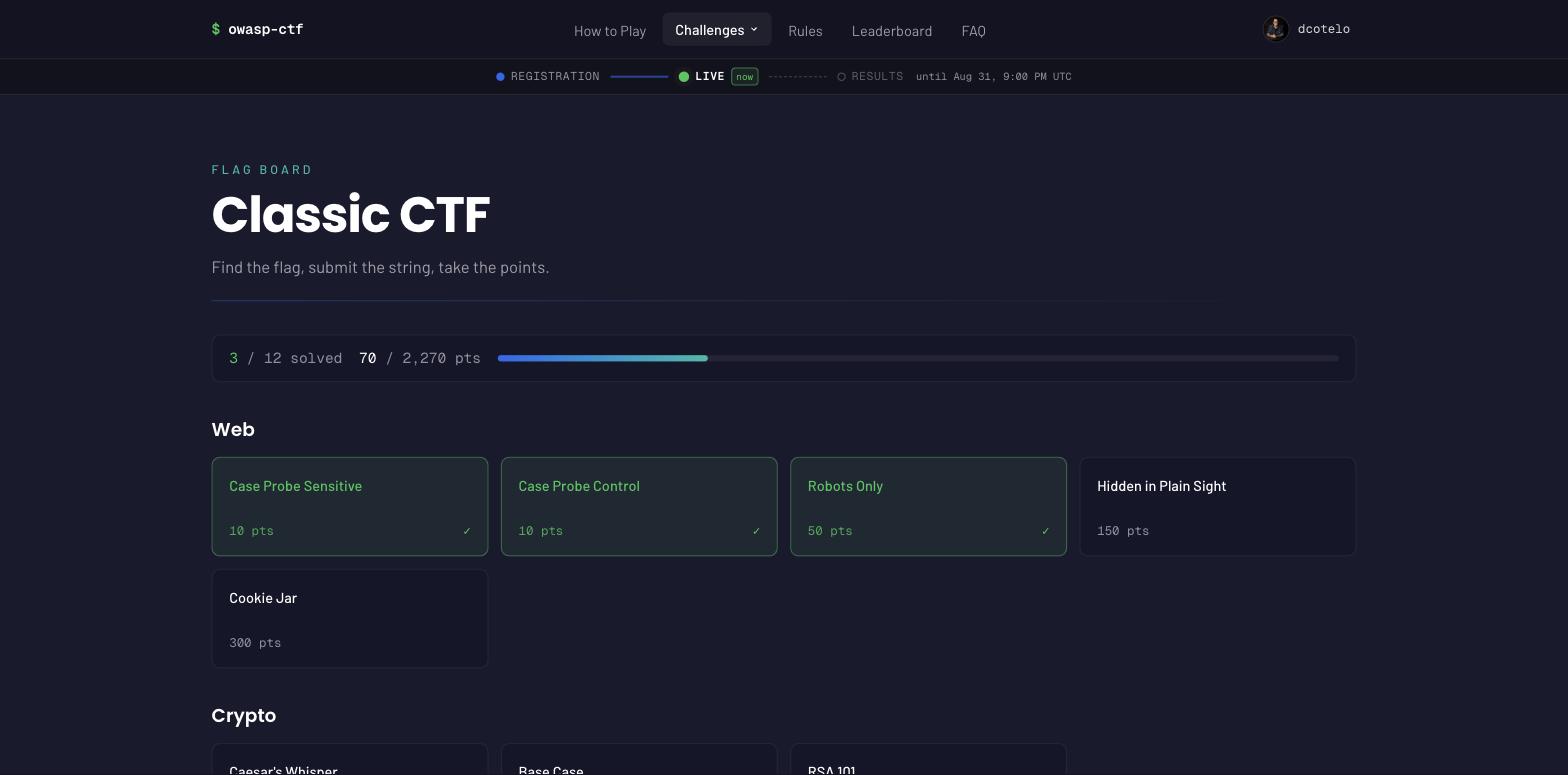
The board as a contestant sees it: every card says what it’s worth, a badge marks the flags where casing matters, and grading answers the instant you submit.
Solve counts are teams (#595). Every visible tile, open story step and
challenge page says how many teams solved it (“3 teams”): scoring is per team,
so two members solving one flag count once, and a solver on no team is not
counted. The figure is folded from the current members’ solves on each read,
never stored, so a team change cannot leave it stale. A locked story step
shows no count. In /admin the Jeopardy list gives each challenge both
figures (“3 teams · 5 players”, or “unsolved”), so a flag nobody can solve
stands out; if a count cannot be read it is left off rather than shown as 0.
First blood (#188). Each visible tile and open story step names the contestant who solved it first (“🩸 First blood: alice”), by their GitHub login. It is display only and moves no points. Like the team count it is read off the current team members’ own solve rows on every page load, never stored: the earliest solve time wins, and an exact tie goes to the login that sorts first, ignoring case. Nothing extra happens during a freeze: a frozen board records no solves, so first blood stays where the leaderboard does. Resetting a contestant’s progress or deleting them in the Support tab, or removing them from their team, passes their first bloods to the next solver (or to nobody), with nothing to clean up. A master reset clears it with the solves. A locked story step shows none, and if the solves cannot be read neither the counts nor first blood are shown.
Authoring happens in /admin, under the Jeopardy module’s tab (see
“Jeopardy controls” above). Before adding a challenge you need at least one
category — categories are a row of chips in the order contestants see
them (add; move a chip left or right, rename it, or remove it, with the
controls that appear when you hover or focus it), and a category can only be
removed while no challenge still files under it; the panel tells you exactly
how many challenges are blocking a removal.
Renaming carries the challenges across. A typo in a category ten challenges already use is one edit, not eleven: the rename rewrites every challenge filed under it as part of the same operation. Renaming to a name another category already holds is refused rather than merged — merging two categories is a different and lossier thing to ask for. Changing only the capitalisation of the same category (“web” to “Web”) is a rename, not a clash. If a rename is interrupted part-way, run the same rename again: it picks up from wherever it stopped, and no challenge vanishes from the panel in the meantime. The challenge list is grouped under those categories, each heading carrying its count. A challenge itself has a title, a category (picked from that list), a Markdown description (a live preview renders alongside the box as you type), a point value, and a flag.
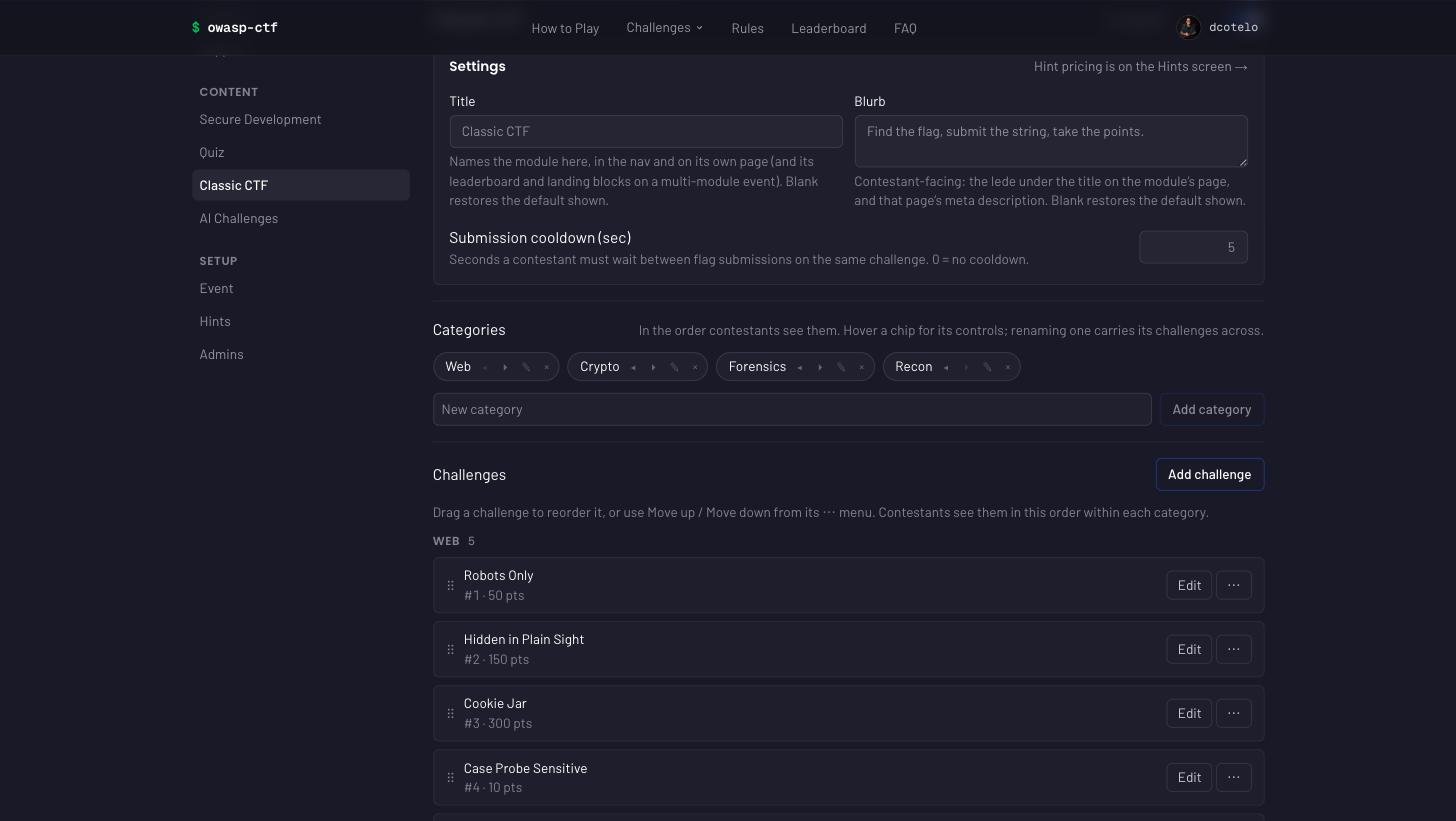
The whole module is authored here — categories, challenges, cooldown, even the module’s display name — live, with no rebuild.
Flag matching forgives what should be forgiven. Submissions are trimmed and Unicode-normalised on both sides, and compared case-insensitively — copy-paste from a terminal picks up trailing spaces, accents can be typed two ways that look identical, and none of that is the skill being tested.
Case-sensitive flags are the one exception, per challenge, off by default. Turn it on only when the capitalisation is the answer: a recovered password, a base64 string, a case-sensitive hash. Trimming and Unicode normalisation still apply — only the case-folding stops. Contestants see a case-sensitive badge on the challenge card, so nobody loses a solve to a shift key without being told; that the flag is case-sensitive gives away nothing about what it says. A challenge authored before this existed, or left unticked, grades exactly as it always did.
A flag is stored in plaintext, and it is visible to anyone with /admin
access. The flag input is masked by default (a Reveal toggle uncovers it,
in case you’re screen-sharing the panel), but there is no hashing and no
one-way transform anywhere in the store beyond the case/whitespace
normalization grading itself uses (below) — an organizer opening a
challenge to fix a typo sees the flag exactly as it was typed. That is a
deliberate trade-off, not an oversight: withholding it would buy nothing
(anyone through the /admin gate can already rewrite or delete the flag
outright) while costing real correctness — an edit form that starts blank
turns every typo fix into a chance to silently redefine what counts as
solved. Treat /admin access itself as the actual secrecy boundary for
every flag on the board.
You don’t type a challenge id. Adding a challenge mints one from its title plus a short random suffix when you save, exactly like the quiz’s question ids, and for the same reason: it’s the reference every contestant’s solve is recorded against, so on an existing challenge it never changes. Delete and re-add if a challenge genuinely needs a new one, after reading the deletion paragraph below.
Ordering is done by dragging, the same as the quiz’s question list: drag
a row, or use Move up / Move down from its ⋯ menu, and the stored order
is rewritten from the resulting positions. The order is one sequence across
the whole board; within a category group the moves step past the group’s own
neighbours, so a challenge never leaves its category by being moved.
Deleting a challenge removes it from the board and hides it from contestants — but points already banked for it remain on the leaderboard. Nobody can submit against a deleted challenge’s id again, but the contestants who already solved it keep those points, and their solve/attempt history for it is left alone. Deletion is gated behind typing the challenge’s own title to confirm (falling back to its id for a blank/whitespace-only title), the same pattern the quiz’s delete and the master reset use.
A challenge can be hidden without deleting it, or released on a
schedule. Each challenge’s form has a Visible to contestants switch (on
for a new challenge) and an optional Release at time, and every row in
the list carries a status chip: Live, Disabled, or Releases Oct 8,
10:00 GMT-3. Switch it off to stage a challenge before it goes up, or to
pull a broken one mid-event. Set a release time for the day-2 and day-3
drops: the challenge stays hidden until that instant and then goes live on
its own. Nothing runs on the box to do it: every page read compares the
release time with the server’s clock, and grading and hint purchases compare
it with Redis’s clock, so a submission racing the instant is decided once.
The time is entered on the event’s clock (Event tab → Timezone, the same zone
the schedule uses) and the form shows the UTC instant it stores. Setting a
release time switches the challenge off until then; switching it on clears
the release time; saving a time that has already passed saves it live.
Give the steps of a story the same release time to release the story
together: release is per challenge. A
hidden challenge does not exist on the contestant side: it is left out of the
board, its page is the same 404 an unknown id gets, its flag is refused like
an unknown challenge’s (no attempt spent, no cooldown, decided by the grading
script itself), its hint cannot be bought, its files do not download, and it
is out of every leaderboard, profile and display-mode denominator. In a
story, the chain closes up around it, the same as a deleted step, and
switching it back on puts it back in its place. Solves already banked on it
stay, like a deleted challenge’s: the solver keeps the points, the challenge
disappears from their lists too, and their profile shows one line, “+N pts
from challenges no longer on the board”, so their total still adds up
(points banked on a deleted challenge are counted in the same line). An admin
can still open a hidden or scheduled challenge’s page, before launch or
after, to check it: the page carries a Hidden from contestants banner
saying why (Disabled, or Releases at what time), and a flag or hint used
there is a dry run that records nothing for the admin. A bundle or event
archive carries the switch (bundle version 4, stamped only when some
challenge is hidden, so other exports still import on an older box), and an
older bundle that carries it is refused rather than imported live. In a
hand-written bundle, releaseAt is an ISO 8601 date and time that names its
zone: it ends in Z (2026-10-08T13:00:00Z) or an explicit offset
(2026-10-08T10:00:00-03:00). One without a zone, or a date or time that does
not exist (2026-02-30, 25:00), is refused, because the box would
otherwise read it in its own zone and release at an instant nobody meant. The
admin form always stores the UTC form, so it never trips this.
Matching is whitespace-insensitive and — by default — case-insensitive, normalized identically on both the authoring and submission sides. The stored flag is trimmed, then Unicode-NFC-normalized, then lowercased before comparison — every submitted flag goes through the same normalization before it’s checked, so a stray leading/trailing space never costs a contestant a solve, and neither does capitalization unless the challenge is marked case-sensitive (see above), in which case only the case-folding stops.
There is no cap on attempts — only a cooldown, and it is set in
SECONDS. The Submission cooldown (sec) field (classicCooldownSec,
default 5, capped at 3600 — one hour) is the only throttle: a
contestant can try a challenge as many times as they like, but must wait
that many seconds between submissions on the same challenge once they’ve
made one. Set it to 0 to remove the cooldown entirely. This is worth
calling out plainly because every other retry-gate setting on this platform
(the quiz’s retry cooldown, the hint gate’s unlock delay) is in minutes
— classic’s own knob is not.
The cooldown is per contestant, but a solve counts for the team. Each login has its own cooldown on each challenge, and a team’s score is the union of its members’ solves. So a team of N members can submit N flags per cooldown period on the same challenge. The cooldown slows one contestant down; it does not slow a team to one guess per period.
Points are static. A challenge’s point value is fixed by whoever wrote it and is read off the challenge record at the instant of a correct solve; there is no decay as more people solve it and no first-blood bonus for being first. Re-pricing a challenge afterward never changes what a contestant already banked, the same rule the quiz follows.
Team totals dedupe by challenge, the same rule already used for the quiz and for secure-development’s shared flags: if two teammates both solve the same challenge, the team’s board counts it once, not twice. Jeopardy points show up as an addition on top of a contestant’s or team’s other points, using the exact same union-and-add mechanism the quiz does — see the architecture doc for the details.
A classic solve gets a contestant a leaderboard row on their own — a
scored PR is no longer required, the same rule the quiz established: the
board’s login set is the union of whoever the scoring backend reports and
whoever holds quiz or classic points, so a login with only classic points
(or an event running the classic module alone) still gets a row.
The master reset clears classic progress, and demo mode seeds a classic
board — both exactly as they do for the quiz; see the notes under
“Organizer admin panel” above. A rehearsal on the classic module resets
back to the challenges, flags, and categories you authored, which the reset
keeps.
Bulk authoring: import and export the whole challenge set as one file.
Beyond the admin form’s one-challenge-at-a-time editing, the Jeopardy tab’s
own panel has an Export challenges button and an Import a bundle
box (paste JSON, or choose a .json file) for authoring — or backing up —
many challenges in one pass. A bundle is a single JSON object: a
categories list, and a challenges array where each entry has exactly the
fields the admin form itself collects, flag included — plus the form’s two
optional ones: caseSensitive (absent means false) and hint (absent means
no hint; as secret as flag itself). For example, a two-challenge,
two-category bundle:
{
  "version": 1,
  "categories": ["Web", "Crypto"],
  "challenges": [
    {
      "id": "web-warmup-x7k2",
      "title": "Web Warmup",
      "category": "Web",
      "description": "Find the flag hidden in the page source.",
      "points": 100,
      "order": 0,
      "flag": "CTF{view_source_ftw}"
    },
    {
      "id": "crypto-basics-q9pm",
      "title": "Crypto Basics",
      "category": "Crypto",
      "description": "Decode the Base64 string to find the flag.",
      "points": 150,
      "order": 0,
      "flag": "CTF{base64_is_not_encryption}",
      "caseSensitive": true,
      "hint": "The padding character is a giveaway."
    }
  ]
}
Every challenge’s category must appear in that same file’s own
categories list — a bundle has to be self-contained, so importing it
never silently depends on categories the target event happens to already
have. The whole file is validated in one pass before anything is written:
every row’s problems are reported together, and if the file has even one
bad row, nothing is imported — there’s no partial write from a mostly-good
file.
Import is upsert by id, and it never deletes. Each challenge in the file is created if its id is new to the board, or overwritten in place if that id already exists — that is the entire rule. A challenge that’s currently on the board but simply isn’t mentioned in the file is left completely untouched. This is worth stating plainly because the natural assumption runs the other way: importing a 10-challenge file into a board that already has 15 does not shrink the board to 10 — the other 5 stay exactly as they were. There is no way to delete a challenge through import; use the admin form’s own Delete button for that, one at a time.
Ids round-trip, so an export is a genuinely usable backup. Exporting writes back the same ids the board already has, so re-importing an unmodified export updates every challenge in place instead of duplicating it. Because a contestant’s solve history is keyed by challenge id, this also means re-importing your own backup never detaches anyone’s already-banked points from the challenge that earned them.
Categories are unioned, not replaced. Importing a file appends any of its categories that the board doesn’t already have, in the order the file lists them, after the categories already there — the existing order is left exactly as it was. Importing a bundle can only grow the category list, never reorder or drop anything from it.
Bundles carry stories as version 2 (#463). An export is now stamped
"version": 2 and has a stories list beside categories. Each story has
exactly id, title, intro and steps, where steps lists challenge
ids in order:
"stories": [
  { "id": "op-red-dawn", "title": "Operation Red Dawn", "intro": "It starts with a leak.", "steps": ["web-warmup-x7k2", "crypto-basics-q9pm"] }
]
A version 1 file still imports unchanged, but it cannot carry stories.
(Today’s export is stamped "version": 2, "version": 3 when it
carries the optional attachment files described under “Files in bundles
and archives” below, or "version": 4 when any challenge is hidden or
scheduled.)
Every step must name a challenge in the same file, the same
self-contained rule that applies to categories. Stories merge by id, the
same way challenges do:
- A story whose id is already on the board is replaced.
- A story with a new id is appended.
- A story on the board that the file does not mention is kept.
If the merge would put one challenge in two stories, the whole import is refused and nothing is written.
The exported file contains every flag in plaintext. Export is the
event’s entire answer key in one JSON file — every challenge’s flag,
unmasked. Do not commit it to a public repository, paste it into a public
issue or chat, or otherwise share it casually; treat it with the same care
as /admin access itself, since a saved copy of the file protects nothing
on its own.
Stories: challenges a team unlocks in order (#463). A story is an ordered chain of challenges, such as an “Operation Red Dawn” that runs from recon to loot. Step 1 is always open. Each later step opens for a team once any member of that team solves the step before it while on that team: a step solved on another team, before the player joined this one, still counts toward this team’s points but opens nothing here (#602). The board shows one lane per story above the categories. A locked step appears there only as “??? — step N of M”, and its page, hint and flag answer as if it did not exist. Points are plain: a step is worth what its challenge says, and a story adds no bonus. See ADR 60 for why the unlock is derived from solves and never stored.
You author stories in the Stories block, below Categories on the Jeopardy tab:
- New story takes a title. The story’s id is made from that title once and does not change when you rename it later, so a re-imported bundle still finds the story it replaces.
- Add step offers only challenges that are in no story yet, because a challenge belongs to at most one story.
- ↑ / ↓ reorder the steps and ✕ removes one. Remove story drops the chain, and its challenges become ordinary board tiles again.
- Save stories writes the whole list at once. The server refuses a step that names a missing challenge, or a challenge placed in two stories, and the refusal is shown in the block.
Reordering during a live event is safe, because the unlock is recomputed
from each team’s solves. A step that a team could see before the reorder
can lock again if its new predecessor is unsolved. A solve only counts for
a team’s unlock if its solver was on that team when they solved it — the
joinedAt rule: a solve carried into a team from an earlier one keeps its
points for the team but opens nothing after it. Deleting a challenge also
removes it from its story, and the chain closes up around the gap.
Denominator counts only reachable challenges. Both the profile page and the leaderboard show per-team reachable totals for classic challenges. The denominator grows as your team unlocks story steps:
- Step 1 of every story is always counted.
- Each later step is added to the denominator only when its prerequisite was solved for your team — by a member who was on the team at the time.
- Locked steps are excluded from both the challenge count and the points ceiling — their titles and points are never exposed.
- A solo contestant is a team of one: their own solves unlock the next steps just like a team’s do.
- Challenges already solved by the team but since deleted from the catalogue are still counted (union with solve records), preserving banked points.
- A leaderboard row — team or contestant — divides by that row’s own reachable total, and the solved column subtracts that row’s still-locked steps from the event’s completable count. The profile’s progress bar divides by the viewer’s own reachable total. A disclaimer appears on the profile and the board while any row still has locked steps: “Totals count unlocked challenges only — story steps add to the total as your team unlocks them.”
Jeopardy has paid hints too (#210, after the board itself shipped
without them): a challenge can carry an optional hint, sold through the
same paid-hint gate and knobs as secure-development targets — cost,
minimum solves, unlock delay, and the penalty fold all work identically.
See the hints section under Organizer admin
panel.
Files and links on a challenge (#186). Open a saved challenge in the Jeopardy tab and use its Files section.
- Upload a file. It is stored in the box’s own Redis and served only to
whoever can see the challenge: nobody before launch except an admin
previewing, nobody while it is a locked story step, and nobody once the
module is off or the challenge is deleted. It always downloads and never
opens in the browser, so an uploaded
.htmlor.svgis harmless. - Add a link for anything larger (a disk image, a big capture). A link is publicly reachable by anyone with the URL and is not covered by the launch or story locks. The panel says so on every link.
- Each file shows its size and the sha256 the server computed, so you can check it is the file you meant to ship.
| Cap | Limit |
|---|---|
| One uploaded file | 5 MiB |
| Uploads per event, in total | 50 MiB |
| Attachments per challenge (files and links) | 10 |
Each refusal names the cap and the current usage. Deleting a challenge deletes its files. The bytes live in Redis’s AOF, so they survive a restart and a redeploy. At the event cap they take about 67 MB of Redis memory as base64; count that when sizing the box. See ADR 61 for why the bytes live in Redis.
Files in bundles and archives. A challenge bundle carries each
attachment’s metadata in an attachments list on the challenge:
{ "name", "size", "sha256" } for an upload, { "name", "url" } for a link.
The bytes travel in one of two places:
- The event archive always carries them, in a top-level
attachmentFileslist. Its import checks every file’s sha256 before it replaces anything. - A challenge bundle carries them only when you ask. Tick Include
files next to Export challenges on the Jeopardy tab, and the export
adds the same top-level
attachmentFileslist. Leave it unticked (the default) and the bundle stays the small, metadata-only file.
A bundle that carries files is stamped "version": 3. One without them
(the option unticked, or nothing uploaded) stays "version": 2 (or 4 when it
carries a hidden or scheduled challenge), so a box on an older build still
imports it. Each attachmentFiles entry
is { "item", "sha256", "bytes" }: the challenge id, the upload’s sha256,
and the file’s bytes as base64. Every entry must name an upload in the same
file by challenge id and sha256. Version 1 and 2 files still import
unchanged, but only version 3 can carry attachmentFiles.
"attachmentFiles": [
  { "item": "web-warmup-x7k2", "sha256": "9f86d081884c7d659a2feaa0c55ad015a3bf4f1b2b0b822cd15d6c15b0f00a08", "bytes": "dGVzdA==" }
]
What a challenge-bundle import does with files:
- An upload the box does not have is created as missing. If the bundle
carries its bytes, they fill it straight away. If it does not, the Files
section flags it (“re-upload
capture.pcap(sha256 …)”) with a re-upload control, and contestants do not see it until it has its bytes. - An upload the box already holds with the same sha256 is skipped; its bytes in the bundle are not used.
- Before anything is written, the import checks each file’s bytes against its sha256 and recorded size. It also checks the caps: 5 MiB per file, 10 attachments per challenge, and 50 MiB for the whole event. A tampered file, or a bundle whose files would push the event past 50 MiB, is refused whole, and the refusal names the cap and the current usage.
- A re-upload whose sha256 differs from the recorded one is refused.
- A challenge-bundle import still never deletes: a file on the box that the bundle does not mention stays. A link matches by name and URL, an upload by sha256. (An event-archive import is a full replace, files included.)
A bundle with files can be large: 50 MiB of uploads is about 67 MB of
base64. The Jeopardy tab sends every import to
POST /api/admin/classic/bundle, which accepts a body of up to 75 MB
(the archive import’s limit). A larger file is refused with a 413 that
names the limit. A file too large to edit is loaded but not shown in the
import box, the same way the event archive’s import handles it. The file
holds every flag and every attachment, so treat it like the archive.
AI
Switch AI on from /admin → Event → Modules and contestants get a third way
to earn points: prompt-injection and guardrail challenges hosted on an
external site, graded inside the box. Like the quiz and classic, it
doesn’t touch GitHub, the scorer, or sync at all — see
docs/architecture.md for how it scores
entirely inside the app, and how a solve can arrive back three different
ways.
The board as a contestant sees it: every tile carries its category, point value, and a 💡 marker where a paid hint is on offer, the same board component classic’s flag list uses.
What the external site has to be configured to do
The box hosts none of the challenge itself. Somebody stands up a site, and that site has to do four things — the admin panel’s Wiring the external site drawer says the same next to the values you paste, and docs/ai-module.md is the full contract:
- Accept the launch token. A challenge’s launch URL must contain the
literal
{token}placeholder; the box substitutes a freshly minted token there and sends the contestant to the result. No cookie crosses the boundary — that token is the whole identity. - Verify it against the published public key.
GET /api/ai/launch-key, verify with hard-coded Ed25519, and pinaudto the challenge id you expect. Never let the token’s ownalgorkidchoose the algorithm or the key. Cache the key for about five minutes (it is servedCache-Control: public, max-age=300), but re-fetch on any verification failure and after an event reset — a master reset rotates the keypair, and a site caching the old key indefinitely rejects every launch token issued afterwards. - Report the solve, signed. For an
eventorbothchallenge, POST/api/ai/eventwithX-CTF-Signature: sha256=<hex>over the exact bytes"<unix-timestamp>.<raw request body>", using that challenge’s own signing key, plus a matchingX-CTF-Timestampwithin ±300 seconds of the box’s clock. Re-serializing the body before signing is the most expensive mistake available here — it fails exactly like a wrong key would. - Expect one award per token. The token’s
jtiis a one-shot nonce; a replay answers409, not a second award.

The two keys are not interchangeable, and conflating them is the usual wiring failure. The launch key is public, one per event, and you fetch it to verify. The signing key is secret, one per challenge, and you paste it in to sign. A leaked launch key costs nothing — it is public by design; a leaked signing key lets anyone assert solves for that one challenge, so rotate it.
Nothing is live until you have proved it. The panel’s Send test
signs a demo event with the challenge’s real key and runs the whole pipeline
with dryRun: true — writing no solve and claiming no nonce — then relays
the box’s own verdict. Would award is the answer you want; every other
verdict is read in the Send test list further down this section. Before
the event is launched, the Send test mints its demo token as an admin
preview, so the dry run is graded while scoring is closed and can reach
Would award.
Authoring happens in /admin, under the AI module’s tab. Before adding
a challenge you need at least one category — same chip row as classic’s
(add, move left or right, rename, and remove only while no challenge still
files under it, the panel naming exactly how many are blocking a removal),
capped at
50 categories with names of at most 64
characters each (AI_CATEGORIES_MAX/AI_CATEGORY_MAX_LEN, enforced in
setAiCategories).
Renaming behaves exactly as it does on Jeopardy, and for the same reasons: the rename rewrites every AI challenge filed under that category in the same operation, so a typo ten challenges share is one edit rather than eleven. Renaming onto a name another category already holds is refused, not merged — including when the two differ only in capitalisation, since two casings would split one category across two headings on the board. Changing only the capitalisation of the category being renamed (“jailbreak” to “Jailbreak”) is a rename and is allowed. If a rename is interrupted part-way, run the same rename again: the challenges move before the list is rewritten, so a repeat finishes from wherever it stopped, and no challenge disappears from the panel in the meantime.
A challenge itself has a title, a category, a Markdown description (live preview alongside the box, same as classic’s), a point value, and one more thing neither sibling module has: a solve mode, a tri-state that decides what a contestant sees and where a solve can come from:
flag— graded by a typed flag, exactly like classic: the shared flag-submission form renders on/ai/[id]and nothing outside the box can assert a solve.event— launcher-only. No in-box form renders at all; the challenge stores no flag (an event-mode upsert deletes both flag hashes regardless of what the form last held), and the external site reports the solve itself, signed, to the module’s own event endpoint. This mode has no in-box fallback: a signed event is the only way it can ever be awarded,/api/ai/submitanswers409 wrong-modefor it, and a contestant has nothing to type. So an event-mode challenge whose external backend is missing, unreachable, or not yet posting events is unsolvable by anyone — which is the intended design (the arena is what judges a “make the model misbehave” objective, and a copyable flag would defeat it the first time one contestant shared the string), but it does mean the external half has to actually exist before the board goes live. Note that the per-challenge Send test button does not establish that: it signs the demo event in-process with the box’s own copy of the signing key, so it proves this side is configured (mode, schedule, key present) and proves nothing about whether the external backend is reachable or holds the same key. The only check that covers the external half is a real signed POST from that backend — have the integrator send one withdryRun: true, which returns a verdict without claiming the token’s nonce or awarding points.both— either path works: the in-box form for a typed flag, or the external site’s signed report.
Every graded challenge also needs a launch URL template — the address of
the externally hosted challenge, which the launcher substitutes a freshly
minted token into. It must be an absolute https:// URL (http:// is
accepted only for localhost/127.0.0.1), and it must contain the literal
{token} placeholder somewhere in it — checked against the raw string, not
a parsed URL, so a template that puts the placeholder inside a path segment
isn’t punished for looking like invalid syntax. validateUrlTemplate
(ai-keys.ts) is the one implementation of that check, run identically
on the admin form (as-you-type feedback) and again inside the store on
submit (upsertAiChallenge) — the client-side check is a convenience only,
never a substitute for the server’s own.
Flag and case sensitivity work exactly like classic’s, because they
share the same code: ai-keys.ts re-exports normalizeFlag and
caseSensitiveFlagForm from classic-keys.ts directly rather than
reimplementing them, so a flag is trimmed and Unicode-NFC-normalized on both
the authoring and submission sides, and case-folded unless the challenge’s
own case-sensitive toggle is on. Both the flag field and the
case-sensitivity toggle are hidden by the form entirely in event mode —
there’s no flag left to apply either one to. The flag input masks by
default (a Reveal toggle uncovers it), the same screen-share consideration
as classic’s.
Hint text is optional and works like classic’s paid hints — sold through the same gate and knobs (cost, minimum solves, unlock delay, penalty fold; see the hints section under Organizer admin panel) — with one save-time rule worth calling out: saving the field empty is a deliberate clear, not “leave unchanged” — the store deletes the hint row on an empty string, exactly like classic.
Position ordering is a plain editable number, not drag-and-drop. Unlike
quiz’s and classic’s question/challenge lists, this panel has no
reorder-by-dragging UI — organizers curate a long-running board there,
so order is the Position number field the form edits directly.
The integration panel is what an external challenge actually wires up
against. It comes in two parts. The Endpoints block sits once, above the
challenge list — three endpoint URLs, Submit (/api/ai/submit), Event
(/api/ai/event), and State (/api/ai/state), each with its own copy
button so an integrator never has to hand-assemble the full origin, and each
with a collapsed demo under it answering send / receive / expect: a
runnable request (the Event one computes its own signature at run time, for
the same reason the per-challenge curl does), the 200 it returns, and the
handful of refusals worth designing for — a wrong flag, a cooldown, a
replay, an invalid-signature. State is marked read-only, because it
is the one route of the three that writes nothing and can be tried against a
live event with no consequence. Every value in those demos is a placeholder
(aik_…, eyJ…); the real signing key and the one-click dry run stay on
the per-challenge row below. The full contract, including the complete error
table, is docs/ai-module.md. The three URLs are
the same for every challenge, which is why they are not repeated per row. The
rest is per challenge, collapsed under each row’s summary line (open it
with the “Integration — signing key, test curl, Send test” disclosure; a
flag-only row’s disclosure says the panel is not needed for it), and
carries:
- The per-challenge signing key, masked by default (
aik_…) with a Reveal toggle and its own Copy button — the raw key is never referenced in the rendered markup while masked, not merely styled to look hidden. - Rotate, behind a confirm dialog, because it takes effect immediately with no grace window. Its consequence sentence, verbatim: “The external system stops posting until you redeploy it with the new key.” It is amber, not red — rotating is recoverable by pasting the new key into the external site; red in the panel is reserved for what cannot be undone (deletes, the master reset). A Send test that comes back solved or would-award is shown in green; only a refusal or a failure is red.
- A ready-to-run test curl that computes its own HMAC signature at the
moment you run it (
TS=$(date +%s)and anopenssl dgst -hmaccall inline) rather than shipping a pre-signed one — a signature is only valid for a few minutes either side of its timestamp, so a static, pre-signed snippet would already be expired by the time anyone pasted it. - A Send test button. This does not hit the network from the browser to
the external side and back — it POSTs to
/api/admin/ai/test, which mints a short-lived demo launch token for the organizer’s own login, signs a demo solve event with the challenge’s real signing key, and calls the real/api/ai/eventhandler in-process withdryRun: true— hard-coded server-side, never taken from the request — so nothing is written: no nonce is claimed, no points are awarded. It is safe to click against a live event, and it relays that handler’s real verdict verbatim rather than inventing one. The panel renders exactly one line under the button: a green Would award — the dry run verified end to end. for the good case, or Test result:<name>for anything else — green forsolvedorwould-award, red for a refusal or failure — where<name>is the verdict or error string the route handed back (orunavailablewhen it handed back nothing readable — a 503, or the request itself failing). The panel now prints a one-sentence explanation under that name for every verdict listed below, so the table here is a reference rather than something to look up mid-event. Reading the result:would-award(shown as the green line) — good: the dry run verified the whole pipeline end to end. After launch that is signature, token, rate limit, team and schedule. Before launch the test runs as an admin preview, which skips the team and schedule gates, so the verdict vouches for signature, token and rate limit only.paused,ended,solved,no-team— the signature and token were fine and a gate refused the award, relayed as-is.solved: the organizer’s own login already holds this challenge. After launch only:pausedmeans scoring is frozen or before its scheduled start,endedthat the scheduled scoring end has passed (#567), andno-teammeans the organizer is on no team (the event route refuses a teamless login before the award, organizers included). Before launch a preview skips both of those gates. None of these is a fault on the external side.unavailable— Redis could not be read, or the request itself failed; try again. Also the answer while the AI module is switched off on the Event tab (a stale tab can still click Send test): the real event route refuses first (#495), so switch the module back on.wrong-mode— this challenge isflag-only. The panel doesn’t even render the signing key, curl, or Send test for a flag-only challenge in the first place (only the three endpoint URLs stay, since an external site embedding one still needs them); seeingwrong-modeat all means the challenge’s mode changed after the panel loaded — refresh and re-check.no-signing-key— a legacy row with no signing key ever minted. Unlike the two above, this one never reaches the event handler: the test route itself answers400 {"error":"no-signing-key"}before any dry run, and the panel shows it as Test result: no-signing-key. Click Rotate once to mint one.
The cooldown knob — aiCooldownSec, on the AI tab — throttles only the
graded flag path: a signed event has no wrong answer to rate-limit, so
it is never subject to this cooldown. null (the field left blank) means
the 5-second default; set a value in [0, 3600] seconds to override it,
the same bounds classic’s own cooldown enforces. Like classic’s, it is
per contestant, while a solve counts for the team: each teammate has
their own cooldown on each challenge, so a team of N can submit N flags per
period on the same challenge. That is by design (one player’s guessing never
locks out the team); size the cooldown with the team cap in mind.
What contestants see: the board (/ai) lists every challenge with its
category, points, and a 💡 marker where a hint is on offer. Opening one
(/ai/[id]) mints that contestant a personal, one-click launch link —
the page says so plainly: “This link is yours — it signs you in on the
challenge site.” That is worth repeating to contestants directly: the link
carries a token naming them as the player, so sharing it hands away the
ability to submit as them on that challenge, exactly like sharing a
password would. A flag/both challenge also renders the same in-box
flag-submission form classic uses, right below the launcher.
Gaps, stated honestly:
- No per-tab bulk import/export. Unlike quiz and classic, the AI tab has no Export/Import bundle button of its own — every challenge is authored one at a time through the add/edit/delete form. The whole-event archive on the Event tab does carry the AI catalogue (challenges, flags, hints, categories and per-challenge signing keys; never the launch keypair), so moving an AI board between boxes or restoring one after a wipe goes through the archive.
- A master reset rotates the module-wide launch keypair, not any
individual challenge’s signing key. Every previously issued launch token
stops verifying, and any external integration that cached the public key
from
GET /api/ai/launch-keyneeds to re-fetch it — see docs/ai-module.md’s “Keys and rotation” section (§9) for what an integrator should watch for.
Verifying it works
The box, from outside: /health and /health/deep
Two URLs answer the two questions an organizer asks before doors open, from any browser or phone, no login:
<EVENT_URL>/health— is the app up, and is it the build you just deployed? Comparerevisionto the commit you expect.<EVENT_URL>/health/deep— can it score?200with every dependency"ok"is the answer you want;503names which ofredisorscoreris"down".launchedsays whether the event has launched (#464) —nullwhen the settings couldn’t be read; it never fails the check.sync.ageSecis how long since the poller last polled — if that number keeps growing while Secure Development is live, score comments are piling up on GitHub and the leaderboard is not moving.
Admin state: through the API, not the rendered panel
Most /admin tabs load their data client-side — the page shell and loading
skeleton are server-rendered, while each tab’s data is fetched in the
browser — so when verifying admin state, ask the API rather than the panel:
an authenticated GET such as /api/admin/sponsors
or /api/admin/metrics, run from a logged-in browser tab — the session
cookie carries the auth, and a cookie on a command line is readable by
every local user. What the JSON says is the state; it also separates “the
panel did not draw it” from “the box does not have it”.
If a client-rendered panel sits on Loading…, check
document.visibilityState in that tab and bring it to the foreground
before diagnosing a rendering failure: a panel driven from a backgrounded
tab can sit there while a manual fetch from the same page’s own JS context
answers immediately (#433). The API answers; the tab is the variable.
The box under load: scripts/load-test.sh
Before content authoring, not after — the harness seeds synthetic contestants
and a master reset is already on the plan between the two. It runs
scripts/load-seed.mjs inside the Fly machine’s app container (srh is on
the private network; the container already holds the URL and token the app
writes through) to create N load-XXXX contestants (N at least 2) on teams
of 2–4 with a
realistic spread of Secure Development, quiz and flag solves attached to the
catalogue the box already has; then drives /leaderboard at 10 req/s and
?display=1 at 2 req/s with autocannon while sampling machine memory, and
writes one Markdown report. Ownership is a manifest, not a name:
load-0001 is a legal GitHub login and nothing reserves it, so the seed
records every key and every shared-hash field it writes in a manifest
(ctf:load-seed:manifest plus two sets of keys and fields, each batch adding
only its own delta, so a large seed stays linear), and refuses to run if any
of them already exists
and is not in its previous manifest (a real contestant may own that login).
The check and the write are one Redis-side script per batch, so a
contestant registering such a login between the two cannot be written
over — there is no between. A collision aborts that batch before it writes
anything; batches before it are already committed and recorded in the
manifest (marked incomplete), so the seed can be partial and the next seed
refuses to run until --clean has removed it. Still, run the harness before
registration opens (or with it closed): a contestant who registers
load-0042 after the seed would be sharing rows the next --clean
removes.
The manifest is written incrementally — each batch of writes ends by
recording what has landed so far — so a seed that dies half-way leaves a
manifest naming exactly the rows it wrote, marked incomplete, and the next
seed refuses to run until --clean has removed them. --clean needs no
--count: it deletes exactly the manifest’s entries and the manifest — so a
challenge removed or a module switched off after seeding cannot strand a
row, and nothing absent from the manifest is ever targeted. What is
listed is deleted whole, later writes included: that is the
load-0042-registers-after-the-seed case above, and the reason to run the
harness before registration opens. One seed or clean runs at a time — both
hold a Redis lock (ctf:load-seed:lock) for the whole operation, so a clean
cannot race a seed and orphan its rows; a run that finds the lock held
refuses and prints who has held it since when. The lock never expires by
itself: after a crashed run, scripts/load-test.sh --app <fly-app>
--break-lock clears it once you are sure nothing is running (the seeder is
not in the app image — the script uploads it the same way a run does, then
calls its --break-lock, which refuses if the lock changed hands meanwhile).
scripts/load-test.sh --app <fly-app> --url <EVENT_URL> --count 200
scripts/load-test.sh --app <fly-app> --clean
Every run, --clean and --break-lock included, deletes the seeder copy it
uploaded to the container’s /tmp on the way out, without changing the
run’s exit status.
Pass bar for a ~100-player event, on the percentile autocannon reports
(p97.5 — it has no p95, so the bar is the stricter one): /leaderboard p97.5
under 1.5 s at 10 req/s, ?display=1 under 1 s, zero 5xx, zero connection
errors and zero timeouts (both are columns in the report; any of them fails
the run outright, because a request that never got an answer is not a
latency measurement), machine memory under 80 %. The script applies that bar
at exit: it returns 0 only when the run was valid and every criterion was
met, 1 when the run could not be trusted or the bar was missed (each miss is
named on stderr as BAR MISSED: …), 2 on a usage error — so a run inside a
shell loop or CI cannot pass by accident. The report carries every number
either way. A miss on memory means fly scale vm; a miss on /leaderboard
alone means the page’s own cost is the problem (see #434, #444, #446).
/api/admin/metrics needs an admin session the script deliberately does not
carry (a cookie in a command line is readable by every local user) — time it
from a logged-in tab.
Fail directions: the seed fails closed — a settings hash whose module
list it cannot parse, or Secure Development live with no LEADERBOARD_API_URL
in the container, or a key or field it is about to write that already exists
outside its own manifest, aborts before a single write, because a seed that
guessed would attach points to a board that does not show them or write over
a contestant. A quiz or classic row the seeder cannot read, or a scorer answer without a
challenges list, is the same refusal — never a partial seed. The report’s directory is
created and its path checked writable before the seed, so a run that could
not write its report never leaves rows behind. The run
fails if a setup step failed (finding the machine, uploading the seeder) or
the seed did not report success (the report then says so and nothing is
driven), if a phase failed to run or left no parseable result
(autocannon missing, a DNS failure — ordinary 5xx responses are counted in
the table, not this), or if the memory sampler produced no sample; in every
case the report is still written and says so, naming only the phase and its exit status (autocannon’s own
error text can echo the target URL, so it stays out of the report). --clean
deletes the data first and the manifest only once every deletion succeeded,
so an interrupted clean can always be re-run. The seeder’s own error line
is a redacted label — never the token or a URL. Not seeded on purpose:
ctf:classic:solvecount — a shared per-challenge counter that real solves
raise; the harness omits it because an exact clean could not lower it back
safely — and hint purchases.
Before an event, four checks in this order: FLY_AUTO_STOP=off is set and
deployed (an idle-suspended machine takes Redis and the poller down with it);
/health/deep is 200; the external monitor described in
docs/hosting.md is enabled and posting to the
organizers’ channel; the Cloudflare rate-limiting rule on /api/* described
in docs/hosting.md is present
and enabled (the zone’s Security rules page lists it; to prove it, first
GET a deliberately nonexistent path such as /api/rate-probe once and see
the normal 404, then burst the same GET about 130 times in a few seconds
from one address — it answers 429 after about a hundred. Use only a
nonexistent GET path, never a POST to a submit, answer, hint or gate
route, which would spend real cooldowns and attempt caps). See
docs/troubleshooting.md for what a 503 means and what
to do.
On AWS, the first and last checks do not apply: there is no Fly machine to
suspend, and no Cloudflare rule unless you put one in front of the ALB.
scripts/load-test.sh does not run against an ECS stack either. The AWS
checks, and how to run the load pass by hand, are in the
AWS event-day runbook.
Checking score consistency: scripts/score-audit.sh
A read-only differential audit of the scores the board shows. It runs
scripts/score-audit.mjs inside the Fly machine’s app container (the
same upload-and-run as the load test), reads every key the leaderboard is
folded from — the scorer’s ctf:solves:<target> hashes and its rubric
catalogue, the quiz, Jeopardy and AI aggregates and per-login rows, hint
spend, team rosters, the module switches — and recomputes every
contestant’s and every team’s total, per module and overall, with ranks.
That recompute is a second implementation of the rules on this page and in
docs/architecture.md; it imports none of the app’s fold
code, so a bug there shows up as a disagreement instead of being copied.
It then fetches /leaderboard from the app with RSC: 1 — the page’s
flight payload, which carries the exact data object the board renders —
and diffs the two.
scripts/score-audit.sh --app <fly-app> [--report <path>]
What it checks, beyond the totals: each module block’s points and item
count, the hint penalty, each contestant’s team chip, each team’s roster,
and ranks (a full tie may come in either order); and three store
invariants — each quiz/Jeopardy/AI aggregate equals the per-login rows it
sums, a login is on at most one team, and its ctf:user:<login> record
names that team.
Exit codes:
- 0: every compared value agrees, no invariant is broken, and the comparison was not vacuous (at least one contestant or team compared).
- 1: any finding. Each is printed as a
MISMATCHorINVARIANTline, and the JSON report has them all. - 2: a usage error — a missing
--app, or an--app,--settle-msor--sd-cache-msvalue that is not a plain name or number. Nothing reachesfly. - 3: the audit could not be trusted, and says why:
- the store holds no scores and no teams, or it has data but no contestant or team was matched and compared;
- the served payload is a shape the parser does not recognise (it fails rather than reporting “no differences”);
/leaderboardredirected away (the event is not launched);- the store changed during every attempt;
- a Redis read or the scorer’s
/challengesread failed; - a wrapper setup step failed: no
flyornode, the machine lookup, the upload, a missing result line, or pulling the report back.
The board is memoized for 10 s, and its Secure Development part is fetched
through a cache that serves a copy up to 30 s old as fresh. So each attempt
reads the store, waits past that cache when Secure Development is live
(--sd-cache-ms, 32 s) so that any copy cached before the read is stale,
fetches the board once to make it refresh, waits past the memo
(--settle-ms, 12 s), fetches the board it compares, and re-reads the
store; it compares only if nothing moved in between. An attempt takes about
45 s with Secure Development live. The cache refreshes in the background,
so if the scorer is slow to answer, the compared fetch can still carry the
old copy — and the before/after store check cannot see that, because the
store itself did not move. A Secure Development mismatch on a box whose
scorer is under load is worth one re-run before you believe it. Run it on a quiet box: before the event,
after a load-test seed, or once scoring closes. The report defaults to
docs/superpowers/ (gitignored).
It is read-only by construction: every Redis command goes through a guard
that refuses anything outside a fixed list of reads before it is sent. Those
reads travel as a POST to srh’s REST /pipeline (the method, not a
write); its other requests, to the scorer’s /challenges and the app’s
/leaderboard, are GETs. Combined with the load-test seed it
exercises the board’s read-and-fold path at volume. load-test.sh has no
seed-only mode, so seed without the HTTP load by calling the seeder
directly, run the audit, then clean:
fly ssh sftp put scripts/load-seed.mjs /tmp/load-seed.mjs --app <fly-app> --container app
fly ssh console --app <fly-app> --container app -C "node /tmp/load-seed.mjs --count 100"
scripts/score-audit.sh --app <fly-app>
scripts/load-test.sh --app <fly-app> --clean
The seeder writes its rows directly rather than through the grading Lua, so that pairing tests how the board reads scores, not how a submission is graded.
The org and the bootstrap keys: ctf-setup.sh doctor
Read-only, no --dry-run needed, and the first thing to run when something
looks wrong. Alongside the per-fork provisioning matrix (see
docs/hosting.md) it checks
three facts that have no other alarm:
ADMIN_LOGINSis non-empty. Empty means/adminforbids every login, which is silent until an organizer tries to open the panel mid-event.GITHUB_ORGis set.doctortakes no separate org argument —GITHUB_ORGis the org it inspects, so there is no second value for it to disagree with; what it catches is the key being absent. With Secure Development off (noSCORE_IMAGE) that is only a warning: an app-only event has no org.- The
syncGitHub App is installed on the org. Without it the poller authenticates against nothing and no score ever reaches the leaderboard. Checked by App id against the org’s installations, and it fails closed: agherror (a token withoutadmin:org, say) reports “not verified” and a non-zero exit, never “installed”.
Which build is live: GET /health
Public, unauthenticated, and the fastest way to answer “did my fix reach the box?”:
$ curl -s https://ctf.example.org/health
{"status":"ok","version":"0.4.0","revision":"d3399e9abcde","builtAt":"2026-09-07T02:01:49.000Z"}
| Field | Means |
|---|---|
status |
Always ok when the app answers at all. Liveness only — it does not check Redis, GitHub or the scorer, so a 200 here means the Node process is serving requests and nothing more. Dependency status is on the admin Overview, behind the organizer gate. |
version |
The repo tag this build was cut from. Only moves on a release, so it cannot tell you whether a deploy happened. |
revision |
The commit the image was built from. This is the field that answers whether a deploy landed. |
builtAt |
When the image was built. Distinguishes two deploys of the same commit — a redeploy after a config or secret change rebuilds the image without moving the sha. |
revision and builtAt are baked at build time from APP_BUILD_REV and
APP_BUILT_AT (Docker build args). deploy/fly/deploy.sh and
deploy/aws-terraform/deploy.sh fill in both; scripts/dev-stack fills in
only builtAt, so a dev stack always reports revision: "unknown". A build
that passes neither reports "unknown" and null rather than failing. Both
deploy.sh scripts deliberately report unknown when apps/web/ (the app’s
build context) is dirty, because the sha would not describe the image built.
Watching for a deploy to land:
until curl -s https://ctf.example.org/health | grep -q '"revision":"abc1234'; do sleep 15; done
The payload is world-readable by design: on an open-source kit the commit sha
and the release tag are already public. Nothing else belongs in it — see the
comment at the top of apps/web/src/app/health/route.ts for the list of
things deliberately kept out, and the test that pins the field set.
The offline gates
No GitHub org, Action runs, or scorer image access needed to check the kit itself:
./scripts/smoke.sh
This brings the full poll pipeline up against fixture GitHub comments and a
mock scorer, then asserts: Redis and the Upstash-compatible REST proxy work,
sync ingests fixture score comments, scores match the fixtures, a forged
comment from an untrusted author is dropped, and unauthenticated POST /score
is rejected. It is what CI runs, and the fastest way to sanity-check a change
to sync, the compose stack, or the setup script.
The scorer engine has two more gates of its own:
./scripts/acceptance-scorer.sh                                   # declarative probe path
./scripts/acceptance-target.sh vampi erev0s/vampi@sha256:0a5a224b6e14ae7da6a6ea265178ff71286ff903aec74adee98f660bb0e4ca12  # a real target, end to end
acceptance-scorer.sh closes the judge → PR-comment marker → leaderboard loop
against a fake target app: it POSTs the marker the judge wrote the way sync
does, and asserts the leaderboard then shows rubric-derived points. It also
checks the report carries the score-action regexes with the expected count,
and that no probe internal leaks into it.
acceptance-target.sh is the stock-scores-zero gate: it boots the real,
unpatched upstream image and asserts every challenge fails against it. Any
challenge that passes there asserts the exploit rather than the fix, and the
gate fails the build rather than handing every contestant a free point. The
full testing strategy is in
docs/architecture.md.
On the release commit, dispatch both heavy scoring gates. The
stock-scores-zero and patched-scores-right workflows run the real
upstream images, so they run on a pull request only when it touches the
judge path. Neither runs on main, and the target images can drift
upstream between runs. Before you cut a release or run an event, run both
by hand on the commit you are releasing (main here; a tag such as
v0.7.0 works as the ref too):
gh workflow run stock-scores-zero.yml --repo OWASP/owasp-ctf-in-a-box --ref main
gh workflow run patched-scores-right.yml --repo OWASP/owasp-ctf-in-a-box --ref main
Then check that both runs finished green on that exact commit. The
headSha must be the release commit:
gh run list --repo OWASP/owasp-ctf-in-a-box --workflow stock-scores-zero.yml --limit 1 --json headSha,conclusion,event
gh run list --repo OWASP/owasp-ctf-in-a-box --workflow patched-scores-right.yml --limit 1 --json headSha,conclusion,event
stock-scores-zero proves that no challenge scores against the stock
targets. patched-scores-right proves that each reference patch scores
exactly its own challenge. A release whose two runs are not both green on
its own commit has not shown that Secure Development scores correctly.
Local dev-stack
Want to click through the actual contestant experience — leaderboard, challenge browsing, teams, a score landing on the board — without a GitHub org, an OAuth app, or a real contestant PR? One command:
./scripts/dev-stack up
This generates a throwaway .env.dev-stack if you have no .env (never
touches or overwrites a real one), builds the scorer image locally from
scorer/ and the app image from apps/web/, brings up redis,
srh, scorer, app and caddy, launches the dev event (it sets
scoringStartsAt to now unless a valid one is already set, because an event
with no scoring start is not launched and scores nothing; a kept start that is
still in the future defers the seeding below, with a line saying so), and
seeds a few demo players onto the
leaderboard through the scorer’s real bearer-authed POST /score — the same
endpoint a scored PR hits, so it exercises the real validation and Redis-write
path rather than poking Redis keys directly. It prints the URL to open when
it’s done.
It needs no config file — there is no such thing any more (#386). The two
identities it has to know, ADMIN_LOGINS and GITHUB_ORG, come from your
environment if you exported them, else from .env, and ADMIN_LOGINS falls
back to whatever login gh is authenticated as; each is read at start-up, so
changing one means a restart, not a rebuild. Everything else — the event’s
name, which modules run, which Secure Development targets — is an /admin
setting.
Watch a new score land live, without a real PR:
./scripts/dev-stack score <login> <juice-shop|dvwa> <n>   # marks the first <n> catalogue challenges solved
./scripts/dev-stack score alice-dev juice-shop 3
./scripts/dev-stack score carol-dev dvwa 2
Those are the only two targets the script knows — it seeds a curated slice of each one’s rubric catalogue, and refuses any other target name.
Tear down with ./scripts/dev-stack down (keeps seeded data in the Redis
volume for next time) or ./scripts/dev-stack down --wipe (also drops it).
What this does not do: sign you in. /admin needs a real session whose
GitHub login is in ADMIN_LOGINS, which needs a real GitHub OAuth app —
there is no local bypass for that boundary, and the script does not add one.
dev-stack up tells you exactly what to add: an OAuth app’s client
id/secret and your login in ADMIN_LOGINS, written to .env when you have
one or to the generated .env.dev-stack otherwise. Edit that file, then run
./scripts/dev-stack down && ./scripts/dev-stack up to apply it — a restart,
not a rebuild, since ADMIN_LOGINS and the OAuth settings are read at start.
Before launch
An event is launched once its Scoring opens time (scoringStartsAt,
on the /admin Event tab) is set and has passed. There is no separate
switch and no password: until that moment the whole contestant side of the
event is locked (#464, ADR 59). After Scoring closes the event stays
launched — scoring stops, but the boards and results stay browsable.
What a contestant sees. Before launch, every module page — /challenges,
/flags and /flags/[id], /quiz, /ai and /ai/[id], and
/leaderboard — redirects to the landing page (/), and the redirect runs
before the page loads any module content, so no challenge text, question or
standing is rendered for a refused visitor. The landing page shows a
countdown when a start is scheduled, or Launching soon. when none is set;
while registration is open it adds “Sign in and form your team.” for a
signed-out visitor, and the hero’s call to action points only at the team
(/profile#team). Everything that is not module content stays reachable:
/, /profile, /join/[code], /faq, /rules, /how-to-play,
/sponsors, /privacy, /terms, /code-of-conduct, sign-in, and the team
APIs — so contestants can sign in and form teams ahead of kickoff (inside
the registration window, which is its own setting).
What the APIs answer. The module APIs a contestant (or a script) would
call directly — POST /api/classic/submit, POST /api/quiz/answer,
POST /api/hints/reveal and GET /api/board/items — refuse with HTTP 403
{ "error": "not-launched" }, and the classic, quiz and hint UIs name that
refusal rather than showing it as a wrong answer. The ai module’s launch
token is only minted from /ai/[id], which is locked, and that page’s
in-box flag form (its server action) answers not-launched too, so no
contestant can open or solve an AI challenge early — only an admin
previewing the event can open one, as described next.
Admins preview. A signed-in admin (ADMIN_LOGINS, or an admin added in
the panel) passes the lock and browses every module page as a preview, to
check the board before contestants see it. Every module page shows a
Preview — event not launched banner, with a View as contestant link
(the landing page, which is all a contestant sees) and a link to /admin.
An admin’s submissions are graded as dry runs: a flag, a quiz answer,
an AI flag or event, or a hint reveal goes through the same grading script
as a real one, and that script writes nothing. There’s no solve, no points,
no attempt or cooldown, no solve count, no hint charge and no activity-log
line. Rate-limit counters still count, as they do for any caller. The answer
says so (“preview only, nothing was recorded”). A preview needs no team.
Once the event launches, admins score like anyone else. An AI launch token
minted during the preview is refused after launch, so re-open the challenge
for a normal one.
Fail direction: closed. The lock is a secrecy boundary (challenge text before kickoff), so if the settings read fails, a non-admin is treated as “not launched”, and if the admin check fails, the viewer is treated as not an admin. The manual scoring freeze read is a different decision and still fails open — a Redis blip must not drop live submissions.
Launching. The /admin Event tab opens with a Launch block that
shows the event’s state: Not launched, Scheduled for … or Live
since ….
- Launch now (with a confirmation) starts the event on the server’s clock, so a laptop with a skewed clock can’t launch it into the future.
- To schedule, set Scoring opens to a future time. The landing page counts down to it, and the lock lifts on its own.
- A window that could never open is refused, with the field to fix named: Launch now or a scheduled start at or after Scoring closes, or a Scoring closes moved to before the start. A Scoring closes left over from an earlier run is the usual cause — clear it first.
- Un-launch, shown once live and confirmed as a dangerous action, locks every module page again and stops scoring. Solves already banked are kept.
A master reset also returns the event to not launched. Launch state is
public on /health/deep ("launched": true | false | null, where null means the box could not read its settings). ctf-setup.sh doctor
reads it and warns while the box is not launched. If contestants
report that only the landing page loads, this is almost always why — see
troubleshooting.
Launch day with Secure Development (#465). The forks are the one part of
the event outside the box, so they get their own lock: they stay private
until launch, and nobody can see the ctf branch, the workflow or the PR
template, or fork and open PRs, before the event starts.
- Detach each fork from its fork network (repo Settings → Leave fork network). A fork still in the network cannot be made private.
ctf-setup.sh privatesets each detached fork private while the box reports it is not launched. It names every fork it skipped, and changes nothing when it cannot reach the box, once the event is launched, or for a fork that already has forks of its own (making it private would cut those off from it).orgruns this step too. Private repos in a free org use the org’s limited Actions minutes, which is plenty for your own test PRs before launch.- Preview the event in
/adminas described above. ctf-setup.sh launch, started before you press Launch:- It checks, before changing anything, that every fork is detached, that no fork was refused the scorer image, and that the scorer package is private. A GitHub error counts as a problem, never as “fine”.
- It waits while you press Launch in
/admin→ Event, polling/health/deepuntil the box reportslaunched(up to 30 minutes;LAUNCH_WAIT_SECSandLAUNCH_POLL_SECS, whole seconds, change the limit and the 5-second interval). The forks stay private the whole time: they hold the event’s content, so opening them first would give everyone a head start. It needsEVENT_URLin.envto see the press, and refuses without it. - Then it makes every fork public, within one poll interval of the
press, and applies the
ctfbranch protection thatorgdeferred (the free plan cannot protect a private repo), checking it before it reports success. If Launch never comes, nothing was changed.
It uses your own
ghlogin; the box never holds a GitHub admin credential. Every step is idempotent: after a partial failure it names what changed, and a re-run finishes the rest.
doctor warns about a fork that is public before launch, or still private
after it. An event without Secure Development has no forks: press Launch
in /admin, and ctf-setup.sh launch says exactly that.
Status and upstream dependencies
The kit is complete, tested offline and running live: scripts/smoke.sh
exercises the whole poll pipeline, sync has unit tests for parsing, cursors
and idempotency, every target’s rubric is gated against its stock image, and a
hosted instance runs continuously from the same Compose file this repo ships,
with GET /health reporting the revision serving it. The full live-GitHub
scoring path now ships in-kit — the two changes this section used to wait
on from other OWASP-CTF repos landed here instead:
- Scorer bearer auth — the in-repo engine’s
POST /scorerequiresAuthorization: Bearer <token>(scorer/src/serve.js), checked constant-time, and the scorer refuses to boot without a token — sosyncauthenticates to the one writer without an OIDC provider. - The scoring workflow — the kit’s own
scorer/consumer-workflow.example.ymlreplaces the upstreamscore-action: it always posts the machine-readable result comment (pass/fail and points only, no exploit detail) and reads the judge’s report only fromCTF_OUT_DIRand only when the scorer step succeeded. It needs no org secrets of its own — the comment is the transport, so there is nothing for it to authenticate to.
It has run a real event. The first one ran on October 7–9, 2026, on the AWS module behind Cloudflare: 28 teams and 41 players, 498 Secure Development score comments ingested with none dropped, and about 465,000 requests on the two busiest days. That is the measured load: a larger cohort, or a single box on venue wifi, is still beyond what has been run.
Known limits, in the open:
- Security Shepherd result matching carried a real under-crediting bug:
the vendored helper read an echoed 32-hex user id out of a refusal page and
called it a result key, so a correct patch scored ❌ on 29 of the target’s
40 challenges. That is fixed in the vendored copy (#101) — a bare key must
now be 64–128 hex, and real keys match with their surrounding context. The
stated residual (see the matcher’s own comment in
scorer/rubric.owasp/securityshepherd/tests/helpers.js): a refusal phrased “isn’t correct” or “never correct” — rather than “not correct” — would still read as a solve. The bias runs the same safe direction as before: it can under-credit a correct patch, never award a free point. - srh subset —
srh(hiett/serverless-redis-http), the Upstash-compatible REST proxy in front of Redis, implements only a subset of Upstash’s REST API (no path-styleGET /get/<key>shortcut, for example). The app is wired to it today for real team-membership and hint-purchase data. That the app’s Redis client stays inside that subset is no longer unverified:apps/web/src/lib/upstash.tsexposes exactly two entry points,upstashPipelineandupstashEval, and every*.upstash.test.tssuite drives both against a real Redis behindsrhin theappCI job — withCTF_LUA_SUITES_REQUIRED=1turning a skip into a failure, so pipelining andEVALare exercised end to end on every run.