HTML Vulnerability Report (--report)
The --report flag generates a self-contained HTML dashboard from a scan. Results are written to a local directory and the report opens automatically in your browser when generation completes.
Screenshot
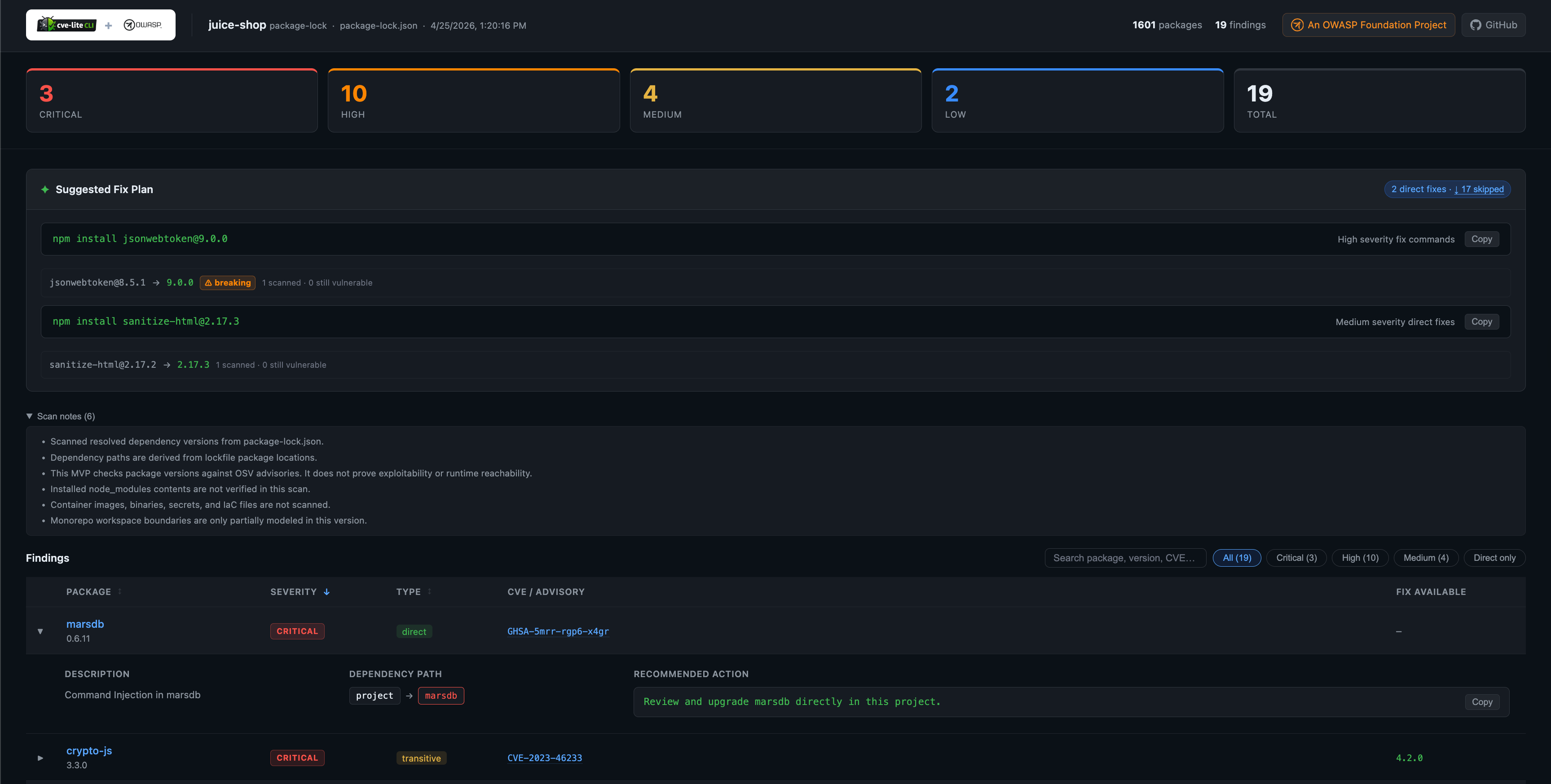
Generating a report
# Generate to the default directory (./cve-report/)
cve-lite /path/to/project --report

# Generate to a specific directory
cve-lite /path/to/project --report ./my-report

# Generate without auto-opening in the browser
cve-lite /path/to/project --report --no-open
Output files
The report writes two files to the output directory:
| File | Description |
|---|---|
index.html | Self-contained dashboard. Open in any browser — no server required. |
report.json | Machine-readable scan data. Same JSON schema as --json, plus scannedAt and cliVersion provenance for the saved artifact, and per-finding riskSummary and nextAction. |
Running --report to the same directory a second time overwrites both files.
In multi-folder mode (no root lockfile, two or more nested lockfiles), the report is the same two-file shape. Override hygiene and maintenance-risk panels appear per folder when --check-overrides / --check-maintenance were set, and report.json includes those findings tagged with subfolder.
What the report shows
Severity summary cards at the top give an immediate count for Critical, High, Medium, and Low findings alongside a total.
Suggested Fix Plan mirrors the terminal output: copy-ready package manager commands for your direct dependencies, grouped by severity. Skipped entries (transitive or no fix available) are listed in a collapsible section.
Findings table with interactive controls:
- Filter by severity or direct-only
- EPSS threat percentile column displaying exploitation likelihood relative to all published CVEs (highlighted in purple for top 10%)
- EPSS Priority Signal column classifying each finding into actionable tiers (
Fix Now,Fix Soon,Monitor,Low Priority) - Expandable rows showing vulnerability description, contextual risk summary, next action, known dependency paths, recommended action, and detailed EPSS Priority Signal breakdown
- CVE / GHSA advisory IDs linked to osv.dev and GitHub Security Advisories
- Fix version shown inline when one is available
- Priority Signal legend below the findings table detailing the severity × exploitation likelihood matrix
Options
| Flag | Default | Description |
|---|---|---|
--report [dir] | ./cve-report | Generate an HTML report in [dir]. Omit the path to use the default. |
--no-open | — | Skip auto-opening the report in the browser after generation. |
--report cannot be combined with --json.
Notes
- The report is fully self-contained: no CDN calls, no internet connection required to view it.
- The CVE Lite CLI logo is embedded as a Base64 data URI inside
index.html. - The report path is printed to the terminal at the end of the scan so it can be picked up by CI scripts or shared with teammates.